Monday, March 29, 2010

My Last Word on NSFetchedResultsController

Somehow, I never posted my final fix for the various NSFetchedResultsController problems. I submitted a bug report to Apple to get the actual row counts out of NSFetchedResultsController including any deferred inserts and deletes, but went ahead with developing a workaround that keeps track of the inserts and deletes locally. I thought I had posted this information, but I guess I never did (Sorry!). I am optimistic that these issues will be fixed in 3.2, but haven't had time to really run the new version of NSFetchedResultsController through its paces, and even if I had, the NDA would keep me from being able to tell you what I had found. Nevertheless, the fact that it has been updated makes me optimistic that this workaround is temporary and that Apple has finally shipped a production-ready version of NSFetchedResultsController. In the meantime…

I'm going to give the changes in context of the Chapter 7 application from More iPhone 3 Development, but these changes are generic and could just be copied to any project using an NSFetchedResultsController and the delegate methods from Chapter 2. I don't usually encourage copy-and-paste coding, but for a temporary workaround it makes sense.

In HeroListViewController.h, we have to add an instance variable to keep track of the deferred inserts and deletes:

#import <UIKit/UIKit.h>

#define kSelectedTabDefaultsKey @"Selected Tab"
enum {
kByName = 0,
kBySecretIdentity,
}
;
@class ManagedObjectEditor;
@interface HeroListViewController : UIViewController <UITableViewDelegate, UITableViewDataSource, UITabBarDelegate, UIAlertViewDelegate, NSFetchedResultsControllerDelegate>{

UITableView *tableView;
UITabBar *tabBar;
ManagedObjectEditor *detailController;

@private
NSFetchedResultsController *_fetchedResultsController;
NSUInteger sectionInsertCount;
}

@property (nonatomic, retain) IBOutlet UITableView *tableView;
@property (nonatomic, retain) IBOutlet UITabBar *tabBar;
@property (nonatomic, retain) IBOutlet ManagedObjectEditor *detailController;
@property (nonatomic, readonly) NSFetchedResultsController *fetchedResultsController;
- (void)addHero;
- (IBAction)toggleEdit;
@end


Then, we need to make some changes to two of the NSFetchedResultsController delegate methods. Easiest thing is to probably just replace the existing version with these new versions. The only difference from the previous version is that we keep track of insertions and deletions for each transaction and then use the row count for sections is determined by adding the deferred insertion / deletion count to the number reported by the NSFetchedResultsController:

- (void)controllerWillChangeContent:(NSFetchedResultsController *)controller {
sectionInsertCount = 0;
[self.tableView beginUpdates];
}

- (void)controllerDidChangeContent:(NSFetchedResultsController *)controller {
[self.tableView endUpdates];
}

- (void)controller:(NSFetchedResultsController *)controller didChangeObject:(id)anObject atIndexPath:(NSIndexPath *)indexPath forChangeType:(NSFetchedResultsChangeType)type newIndexPath:(NSIndexPath *)newIndexPath {
switch(type) {
case NSFetchedResultsChangeInsert:
[self.tableView insertRowsAtIndexPaths:[NSArray arrayWithObject:newIndexPath] withRowAnimation:UITableViewRowAnimationFade];
break;
case NSFetchedResultsChangeDelete:
[self.tableView deleteRowsAtIndexPaths:[NSArray arrayWithObject:indexPath] withRowAnimation:UITableViewRowAnimationFade];
break;
case NSFetchedResultsChangeUpdate: {
NSString *sectionKeyPath = [controller sectionNameKeyPath];
if (sectionKeyPath == nil)
break;
NSManagedObject *changedObject = [controller objectAtIndexPath:indexPath];
NSArray *keyParts = [sectionKeyPath componentsSeparatedByString:@"."];
id currentKeyValue = [changedObject valueForKeyPath:sectionKeyPath];
for (int i = 0; i < [keyParts count] - 1; i++) {
NSString *onePart = [keyParts objectAtIndex:i];
changedObject = [changedObject valueForKey:onePart];
}

sectionKeyPath = [keyParts lastObject];
NSDictionary *committedValues = [changedObject committedValuesForKeys:nil];

if ([[committedValues valueForKeyPath:sectionKeyPath] isEqual:currentKeyValue])
break;

NSUInteger tableSectionCount = [self.tableView numberOfSections];
NSUInteger frcSectionCount = [[controller sections] count];
if (tableSectionCount + sectionInsertCount != frcSectionCount) {
// Need to insert a section
NSArray *sections = controller.sections;
NSInteger newSectionLocation = -1;
for (id oneSection in sections) {
NSString *sectionName = [oneSection name];
if ([currentKeyValue isEqual:sectionName]) {
newSectionLocation = [sections indexOfObject:oneSection];
break;
}

}

if (newSectionLocation == -1)
return; // uh oh

if (!((newSectionLocation == 0) && (tableSectionCount == 1) && ([self.tableView numberOfRowsInSection:0] == 0))) {
[self.tableView insertSections:[NSIndexSet indexSetWithIndex:newSectionLocation] withRowAnimation:UITableViewRowAnimationFade];
sectionInsertCount++;
}


NSUInteger indices[2] = {newSectionLocation, 0};
newIndexPath = [[[NSIndexPath alloc] initWithIndexes:indices length:2] autorelease];
}

}

case NSFetchedResultsChangeMove:
if (newIndexPath != nil) {

NSUInteger tableSectionCount = [self.tableView numberOfSections];
NSUInteger frcSectionCount = [[controller sections] count];
if (frcSectionCount != tableSectionCount + sectionInsertCount) {
[self.tableView insertSections:[NSIndexSet indexSetWithIndex:[newIndexPath section]] withRowAnimation:UITableViewRowAnimationNone];
sectionInsertCount++;
}


[self.tableView deleteRowsAtIndexPaths:[NSArray arrayWithObject:indexPath] withRowAnimation:UITableViewRowAnimationFade];
[self.tableView insertRowsAtIndexPaths: [NSArray arrayWithObject:newIndexPath]
withRowAnimation: UITableViewRowAnimationRight
]
;

}

else {
[self.tableView reloadSections:[NSIndexSet indexSetWithIndex:[indexPath section]] withRowAnimation:UITableViewRowAnimationFade];
}

break;
default:
break;
}

}

- (void)controller:(NSFetchedResultsController *)controller didChangeSection:(id <NSFetchedResultsSectionInfo>)sectionInfo atIndex:(NSUInteger)sectionIndex forChangeType:(NSFetchedResultsChangeType)type {
switch(type) {

case NSFetchedResultsChangeInsert:
if (!((sectionIndex == 0) && ([self.tableView numberOfSections] == 1))) {
[self.tableView insertSections:[NSIndexSet indexSetWithIndex:sectionIndex] withRowAnimation:UITableViewRowAnimationFade];
sectionInsertCount++;
}


break;
case NSFetchedResultsChangeDelete:
if (!((sectionIndex == 0) && ([self.tableView numberOfSections] == 1) )) {
[self.tableView deleteSections:[NSIndexSet indexSetWithIndex:sectionIndex] withRowAnimation:UITableViewRowAnimationFade];
sectionInsertCount--;
}

break;
case NSFetchedResultsChangeMove:
break;
case NSFetchedResultsChangeUpdate:
break;
default:
break;
}

}


You can find the fixed version of the Chapter 7 application right here.

Friday, March 26, 2010

Improved Irregular Shape UIButton

I took some of the feedback and improved the UIButton subclass from my last post. I implemented a cache for the alpha data and also incorporates changes based on Alfons Hoogervorst's modifications to my original UIImage category.

You can find the new and improved version of the irregular shaped UIButton code here.

Irregularly Shaped UIButtons

Note: There is an improved version of the code from this blog post right here.

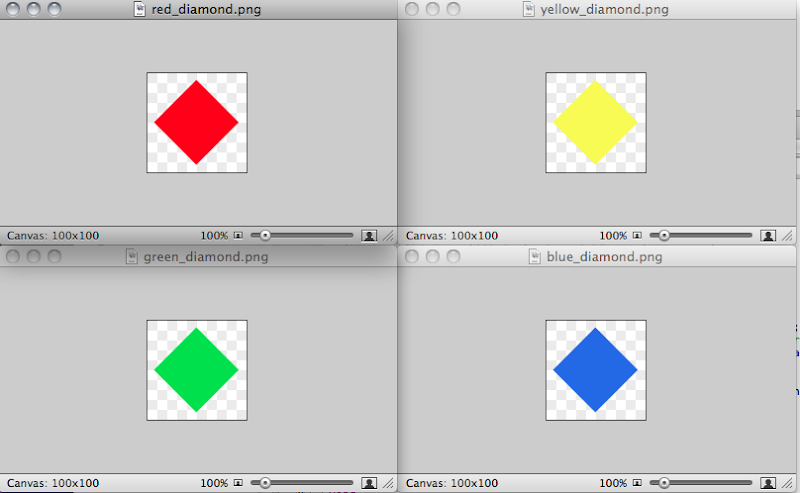
You probably know that UIButton allows you to select an image or background image with alpha, and it will respect the alpha. For example, if I create four images that look like this:

Screen shot 2010-03-26 at 1.02.47 PM.png

I can then use create custom buttons in Interface Builder using these images, and whatever is behind the transparent parts of the button will show through (assuming the button is not marked opaque. However, UIButton's hit-testing doesn't take the transparency into account, which means if you overlap these buttons in Interface Builder so they look like this, for example:

Screen shot 2010-03-26 at 1.04.17 PM.png

If you click here:

pointat.png

The default hit-testing is going to result in the green diamond button getting pressed, not the blue one. While this might be what you want some of the time, typically this won't be the behavior want. So, how do you get it to work like that? It's actually pretty easy, you just need to subclass UIButton and override the hit testing method.

But, first, we need a way to determine if a given point on an image is transparent. Unfortunately, UIImage is an opaque type without a mechanism to give us easy access to the bitmap data the way NSBitmapRepresentation does for NSImages in Cocoa. But, every UIImage instance does have a property called CGImage that gives us access to the underlying image data, and Apple has very nicely published a tech note telling how to get access to the underlying bitmap data from a CGImageRef.

Using the information in that technote, we can easily craft a category on UIImage with a method that takes a CGPoint as an argument and returns either YES or NO depending on whether the alpha value that corresponds to that point is transparent (0).

UIImage-Alpha.h
#import <UIKit/UIKit.h>

@interface UIImage(Alpha)
- (NSData *)ARGBData;
- (BOOL)isPointTransparent:(CGPoint)point;
@end


UIImage-Alpha.m
CGContextRef CreateARGBBitmapContext (CGImageRef inImage)
{
CGContextRef context = NULL;
CGColorSpaceRef colorSpace;
void * bitmapData;
int bitmapByteCount;
int bitmapBytesPerRow;


size_t pixelsWide = CGImageGetWidth(inImage);
size_t pixelsHigh = CGImageGetHeight(inImage);
bitmapBytesPerRow = (pixelsWide * 4);
bitmapByteCount = (bitmapBytesPerRow * pixelsHigh);

colorSpace = CGColorSpaceCreateDeviceRGB();
if (colorSpace == NULL)
return nil;

bitmapData = malloc( bitmapByteCount );
if (bitmapData == NULL)
{
CGColorSpaceRelease( colorSpace );
return nil;
}

context = CGBitmapContextCreate (bitmapData,
pixelsWide,
pixelsHigh,
8,
bitmapBytesPerRow,
colorSpace,
kCGImageAlphaPremultipliedFirst);
if (context == NULL)
{
free (bitmapData);
fprintf (stderr, "Context not created!");
}

CGColorSpaceRelease( colorSpace );

return context;
}


@implementation UIImage(Alpha)
- (NSData *)ARGBData
{
CGContextRef cgctx = CreateARGBBitmapContext(self.CGImage);
if (cgctx == NULL)
return nil;

size_t w = CGImageGetWidth(self.CGImage);
size_t h = CGImageGetHeight(self.CGImage);
CGRect rect = {{0,0},{w,h}};
CGContextDrawImage(cgctx, rect, self.CGImage);

void *data = CGBitmapContextGetData (cgctx);
CGContextRelease(cgctx);
if (!data)
return nil;

size_t dataSize = 4 * w * h; // ARGB = 4 8-bit components
return [NSData dataWithBytes:data length:dataSize];
}

- (BOOL)isPointTransparent:(CGPoint)point
{
NSData *rawData = [self ARGBData]; // See about caching this
if (rawData == nil)
return NO;

size_t bpp = 4;
size_t bpr = self.size.width * 4;

NSUInteger index = point.x * bpp + (point.y * bpr);
char *rawDataBytes = (char *)[rawData bytes];

return rawDataBytes[index] == 0;

}

@end

Once we have the ability to tell if a particular point on an image is transparent, we can then create our own subclass of UIButton and override the hitTest:withEvent: method to do a slightly more sophisticated hit test than UIButton's. The way this works is that we need to return an instance of UIView. If the point is not a hit on this view or one of its subclasses, we return nil.. If it's a hit on a subview, we return the subview that was hit, and if it's a hit on this view, we return self.

However, we can simplify this a little because, although UIButton, inherits from UIView and can technically have subviews, it is exceedingly uncommon to do so and, in fact, Interface Builder won't allow it. So, we don't have to worry about subviews in our implementation unless we're doing something really unusual. Here's a simple subclass of UIButton that does hit-testing based on the alpha channel of the image or background image of the button, but assumes there are no subviews.

IrregularShapedButton.h
#import <UIKit/UIKit.h>

@interface IrregularShapedButton : UIButton {

}


@end


IrregularShapedButton.m
#import "IrregularShapedButton.h"
#import "UIImage-Alpha.h"

@implementation IrregularShapedButton

- (UIView *)hitTest:(CGPoint)point withEvent:(UIEvent *)event
{
if (!CGRectContainsPoint([self bounds], point))
return nil;
else
{
UIImage *displayedImage = [self imageForState:[self state]];
if (displayedImage == nil) // No image found, try for background image
displayedImage = [self backgroundImageForState:[self state]];
if (displayedImage == nil) // No image could be found, fall back to
return self;
BOOL isTransparent = [displayedImage isPointTransparent:point];
if (isTransparent)
return nil;

}


return self;
}

@end


If we change the class of the four image buttons in Interface Builder from UIImage to IrregularShapedButton, they will work as expected. You can try the code out by downloading the Xcode project. Improvements and bug-fixes are welcome.

Curiously, the documentation for hitTest:withEvent: in UIView says This method ignores views that are hidden, that have disabled user interaction, or have an alpha level less than 0.1.. In my testing, this is actually not true, though I am unsure whether it's a documentation bug or an implementation bug.


Update: My Google-Fu failed me. I did search for existing implementations and tutorials about this subject before I wrote the posting (I hate reinventing the wheel), but I failed to find Ole Begemann's implementation of this from a few months ago. It's worth checking out his implementation to see different approaches to solving the same problem. There's also some discussion in the comments about the differences in our implementations that may be of interest if you like knowing the nitty-gritty details. Plus, his diamonds are prettier than mine.

Update 2: Alfons Hoogervorst tweaked the code andshowed how you could reduce the overhead by creating an alpha-only context.

Monday, March 22, 2010

Absolute Filenames

Well, I got bit today by something I should've known better than to do. It was a classic newbie mistake so, but it caused me enough grief that I feel it's worth embarrassing myself with a cautionary post. Here's what happened:

When you use Core Data, Apple recommends that except for relatively small chunks of binary data, you store binary data like images, sounds, and movies in the file system and not inside Core Data's persistent store. Now, in my experience, SQLite can handle even really large blobs without too much additional overhead, but when Apple makes a specific recommendation like this, I find it's usually a good idea to follow that recommendation unless I have a really good reason not to. In this case, I didn't.

In an app I'm working on for a client, I'm recording audio using AVAudioRecorder. I don't ask the user to choose a name for the file, I just store the recordings as caf files in the file system using a filename based on the date and time, like so:
NSString *audioPathString = [NSString stringWithFormat:@"%@/%@", DOCUMENTS_FOLDER, [item valueForKey:@"audioPath"]];


Then, later on, after the recording is done, I store audioPathString inside a managed object that represents audio recordings:

audioItem.audioPath = audioPathString;


Then, when I want to play the sound, I just pull the pathname from Core Data and load the data from the file system, sort of like this:

NSError *error;

NSURL *url = [NSURL fileURLWithPath:item.audioPath];
AVAudioPlayer *player =[[AVAudioPlayer alloc] initWithContentsOfURL:url error:&error];


And it worked great. For a while. I could quit and start back up and it would keep working. And then, at some point, it wouldn't work any more. It would report back OSStatus codes of -43 or -50 when I tried to create an instance of AVAudioPlayer, even though the audio file was still in the /Documents directory. I'm sure a few of you are chuckling to yourselves about my dumb error, but for those who don't see it, I'll explain.

Tip: If you find yourself in a situation where an NSError gives you nothing more than an OSStatus or OSErr error code, you can find out what that error code means by dropping to the terminal and typing macerror followed by the error code you're interested in, including the - (these old-style error codes are negative numbers).


The full pathname to an item in the Documents directory of an application's sandbox includes not the name of the application, but a UUID (unique identifier) instead. When you build and run your application, a new UUID is calculated if, and only if, something has changed since your last build. If you haven't made any changes, it keeps running with the previous UUID. Once you make some changes to code or a resource and re-compile, the UUID changes, and the stored absolute path no longer points to the right location. The portion of the URL that represents the Application's UUID has now changed. Xcode is smart enough to move the application's /Documents directory to the new location so you don't lose all of your data while developing, but all that data is now at a new location in the file system.

So, how do you handle this situation? The easiest way is to just store the filename and then re-build the absolute path at runtime by assuming the file is in your application's /Documents directory. So, instead of storing the path from recorderFilePath as I did in the earlier code sample, you would store just the last path component using NSString's lastPathComponent method, like so:

newItem.audioPath = [recorderFilePath lastPathComponent];


Then, when it's time to load the file, you just re-build the full path to the file based on the current UUID of the application, like so:

NSString *documentsDirectory = [NSSearchPathForDirectoriesInDomains(NSDocumentDirectory, NSUserDomainMask, YES) objectAtIndex:0];
NSString *audioPathString = [NSString stringWithFormat:@"%@/%@", documentsDirectory, [item valueForKey:@"audioPath"]];


Using this approach, your code will continue to function even between development builds or application releases, and you won't waste an hour trying to figure out why your perfectly valid files won't load.

Wednesday, March 17, 2010

Xcode Project Template Expansion Macros

Earlier today, I lazy-tweeted to see if anyone had a definitive list of Xcode's project expansion macros. If you open up a project template and poke around, you'll see both in filenames and in file contents, these all-cap words surrounded by three underscores like ___PROJECTNAME___. These are replacement macros that get replaced with some other value when you create your project based on that template. ___PROJECTNAME___, for example, gets replaced with the name of the project as it was typed in by the user into the new project assistant.

I've assembled from a few different sources a list of all the known macros.
Token

Replaced By

___PROJECTNAMEASIDENTIFIER___

The project name with spaces and any filename-illegal characters replaced by underscores.

___PROJECTNAME___

The project name exactly as entered by the user when the project was created.

___PROJECTNAMEASXML___

The project name exactly as entered by the user when the project was created, but with converted using XML encoding so that it's legal XML.

___FULLUSERNAME___

The long user name of the developer who created the project pulled from the account information.

___USERNAME___

The short user name of the developer who created the project.

___TIME___

The time of the day at which the project was created.

___DATE___

The date on which the project was created.

___YEAR___

The four-digit year in which the project was created.

___ORGANIZATIONNAME___

The name of the company or organization for which the developer works (SEE SIDEBAR).

___UUID___

A generated unique identifier for your project.

___UUIDASIDENTIFIER___

The same unique identifier as ___UUID___, but with spaces and illegal characters converted to underscores.


One of the values in that table, however, doesn't belong there. I've included it (___ORGANIZATIONNAME___) because Apple uses it in most (all?) of their own Xcode templates, but it's not a built-in value like the others with a set meaning. It's a custom macro and (as you may know) you have to manually add it to Xcode's list of macros to get it to work. To make things more confusing, there's no place in Xcode where you can actually set this value (that I know of, at least).

To define the organization name that will be used in place of the ___ORGANIZATIONNAME___replacement token that's used in Apple's provided templates, you have to drop down to the terminal and type something like:
defaults write com.apple.Xcode PBXCustomTemplateMacroDefinitions '{ "ORGANIZATIONNAME" = "Naked Software, Inc.";}'
That's a pain, but the good news is, this mechanism is generic. It works for any replacement token you want to define. You could, for example, type this command in the terminal:
defaults write com.apple.Xcode PBXCustomTemplateMacroDefinitions '{ "MYTESTTOKEN" = "Hee Haw";}'
And anywhere in a project templates where you included ___MYTESTTOKEN___ in a filename or as part of a file's contents, Xcode would substitute Hee Haw for it.

If you want to find out what expansion macros you have defined, you can do this:
defaults read com.apple.Xcode PBXCustomTemplateMacroDefinitions
Now, in reality, there's a limit to just how useful this feature is. Apple's not likely to start using custom tokens other than ___ORGANIZATIONNAME___ and for your own templates, you can put whatever the hell you want in there, so unless you have machine- or user-specific data to insert into new projects, you'll probably never actually use this feature further than to define ___ORGANIZATIONNAME___, but it's nice to know it's there and understand what's going on a little better under the hood.


Matt Gemmell and two commenters reminded me that organization name IS now exposed in Xcode starting with 3.2 and that if it's not set, Xcode will pull it from your card in Address Book, so ___COMPANYNAME___ does belong in the list. The rest of the above is still true, however.

Friday, March 12, 2010

Alive!

Sorry for the dearth of posts lately. Things have been quite crazy. I've got a couple of super-secret projects I've been working on that can't announce just yet, plus I've been keeping busy doing contract work for clients to try and catch up a bit financially from how long More iPhone Development took to write.

On top of that, we've decided to move from Central New York to Florida, so we've got the added burden of trying to get the house ready to go on the market. Plus, our washing machine broke. It seems that the closer we get to the end of a fiscal quarter (royalties are paid quarterly), the more likely a major appliance or car will crap out. Last quarter, it was my wife's car. This quarter it's the washing machine. Doesn't make sense to buy a new one and then pay to move it, so we're without a washing machine until the move, meaning more time devoted to hand washing and/or going to the laundromat. A family of six (plus a dog) generates a lot of laundry.

Don't mean to complain, the washer wasn't exactly new and these things happen, but I wanted to let you all know why the pace of new posts lately has slowed down so much the last week or so. I haven't forgotten you all, I'm just having trouble finding the time to do everything I need to do.

On a happier note, I ordered an iPad today. I'm starting with a dev device, but if we like it, we'll probably get another one or two for the family later one. I'm pretty excited about the opportunities this device presents, and I can't wait to see some of the killer apps people devise for that big touch screen. I've got a few SDK 3.2 topics I'd love to cover here but, alas, the whole NDA thing has stifled me a bit as well.

Tuesday, March 9, 2010

A Short Android SDK Follow-Up

Something interesting has happened since I posted my thoughts on the Android SDK. Two interesting things, actually. Both were e-mails from people who work on the Android SDK, one from Google and another from Motorola.

Despite the fact that I was quite critical of several aspects of the Android SDK in that post, neither e-mail attempted to argue with me. Neither took an adversarial approach at all. Both basically thanked me for my opinion and asked me for more information so they could improve Android and address those things I criticized in my post.

It may seem like a small thing, but those two e-mails impressed the hell out of me. Regardless of language or preferred design patterns or any of the other million things that we developers love to argue about over a pint of beer, one of the true marks of a good developer is the ability to take criticism without getting defensive combined with a true desire to make your products the best they can be. Reaching out to somebody who has criticized a product you work on is not an easy thing to do.

So, I felt it was only fair to point this out here because I think it bodes really, really well for Android's future. I think we'll see great things out of Android as it matures. I don't think those things will change my personal desire to work with Android as my primary platform, but that's simply because I don't like Java anywhere near as much as I like Objective-C, but I'm definitely not going to bet against Android doing well.

Friday, March 5, 2010

Pull to Refresh

Dr. Touch (aka Oliver Drobnik) has a great tutorial on implementing Tweetie's pull-to-reload table implementation.

Note: After I originally posted this link, I received a handful of e-mails expressing concern about the use of Tweetie 2's sound files in the original article. Oliver has since changed the article to remove those instructions and has also contacted Loren Bichter tp make sure he didn't have any objections to the post (Loren is the developer of Tweetie). After receiving the original e-mails, I pulled the link to this tutorial, but I feel comfortable that any concerns have now been addressed and there is some really useful information in the blog post.

Thursday, March 4, 2010

Animation Correction

The earlier code I posted in the entry on implementing a wait alert and the follow-up entry that applied the technique to the Tic-Tac-Toe game both contained a mistake. The animation keyframes were specified as seconds, and should have been specified as clamped floats (floats with a value from 0.0 to 1.0).

Here are the corrected keyframe values for the bounce animation:

    animation.keyTimes = [NSArray arrayWithObjects:
[NSNumber numberWithFloat:0.0],
[NSNumber numberWithFloat:0.6],
[NSNumber numberWithFloat:0.8],
[NSNumber numberWithFloat:1.0],
nil
]
;

I will update both projects as soon as I can. Sorry for the inconvenience.

Wednesday, March 3, 2010

Android SDK from an iPhone Developer's Perspective

I've already given my opinion on the Nexus One hardware. Now it's time to look at the programming side of things. It's time for my opinion of the Android SDK.

Let me start by stating the obvious, because I know a few people will forget this: I'm about to state my own personal and very subjective opinions about the Android SDK. That opinion may differ from yours, and that's okay. Really. It is. The Earth will continue to spin even if you think I'm 100% wrong.

Let me also put my biases right out front: I don't like Java. I've actually been using Java longer than Objective-C and have actually logged more hours and made more money using Java than I have with Objective-C, but from the moment I read Object-Oriented Programming and the Objective-C Language back in 1997 or 1998, I felt like Java was doing many things wrong. Every step in Java's evolution has reinforced and strengthened that feeling. The approach used in NextSTEP (which evolved into Cocoa and then Cocoa Touch) matches my way of thinking. I believe in the approach. I like the approach and the language so much, in fact, that I took a substantial cut in income to be able to work with it full time. So, based on that, you should be able to see that Android's already got one strike against it from my point of view.

I've been intentionally putting off writing this blog post, however, because I didn't want to do what I've seen a lot of people do with the iPhone SDK and Xcode, which is to write a blog post about how it doesn't work the way I expect it to, and therefore it's bad. Given that I already have quite a bit of experience with the language and IDE and have now had several weeks with the Android SDK, I feel like I can give an opinion that's not just me complaining that it's not what I already know and like, though the fact that it does many things in a way I don't like is certainly a factor in my opinion.

So, after spending a few weeks with Android, what do I think?

It's actually not bad. It's a fairly capable SDK. It has most of what you'd need and, being based on Java, there's an awful lot of code and libraries you can draw upon. The design of the SDK is a little inconsistent (just like the Android user experience, actually). There are parts that are almost as close of a copy of the iPhone SDK are very similar in design and feel to the iPhone, and there are parts that seem downright alien1.

There definitely is a lack of consistency in the design when compared to the iPhone SDK. Different parts of the Android SDK feel like they were written by completely different teams that didn't necessarily communicate or even agree on the best way to do things. There are some small inconsistencies in the iPhone SDK, but there are strong guiding principles and dominant design patterns throughout the iPhone SDK that don't have any counterpart in the Android SDK. The overall effect is that Android is a little chaotic and disjointed, but still competent.

Android also has a difficult task in that it's designed to run on such a broad range of hardware and you can developed on a broad range of operating systems and hardware. Google has actually done quite an admirable job given how much harder the problem is when you don't have limited hardware options, all of which you control.

One of the ways they've dealt with this is in the design of the emulator. You can configure the emulator to simulate different hardware with different features and different screen sizes, and you can have multiple virtual devices setup. This means you can test your app on a "virtual Nexus One", then switch to a new virtual device and test on a "virtual Motorola Droid". Working with the emulator is smooth, but not as smooth of an experience as the iPhone Simulator. For example, when you launch an app in the emulator, the emulator doesn't become the front-most application, and the emulator doesn't unlock automatically. But, the experience is still quite decent, especially in light of the additional challenges presented by it being an open platform.

Running on the device worked well, too. Surprisingly well, in fact. Again, it's not quite as smooth of an experience as running on the iPhone. There were little annoyances, such as when you run a program on the device, the phone doesn't wake up or unlock the way the iPhone does. But, overall, it works pretty well and without the hassle of provisioning profiles or developer certificates.

I found debugging to be somewhat painful on Android, but that may just be that I know GDB so much better than JDB/ADB (the Android Debugging Bridge) and I also know Xcode's debugging features much better than Eclipse's.

Although you don't have to use Eclipse to program for Android, it does seem to be the default choice. At least, it seemed like the choice with the fewest obstacles when I was getting everything setup. Eclipse has really good integration with the Android SDK and tools. Running and debugging on the device or on the emulator are a piece of cake, and there are even tools for pushing data to the running virtual device such as location data.

But I hate Eclipse with a passion. It completely and totally doesn't jive with the way I think or work. I find the UI inscrutable and its performance on the Mac is less than stellar. If I were going to be doing a lot of Android development, I would probably invest some time in finding an alternative IDE with good Android integration, or just work with TextMate and the command-line.

I do feel like I can code any application I need using Android. Making it look nice can be a challenge, and I spend a lot more time referencing documentation than I ever did with the iPhone SDK. Knowing one part of the Android SDK doesn't necessarily give you any clues about how another part works and even being an experienced Java developer doesn't give you that much of an advantage in that respect.

Designing views in the Android SDK is one of the areas that I can say without equivocation is worse than the iPhone in every single respect. Android's approach to creating views has absolutely no redeeming value whatsoever. Designing your interface on the iPhone is easy. It's fun. It's intuitive. On Android, it's fucking hell. It's like working with the evil offspring of GridBagLayout and XML. It's utterly horrid. But, Java has never done UI well and has never made it particularly fun so I can't say I was surprised by this, though it did exceed my expectations by being even worse than I thought humanly possible. The whole process is counter-intuitive and time-consuming, and that's just to make something that functions. It's even more time-consuming and painful to make a UI that doesn't look like ass.

But, that's the only area so far in Android that I've found really horrible. Overall, it's a capable SDK. What it's not, however (at least for me), is fun. It's completely missing any fun factor whatsoever. The SDK doesn't get out of my way when I want to create. It's a constant obstacle. Not a big or insurmountable obstacle, but a constant one. The iPhone SDK, on the other hand, is quite fun. Once I understood its approach to doing things, it became quite easy to forget about the SDK and just create my apps.

I've been trying to figure out exactly what the difference is; what it is that makes one fun for me and the other not, and I think I've got it. The Android SDK generally fails to follow one design principle that Apple does pretty damn well, which is:
Make the stuff you do all the time easy.
As a result, on Android, things you almost never do seem to be just about equally hard and time consuming as those that you do all the time.

Case in point: Because of the relatively small screen size, one of the things you do all the time in mobile apps is switch in new screens of data. On the iPhone, we accomplish that like so:
  1. Create an instance of the view controller class for the view we want to show
  2. Set properties on that view controller to provide it with the data it needs to function
  3. Present the view controller's view by adding it to the view hierarchy, pushing it onto a navigation controller's stack, or presenting it modally, each of which typically requires a single line of code
Now, on Android, it's not quite so straightforward.
  1. Add an entry for the Activity (which is similar to UIViewController, but not exactly the same) to your application's Android Manifest to let Android know the class can be launched
  2. Create an Intent based on the Activity's class
  3. Make sure that any data you want to pass to the other Activity is serializable or in the shape of raw datatypes
  4. Push the information you want to pass to the other Activity as an "extra" to the Intent, serializing those that are objects
  5. Start the Activity
  6. In the Activity class, override onActivityResult and retrieve the extras you need, deserializing those that aren't native datatypes.
  7. In the Activity override the onCreate() method to specify the view to be used (and don't even get me started on designing views in Android...)
In reality, the two lists above don't do justice to the difference in effort. This is a task that becomes second nature for the iPhone developer because it's intuitive, and thankfully so. This is the kind of three or four line chunks of code you begin to write without even thinking about it. On Android, the stuff you need to do to accomplish the same task is scattered throughout your project files and the process is not likely to ever become second nature or easy.

Now, people who love Android will argue that Intents are powerful - more powerful than the iPhone's approach because Intents can be used to let other programs and the OS leverage functionality from your program.

Indeed. Intents are powerful. The problem is that they give you power that you don't need the vast majority of the time in the vast majority of applications. And they do that at the expense of making something you need to do all the time more involved and more complex than it should be (and, therefore, more likely to contain bugs). It's indiscriminate complexity, which is not a virtue. As OpenDoc and CyberDog will gladly attest, seemingly good concepts do not always make for good implementations or user experiences, and the iPhone hasn't suffered much for its lack of a way to share functionality between applications.

To me, much of the Android SDK (pretty much the parts that weren't heavily influenced by the iPhone SDK) seem to be over-engineered. Much of the Android SDK features complexity seemingly for complexity's sake. Fifteen years ago, I would have loved it because I was in my over-engineering macho-programmer phase2 and that complexity and the theoretical power it gave me would have seemed really cool.

Today, it just makes me shake my head and think Google's engineers should stop showing off how smart they think they are and start writing elegant code that's exactly as complex as it needs to be. They should be designing their SDK's architecture with an awareness of the fact that that not all tasks are created equal, and simplicity is, at times, the absolute best choice.

But, despite my feelings about Android's elegance, it absolutely is a decent mobile SDK. There's a lot of functionality in there, and an awful lot of libraries and sample code that you can draw on to avoid re-inventing the wheel in your applications.

I don't see myself ever doing Android work full time. I don't see myself ever actively looking for Android SDK work that's not part and parcel of a larger project that includes an iPhone application. But, bottom line, it's not bad. It is, at times, inelegant, unnecessarily complex, and convoluted, but it's young and it still has the potential to grow into a great SDK.

Will Android take off? Probably. There are a lot of Android phones coming to the market. Phone and wireless companies love free OSes because they increase their profit margins. And, once enough people start to own Android phones, people will really start writing apps for Android phones. I don't think you'll ever see the groundswell the way you have with the iPhone SDK where people from all walks of life with no programming experience developed a desire to learn to write software, but I do think that there will eventually be a good market for Android apps and, therefore, for Android developers.

I'm happy to leave that market to others.


1 My apologies. My original wording here could have been read to imply that the Android team copied the iPhone SDK, which really wasn't my intent. I meant to say that some parts have a very similar feel and use design patterns commonly used in the iPhone SDK. It's quite obvious if you've spent any time with the Android SDK, that they are doing their own thing and are not just copying the iPhone
2 Every programmer goes through this phase if they stick with programming long enough. If you've been programming for a while and don't think you went through it, there's a very good chance you're still in it.

Monday, March 1, 2010

Tic-Tac-Toe Update

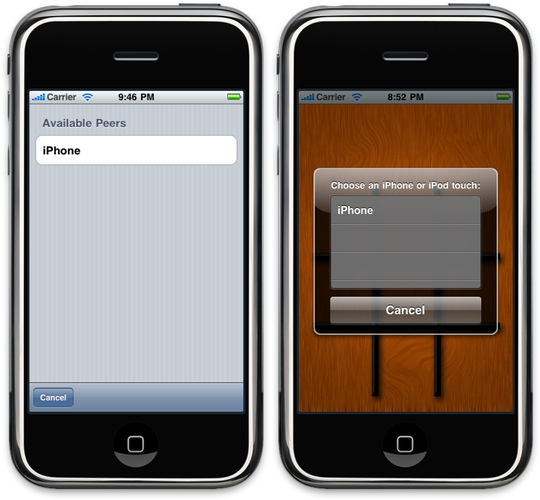
In Chapter 9 of More iPhone Development, we showed you how to add online play to program that already used GameKit to do network communication over Bluetooth. The code in that chapter is still correct, but the appearance of the online peer picker in the game always bothered me, since it was so different from that of GameKit's peer picker:

before.png

After writing up the technique in my last blog posting, I realized that I could use the same approach to make the appearance of the online peer picker more closely match the GameKit peer picker.

I haven't gotten it pixel perfect, and the code isn't written in such a way that you can just drop it into another project and use it (though I plan to do that at some point), I though some of you might be interested in seeing my progress, as well as seeing how the dialog presented earlier can be used in more complex scenarios.

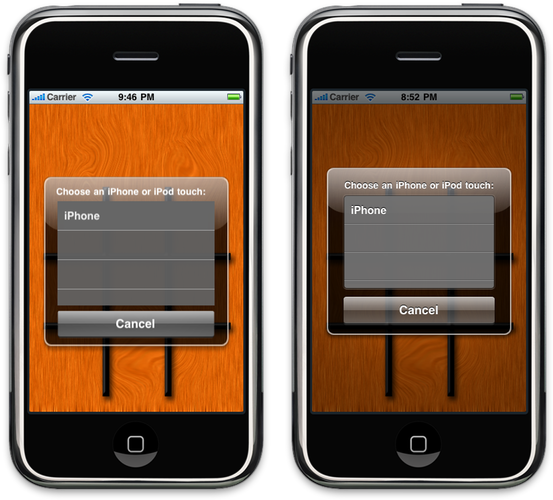
Here is the current state of things:

after.png

As you can see from the screenshot, there are some differences in the size and placement of the views, and the translucency of the button. Plus, the background image doesn't dim in my version yet. But the overall appearance is much closer, and without the benefit of a side-by-side comparison, you'd be hard pressed to notice the difference. I plan on tweaking it a little, though it may be impossible to get a pixel-perfect match without using private APIs.

You can find the current version of the TicTacToe project right here. I'll also add it to the iPhone Bits repository on Google Code when I get a chance. Be forewarned that this is still a work in progress and the code is a little sloppier than what I normally place out here. All the functionality for the new peer browser is in TicTacToeViewController rather than in its own class, where it should be.

 
Design by Wordpress Theme | Bloggerized by Free Blogger Templates | coupon codes