Tuesday, May 29, 2012

WWDC 2012 Pilgrimage to Apple HQ


Just a reminder: Once again this year, there will be a bus pilgrimage to Cupertino on Sunday, June 10, which is the day before WWDC starts. While the morning bus has sold out, there is still some room on the afternoon buses. If you have any thoughts of visiting the Apple campus, this is the best way to go if you don't have a car.  Hell, it's probably the best way to go even if you do have a car. Bay Area traffic is no fun, and we use big comfortable touring buses.

The Company Store will be open and you don't need a WWDC ticket to shop, so this is a great chance to stock up on Apple swag, including a whole lot of stuff that they won't be selling up at Moscone during the week. It's also a chance to get your picture taken in front of the Apple HQ sign. You'll get to hang out with several other Mac and iOS developer geeks and meet some people before the official WWDC craziness gets started. 

The last several years have been a blast. I think this is, what? The third annual WWDC Pilgrimage? Or is it the fourth? Either way, it's been great fun every year. If you're interested in going, the signup and information page is here. 

If you think you want to go, don't wait. This event has sold out every year so far and there's no reason to think this year will be different.

Thursday, May 24, 2012

2012 WWDC T-Shirts

Well, pre-ordering of the WWDC MartianCraft T-Shirts for 2012 is now closed. We're going to leave the order form up until WWDC ends and do one final print run at that point. After that, the 2012 shirt is going out of production. We'll be back next year (or maybe even sooner) with a new design, but this particular one will be retired for good.

As I mentioned before, we will be bringing some shirts with us just like in past years, but we're not promising them to people an advance. There's too many people who'd like them.  It's too hard to keep track of who was promised what size and we end up carrying dozens of shirts all over the place looking for people. When we have shirts available for givesies, either Rob or I will tweet where we are or how you can get one.

Tuesday, May 22, 2012

Appsterdam WWDC HQ

I normally leave reporting of WWDC events to other blogs, but I thought this was interesting enough that it warranted its own post, especially given the number of people who didn't get tickets this year but still plan to be in San Francisco showcializing.

The folks from Appsterdam have arranged free space, electricity, internet, and coffee at the StockMob HQ at 541 8th street all week long. Any developers in town from June 11th to 15th are welcome to work during the days for free.

You can find out more details at the Appsterdam WWDC HQ page.

Sunday, May 20, 2012

The Gospel of Treadmill

Since the treadmill desk experiment I've been engaged in isn't directly related to iPhone Development, I've been trying not to fill up this blog with posts about it, but it has now been several months and I thought one last post on the subject was in order.

I'm still extremely happy with using a treadmill desk and will never willingly go back to full-time sitting. I still sit a few hours a day: I treadmill for about eight hours, six days a week, averaging just under three miles per hour. However, my work days are almost always longer than eight hours, so after that, I switch to sitting. Although my rate of weight loss has slowed (partially attributable to spending a month away from my desk: two weeks in Europe for conferences and two weeks on vacation), my weight is still going in a fairly steady downward motion. The first two months, I averaged between ten and fifteen pounds a month of weight loss. Now, it's closer to eight pounds a month on average (plus I gained a few back while traveling). At this pace, it'll take me a while to get my weight where I want it (in other words, if you're at WWDC and want to find me, you still need to look for a fat guy), but that's okay, because I don't have to think about losing weight. I just go to work. I don't have to remember to go to the gym or to go for a run and I don't have to make time in my day for it. I just go to work, which I have to do anyway and actually enjoy doing.

More important than the number on the scale, though, is how I feel, and I certainly feel better than I did when I was at this same weight on the way up. In fact, physically, I feel better than I have in a decade, despite the fact that I still have a fair bit of weight to lose. For years, I've had pretty serious back problems that trace to an injury I sustained in 1997. Since then, almost any time I've had to do significant lifting or heavy physical labor, I've ended up in agony for a few days, sometimes to the point of not being able to walk; sometimes to the point where the twenty steps from my bed to the bathroom were nearly unbearable.

Last weekend I dug a drainage ditch and lugged about twenty fifty-pound bags of gravel around my property. Six months ago, that effort would've bought me at least a day or two of agony. I woke up last Monday morning feeling fine. No back pain, no soreness, and I haven't been doing any physical exercise except what I do at my treadmill desk. I don't know whether that's because I'm strengthening my back while walking or simply allowing it to heal by not being hunched in a chair all day (or both), but whatever it is, I like it.

But there's one thing that's even better than the way that I'm feeling now: The fact that the success of my experiment has caused a number of other people to join me. I haven't taken a census of who has picked up treadmill desk-ing since I started, but I can think of close to a dozen offhand and several more who I know are contemplating it. Although they deserve the credit for taking the initiative and putting in the work, it's still really gratifying to have been some small factor in other people making the decision to start. And I'm not the only one spreading the Gospel of Treadmill in our community these days. In fact, Dan's tale is awfully similar to mine, except that I never worked at NASA and my weight numbers are a lot higher than his.

If you have questions about treadmill desk-ing, feel free to hit me up on e-mail or on twitter. I'm @jeff_lamarche on Twitter and you can reach me by e-mail at my twitter handle at mac dot com.

Wednesday, May 16, 2012

WWDC First Timer's Guide, 2012 Edition


I'm a little slow in getting this up this year, but given how popular it's been the past few years, I thought it was worth updating and re-posting my WWDC First Timer's Guide (2011, 2010, 2009).

Remember that WWDC is different every year, so don't take anything written here as gospel. Things changes every year, and I expect the first WWDC of the post-Jobs era will change things up a little, just as they've done every year. Hopefully these hints and suggestions will help some of you.

  1. Arrive on Sunday or Earlier. Registration is usually open most of the day on Sunday. You really, really want to get your badge and related swag (usually a bag and shirt or jacket, etc) on Sunday if you plan to get in line for the keynote. The line for the keynote will start forming many hours before the doors to Moscone West open up on Monday (the past four years, people have started lining up before midnight Sunday, last year the line started late afternoon on Sunday). If you do not have your badge when you get to Moscone on Monday morning, you will almost certainly end up in an overflow room for the Keynote and may even miss part of it. Even if you don't care about being in the main room, there's still a lot going on on Sunday and it's a good time to meet new people and catch up with old friends. You really don't want to deal with the badge process on Monday. Developers, especially those coming from overseas, will start coming into town much earlier, so it's not even a bad idea coming in Saturday or even Friday.

  2. Do not lose your badge. If you lose it, you are done. You will spend your time crying on the short steps in front of Moscone West while you watch everyone else go in to get schooled. Sure, you'll still be able to attend many of the unofficial after-hours goings-on (aka "showcializing"), but not the Thursday night party, which is often a blast. Without a badge, you'll miss out on some of the really important stuff if you're a first timer. No amount of begging or pleading will get you a replacement badge, and since they sold out, no amount of money will get you another one, either. And that would suck. Treat it like gold. When I'm not in Moscone West or somewhere else where I need the badge, I put it in my backpack, clipped to my backpack's keyper (the little hook designed to hold your keys so they don't get lost in the bottom of your bag). Yes, there have been isolated stories of people managing to convince a sympathetic conference worker to print them a new badge, but don't expect it, those are exceptions. The employees are not supposed to print new badges, and most won't.

  3. Eat your fill. In the past, they've provided two meals a day; you're on your own for dinner. Breakfast (starts a half-hour before the first session, and it's most likely going to be a continental breakfast - fruit, pastries, juice, coffee, donuts, toast, and those round dinner rolls that Californians think are bagels, but really aren't. If you're diabetic, need to eat gluten-free, or are an early riser, you'll probably want to eat before-hand. Lunch used to be (IIRC) a hot lunch, but three or four years ago they switched to boxed lunches. They are pretty good as far as boxed lunches go, but they are boxed lunches. A lot of people complain (loudly) about them and choose to go to a nearby restaurant during the lunch break, which is pretty long - at least 90 minutes.

  4. Party hard (not that you have a choice). There are lots of official and unofficial events in the evening. A list of WWDC events is maintained at http://wwdcparties.com/, but your best bet is to follow as many iPhone and Mac devs on Twitter that you can - the unofficial gatherings happen at various places downtown, often starting with a few "seed crystal" developers stopping for a drink and tweeting their whereabouts. The unofficial, spontaneous gatherings can be really fun and a great opportunity to meet people. The parties often start before WWDC - there are usually a few on Sunday, and there have been ones as early as Friday before. Pretty much any other bar within stumbling distance of Moscone West will be used for both planned and informal gatherings. As we get closer, there will be lists and calendars devoted to all the events and parties. Some are invite-only, but many are first-come, first-serve. Although there's a lot of drinking going on, these are worth attending even if you don't drink. Great people, great conversations... good times, whether you imbibe or not. And even if you do enjoy alcohol, it's not a bad idea to take a night off during the week. It's a marathon, not a sprint.

  5. Take good notes. You are going to be drinking knowledge from a firehose there. The information will come at you fast and furious. As an attendee, you will get all the session videos on ADC on iTunes. It used to take some time before the videos were available, but hopefully they'll continue to get them out quickly as they have the last two years. Even so, make sure you write down the information you need immediately.

  6. Collaborative note taking A few years ago, people started taking communal notes using SubEthaEdit and Panic's Coda (they are compatible with each other). That worked out really, really well. My notes from the past few years are ten times better than from previous years. With collaborative note taking, you don't have to type fast enough to catch every detail. Instead, the audience works as a team and everybody gets great notes. The license fee pays for itself in one WWDC, especially considering you can see notes being taken in other sessions, not just your own.

  7. Labs rule. If you're having a problem, find an appropriate lab. One of the concierges at any of the labs can tell you exactly which teams and/or which Apple employees will be at which labs when. If you're having an audio problem, you can easily stalk the Core Audio team until they beat the information into your skull, for example. It's unstructured, hands-on time with the people who write the frameworks and applications we use every day. It used to be that people started remembering about the labs later in the week, but now they fill up from the get go. Sign up early! 

  8. Buddy up, divide and conquer There will be at least a few times when you want to be at more than one presentation at the same time. Find someone who's attending one and go to the other (Twitter is a good way to find people), then share your notes. Also, see #6 above.

  9. Make sure to sleep on the plane. You won't get many other chances once you get there. Everybody is ragged by Friday, some of us even earlier. Everyone remains surprisingly polite given how sleep-deprived and/or hungover people are.

  10. Thank your hosts. The folks at Apple - the engineers and evangelists who give the presentations and staff the labs, kill themselves for months to make WWDC such a great event. So, do your mother proud and remember your manners. Say thank you when someone helps you, or even if they try and don't. And if you see one of them at an after hours event, it's quite alright to buy them a beer to say thanks.

  11. Remember you're under NDA. This one is hard, especially for me. We see so much exciting amazing stuff that week that it's natural to want to tweet it, blog it, or even tell the guy handing out advertisements for strip joints on the corner all about it. Don't. Everything, from morning to night except the Keynote and the Thursday night party are under NDA.

  12. Brown Bag it. Most days there are "brown bag" sessions. These are speakers not from Apple who give entertaining, enlightening, or inspiring talks at lunchtime. Check the schedule, some of them are bound to be well worth your time.

  13. Monday, Monday I don't know what to say about Monday. The last few years, people started lining up before midnight the night before. I'm typically on East coast time and usually walk over around 4:15 to see what's going on. I've done the line, and I've done the have-a-leisurely-breakfast route, and both have their merits. If you straggle too much, they may start before you get in the room, however (happened to me two years ago), but you'll be much better rested for the rest of the day.

    Waiting in line is not really my thing any more, but you do get to talk to a lot of very cool people while waiting in line, and there is a sense of camaraderie that develops when you do something silly with other people like that. Some people probably want me to suggest what time to get in line. I have no idea. Most people will get into the main room to see the Keynote. There will be some people diverted to an overflow room, but because the number of attendees is relatively low and the Presidio (the keynote room) is so big, it's a tiny percentage who have to go to the overflow rooms (maybe the last 1,000 to 1,500 or so, depending on number of VIPs in attendance). On the other hand, you'll actually get a better view in the overflow rooms unless you get in line crazy early - you'll get to watch it in real time on huge screens and you'll get to see what's happening better than the people at the back of the Presidio. So, go when you want to. If you want to get up early and go be one of the "crazy ones," cool! If you want to get up later, you'll still get to see the keynote sitting in a comfy room with other geeks.

  14. Turn off your MiFi/Clear/other wireless router. I'm so totally not kidding on this one. People will punch you if they find out you've got one on. Two years ago, so many people had MiFis and other mobile hotspots running during the keynote that it interfered with the conference center's (usually very good) WiFi network and disrupted some of the tech demos. Once you're in the building, you don't need it. They have crazy fast pipe in the building, so just use the provided WiFi or wired connection and turn your wireless router off. Seriously.

  15. Park it once in a while There will be time between sessions, and maybe even one or two slots that have nothing you're interested in. Or, you might find yourself just too tired to take in the inner workings of some technology. In that case, there are several lounges around where you can crash in a bean bag chair, comfy chair, moderately-comfy chair, or patch of floor. There is good wi-fi throughout the building and crazy-fast wired connections and outlets in various spots. So, find a spot, tweet your location, and zone out for a little while or do some coding. You never know who you might end up talking with. If you move around too much, well… let's just say a moving target is harder to hit than a stationary one.

  16. Twitter is invaluable, but don't expect it to stay up during the keynote. There's really no better way to hook up with people you didn't travel with than Twitter. Three years ago, we completely overwhelmed twitter during the keynote. Two years ago it fared okay, though there were some delays and hiccups. Last year it wasn't bad. If this year is okay, I'll remove this, but I want to good consecutive years from Twitter before I tell people to rely on it.

  17. It's okay to leave. Don't worry if a few minutes into a session you decide that you've made a horrible mistake and it's too boring/advanced/simple/etc, or you're just too hungover. Just get up and leave quietly and wander to a different session. Nobody is going to be offended if you leave politely and without causing a disturbance.

  18. Bring proof of age on Thursday night. The official party is always on Thursday night, and it's always a blast. There's good food, good drink, great company, and sometimes a pretty good band. They are pretty strict about making sure only people who are over 21 get alcohol. So, if you want to have a drink or five on Thursday, don't leave your license or passport in your hotel room, even if you're 70 years old.

  19. It's okay to take breaks. Your first time, you're going to be tempted to go to every session you possibly can. Somewhere around Wednesday or Thursday, though, that effort combined with lack of sleep, is going to take its toll on you. If you're too tired or overwhelmed to process information, it's okay to hole up on a couch or at a table instead of going to a session, or even to go back to your hotel (you did get a close one, right?). In fact, it's a darn good idea to map out a few "sacrificial" time slots that won't feel bad about missing just in case you need a break. You don't want to burn out and then miss something you are really interested in. And some of the best, more advanced sessions fall at the end of the week, so don't shoot your wad early in the week.

  20. Get a close hotel If at all possible, try and get a hotel within two blocks and definitely not more than five blocks from Moscone West. Five blocks doesn't seem like a lot, but it can become quite a hassle, especially if you're North of Moscone West because you'll be climbing up a pretty decent hill in one direction.

  21. Official Evening Events In addition to the Thursday night Beer Bash, there are other official activities in the evening that are very entertaining and usually happen in the early evening before the parties really get going. The two stalwarts are the Apple Design Awards and Stump the Chumps (it's actually called "Stump the Experts", but most of the participants refer to it as "Stump the Chumps"). Stump the Experts is an Apple trivia game-show-like event with notable tech luminaries and former Apple employees. Lots of sharp wits and deep knowledge of Apple make for some good entertainment. There used to also be a Monday night reception and cocktail hour, but if memory serves, it hasn't happened in a few years.

  22. Take BART If you're flying into either SFO or OAK and are staying near Moscone West (or near any BART station) there's really no reason to bother with renting a car or taking a cab from the airport. Just take BART and get off at the Powell Street station and walk up 4th street (South). Moscone West will be about four blocks on your right.

  23. Bring a Sweatshirt or Jacket A lot of first-timers assume that it's California in the summer so it's going to be hot. Well, it could be, during the middle of the day, but look up Mark Twain's quote about San Francisco in the summer. It can be downright chilly in San Francisco in the summer time, especially in the evenings and early morning. Bring a sweatshirt or light jacket, and wear layers because the temperature differential over the course of the day can be forty or fifty degrees.

  24. Sample Code Many sessions will have sample code, usually downloadable from the schedule or class descriptions web pages. The sample code will stay up for a while, but may not stay around forever, so it's a good idea to download any code samples you want as soon as you can. Edit: It looks like starting with 2009, you can get to the old source code for years you attended by logging in to ADC on iTunes, however I always save off a copy just in case.

  25. Get a Battery Pack You might want to consider a battery pack for your iPhone and/or iPad. You'll be in for some very long days, and it's not uncommon for your phone to be bone dry by early evening if you don't remember to charge it during the day. AT&T reception in San Francisco is notoriously bad, and that takes a toll on battery life.

  26. Don't Sound Like a N00b It's technically called the "World Wide Developer's Conference", so logically, you'd expect people to refer to it as "the WWDC" (e.g. "I'm going to head over to the WWDC")… only nobody does. It's just "WWDC" ("are you gong to WWDC this year?). Less commonly, it's also called the "Dubdub", usually but not always without the "the": ("Man, what an awesome Dubdub that was", or "What time are you heading to Dubdub?").

  27. American Drinking Age if you're coming from a country with a civilized drinking age, and you're under the age of 21, you're in for a bit of an unpleasant surprise: You won't be allowed to drink here, and most places are very strict about it because they will lose their license to serve alcohol if they're caught serving to an underage person.

  28. Clean up your mess! I never thought I'd have to say this, but last year, I noticed a disturbing thing. People leaving trash and garbage all over Moscone. It was especially bad during the keynote line. Don't. Just really don't. There are garbage cans and recycling bins. Use them. You're an adult, and even if you weren't, your mom's not at Moscone to clean up after you.

Have more suggestions for first-timers? Drop me an e-mail at jeff underscore lamarche at mac dot com.

MartianCraft WWDC Shirts

As in past years, the MartianCraft team will  be printing special T-shirts to wear and also some to give away at WWDC. This is what this year's shirt will look like:


Unfortunately, every year, the number of people wanting shirts way has increased substantially. Last year it became obvious that the demand has now far exceeded the number we could ever hope to bring with us. As a result, we're making the shirts available for a limited time at http://martiancraft.myshopify.com.

Shirts are hand printed by our friends at Wire & Twine. The shirt itself is an American Apparel BB401 Poly-Cotton blend, which fit a size slimmer. The color of the shirt is called "Heathered Black."

We're calling the print color "Martian Red."

US orders that arrive before May 23rd should make it in time for WWDC. We cannot guarantee orders on International orders due to customs.

Wednesday, May 9, 2012

Humane Rigging

I recently started watching the Blender Foundation Humane Rigging DVD by Nathan Vegdahl, and I'm about halfway through it. The DVD¹ is great, but it doesn't really have anything to do with iOS or graphics programming.

Sometimes, however, you find amazing things in unlikely places, and this is one of those times.

If you're interested in learning or getting better at rigging 3d models for animation, especially using Blender, you absolutely should pick up this video. It's one of the best pieces of Blender-related pedagogy that I've seen. In fact, it's one of the best training videos of any kind that I've ever watched. It does a tremendous job of breaking down complex concepts and focuses on teaching the why as much as, if not more than, the how. You walk away not just knowing how to build a rig: You walk away knowing how to build nearly any rig you might need.

But even if you don't give a rat's ass about Blender or rigging, you might want to check this DVD out anyway. The reason for that is the third chapter. If you've ever had trouble with some of the basic 3D concepts like axis-angle rotation, Euler angles, gimbal lock, or just what the hell these quaternion things are, you should watch Chapter 3 and just ignore the Blender-specific parts. If you're not interested in learning rigging, you can skip the last video in the chapter that applies what's been learned to Blender. The rest of the chapter is almost all theory and concepts, and it's brilliant.

I can almost guarantee that you'll walk away with a solid understanding of the what and why of these foundational concepts, and that will help with any graphics programming you might be wanting to do, whether it's OpenGL ES, Unity3D, Cocos3D, or whatever.

I would strongly encourage you to buy the DVD if you're interested in the video, but it was released under a Creative Commons Attribution license, so you can torrent it legally and mostly guilt-free. Throwing a little money at the Blender Foundation will result in good karma, though.


1. This is a data DVD of video files, not a video DVD you watch on a DVD player.

Friday, April 27, 2012

WWDC Pilgrimage is On

Well, even though I've decided to sit out the bus pilgrimage this year, my friend Scott Knaster (who has done the hard work of arranging the buses in the past) has decided he won't be deterred by my lack of participation, and he's going ahead with plans to organize a bus trip from the Moscone Center to the Apple Company Store in Cupertino on June 10, 2012, the day before WWDC starts.

If interested, you can sign up at using the interest form.

Wednesday, April 25, 2012

WWDC

As somebody who reads this blog, you probably already know that WWDC tickets are on sale. I wouldn't expect them to be available long. Apple has taken some steps to slow down the sales, such as implementing a developer membership requirement and a one-ticket-per-individual-member and five-ticket-per-organization limit on tickets, but I still expect them to go fast (I've heard rumors they're sold out, but the purchase link still shows for me).

I am glad to see that they've lowered the attendee age to thirteen this year. In the past, they allowed under-age people on an individual ad-hoc basis and prior to 2011, it had never been a problem. But, there were at least two heart-breaking stories last year of under-eighteen developers who bought tickets and then weren't allowed to go. Somebody fairly high up at Apple decided that with the kurfuffle over how fast the tickets sold out, they just couldn't bend the rules that year. They did refund money, but still… the situation didn't sit right with me, so I'm glad they've changed the official policy to allow younger developers in.

I'm currently on vacation, but when I get back, I'll blow the dust off my "First Timers's Guide to WWDC". There are definitely a few things from last year's post that need updating and revising for 2012, but I'm not doing it on vacation. :)

Finally, I've gotten a lot of questions about the annual bus pilgrimage to Apple's Company Store on the Sunday before WWDC starts. Honestly, I don't think I'm doing it this year. I know I've said that the last few years, and I know Scott will try to talk me into it by offering to do all the hard work again, but I really mean it this time. Even with Scott doing the arrangements, managing two trips of three buses each down to Cupertino and back really shoots a hole in my first day on the left coast and takes a toll on me. While I enjoy meeting devs, the sheer number I meet on the pilgrimage is overwhelming and it becomes nearly impossible to remember anyone new I meet, let alone everyone. This year, I'm thinking of a more leisurely Sunday - catching up with some old friends and meeting some new ones over a relaxing drink or three and maybe a meal. I'd really like to start the week not already in a sleep deficit if possible. It's probably not, but I'm going to give it a shot.

Anyway, back to vacation for me, but I hope to see you in San Francisco.

Thursday, March 15, 2012

PaintCode

I picked up a new app today called PaintCode. It's targeted at developers, and all drawing actions are recorded as drawing code for OS X or iOS. This is a feature already available in Opacity, but the code generation seems to be the primary reason for PaintCode as opposed to Opacity, which is a drawing program that will export what you've drawn to code.

Opacity does more. It's more of a full-featured vector drawing program. The downside of Opacity is that it lets you do things that you can't export to core graphics. At least for simpler cases, PaintCode looks like it will let you get in, draw, get your code, and get back to Xcode faster than Opacity.

After I've had some time to use it, I'll try and do a full review, including a comparison with Opacity, but my first impression is that it has a fairly basic feature set, but what it does, it seems to do very well. It has a clean interface, is fairly intuitive, and the generated code looks pretty good.

Unfortunately, there's no trial version you can download, which will likely deter some people from buying an $80 app, but in my mind, $80 is a bargain for something that can save me time in my professional life. Anyone who's ever had to figure out bezier or gradient code manually knows that PaintCode should do just that.

Saturday, January 28, 2012

Treadmill Desk Plans

I've been promising this for a while. I apologize for the delay, but it's been a hectic month and I wanted to write up instructions that were easy to follow. I also wanted to make sure my desk continued to be sturdy and usable before writing it up. Finally, I'm ready, and this post will detail how I built the treadmill desk I've been blogging and tweeting about for the last month.

I've been using this desk for a little over a month now. Since December 21st to be exact. Despite Christmas (and multiple Christmas parties), New Year's Eve, socializing and drinking after the New York City Tech Talks, and a family vacation, I've still managed to lose 23 pounds, and I've done it just by going to work. To say I'm happy about how this is working out would be an understatement. I still have quite a bit more weight to lose, but it all seems very doable now.

Before you decide to build a desk like mine, there are a few things to consider. First, the reason I built one rather than buying one is because my rig is much heavier than the typical one. I have a Mac Pro with two 27" ACD monitors and a large number of peripherals. If you work with a lighter setup, like a laptop plus monitor, or an iMac, then you might want to consider buying a pre-made treadmill desk. Building the desk won't save you a significant amount of money and it will take a fair bit of your time. Plus, it requires you to already have a number of tools. Plan to spend at least a full day building this. For me, it was closer to three, but that's because I had to experiment a lot to come up with a design that was sturdy enough to make me feel comfortable putting 200+ pounds of expensive kit on it.

A company called LifeSpan makes a treadmill desk that looks sturdy and may be a better option for many of you. It's not cheap, but when you factor in your time, it's probably not much more expensive than buying a treadmill and building a desk according to these plans. I would have bought one if I had been confident I could buy one that would work with my setup.

Also, before committing to a full treadmill desk, you can setup a makeshift desk for considerably less money in order to try it out and make sure it's going to work for you. I didn't have any problem adjusting to walking while working, but building a treadmill desk is a significant investment of time and money, so you might want to make sure it's going to work for you before investing.

Finally, make sure you go slow when you start and that you get good shoes that fit you well. Here's another tip: Definitely consider getting some underwear designed for exercising. Though this isn't really exercise, it is a lot of movement over the course of the day and something like Under Armour instead of regular cotton underwear can save you some definite pain and suffering.

When I first started, I was averaging about 1.3 miles per hour and was spending between three and four hours a day on the treadmill desk, then working from my laptop the rest of the day. I could have handled walking faster, but I kept my speed slow so I could adjust to typing and mousing while walking. The point of the treadmill desk isn't to work up a sweat (though you may if your office is warm), but to be in constant motion. Long and slow is better than fast and short.

I find I tend to increase my speed and/or time each Monday. After taking a day or two of rest, I come back able to walk longer and/or faster. After 5 weeks, I'm now averaging about 2.2 miles per hour for about six hours per day, which equates to about 1500 calories burned per work day. I don't think I'll increase my speed any more, as my ability to mouse precisely seems to degrade when I hit 2.3 or 2.4 miles per hours (I might be able to go a bit higher using the trackpad, though, which seems less impacted). I do plan to keep increasing my time on the treadmill until I'm spending every working hour on it.

So, if you're still with me and still intent on building your own heavy-duty treadmill desk, let's start.

Note that this desk is designed to be used with this treadmill, so if you're planning to use a different model, some adjustments might be needed. This treadmill is designed just for walking, is shorter than most treadmills, and has the speed and other controls on the handle in addition to the console, which is important because the console will be hard to reach while using the desk unless you disassemble it.

Last thing before we begin: I'm providing the information on what I did. It's your responsibility to make sure the desk you build is sturdy enough for your gear and to make sure you're taking necessary safety precautions while building it. While you don't need to be an expert carpenter to build this desk (I'm certainly not), you do need to know how to use a variety of different tools and to use them safely.

Tools List

  • Table saw or circular saw
  • Saber saw, or jigsaw
  • Drill with ¼" bit and 1" bit
  • Phillips head screw bit for drill or electric or manual Phillips head screwdriver
  • Swage tool for ⅛" wire rope crimping sleeves, or alternatively a hammer and anvil or heavy-duty pliers (but a swage tool like this one will make your life easier)
  • Heavy duty cutters capable of cutting ⅛" wire rope
  • Palm router, router (the power tool, not the networking device), or router table with ½" or ¾" rounding bit (optional)
  • Respirator (for sanding and for applying paint, lacquer, and/or polyurethane)
  • Safety goggles or glasses (no, really)
  • Rotary sander, mouse sander, or lots of elbow grease
  • Sawhorse or cinder blocks to put wood on while cutting, sanding, and painting it
  • Level
  • Ruler or measuring tape
  • T or L Square

Parts List

  • 8 - equal lengths of 1¼" diameter galvanized steel threaded pipe (20"-24" see pre-build instructions to calculate length)
  • 2 - equal lengths of 1¼" diameter galvanized steel threaded pipe (20")
  • 8 - 1¼" diameter galvanized steel flanges
  • 4 - 1¼" diameter galvanized steel T-couplings
  • 4 - 5" long threaded pipe nipples (1" diameter galvanized steel)
  • 8 - 1" diameter galvanized steel flanges
  • 1 - 10' length (or longer) ⅛" wire rope
  • 48 - ¼" (#20) wood screws (½" long)
  • 6 - crimping sleeves for ⅛" wire rope (actually, get a few extra, they're cheap)
  • 3 - ¼" eye-eye turnbuckles (not eye-hook or hook-hook)
  • 2 - 1¼" thick wood boards, 24" x 48" (if you are getting them custom cut instead of using stock pieces, get one 24" x 48" and the other 18" x 38" instead)
  • Wood stain or paint, shellack, polyurethane - depending on how you want to treat the wood. I went with black gloss paint followed by a coat of shellack, followed by a coat of polyurethane, (optional - even just plain wood will work and I won't be giving detailed instructions on how to paint or polyurethane)

Pre-Build Instructions

Determine the pipe lengths for the 8 equal length threaded pipes. Threaded pipe comes in standard pipe lengths (24" is one of the standards), but most hardware chains (in the US at least) along with most plumbing supply shops will cut pipes to length and thread them. It is important that you get your desk the right height, otherwise it will be uncomfortable. I'm 6'3, and I used 24" lengths, which is comfortable for me, but if it were any higher, it would not be. If I were building it again, I'd probably use 23½" lengths. Unfortunately, because of the treadmill's arms, if you go less than 20" on these supports, you may have problems. If you're short enough that this will be a problem, you may need to look at a different treadmill model. You can accommodate a slightly shorter desk by moving the desk back from the treadmill console a bit, but if you move it back too far, you'll run out of room to walk.

Keep in mind, as you're calculating the lengths, that reducing the pipe length by one inch will reduce the desk height by two inches. If you're unsure about what lengths to use, your best bet is to stand on your treadmill, put your arms out as if you were typing, and measure the distance from the ground (and make sure that position is above the arms of the treadmill).

The completed desk height will be approximately equal to (2 * pipe length) + 6". The flanges, desk surface, and T-coupling contribute to the height and amount to approximately 6" in height.

Threaded pipes don't all screw together to exactly the same point, so the height will vary a small amount, and you may need to adjust the height of some legs by adjusting the flange tightness or using shims to get the desk exactly level.


Build Instructions

  1. Take one of the two wood boards to serve as the desk surface (if using custom cut pieces, this will be the larger piece).
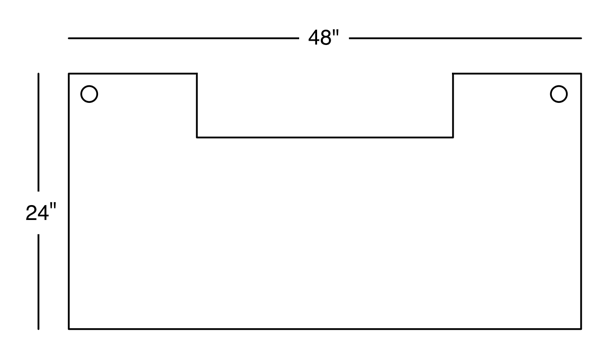
    1. Using the 1" drill bit, drill two holes Using the diagram at the end of this blog post as a guide. These holes will be used for attaching guy wires.
    2. Again, using the diagram at the end of the post as a guide, cut out a 24" x 6" notch at the back (the same side of the desk that you cut the holes for the guy wire) using a jigsaw or sabersaw. This notch will be for the treadmill console panel and to make sure you have enough tread in front of the desk to walk comfortably.
    3. (Optional) Using a router with a ½" or ¾" self-guided rounding bit, bullnose the desk edges to get rid of the sharp edges and corners. This is optional, but it makes the desk look nicer and decreases your chances of a deep forehead gash should you ever stumble while walking. You can, of course, use more decorative edge treatments if you are so inclined, but a simple bullnose looks nice, is less deadly, and won't accumulate dust, crumbs and other detritus of your workday the way some of the more ornate edge treatments will.
    4. Sand the surface and edges of the desk very, very well, starting with a medium grit and working up to a finishing grit. When done, you should be able to run your palm over the entire surface area without feeling any grit or imperfections or getting slivers . A circular or mouse sander will make your life much easier.
    5. Paint or stain the surface to your tastes, making sure to let it dry completely. If you choose to shellack and/or polyurethane, you'll want to let it dry for 48 hours after the final coat before assembling your desk (even if the instructions say you need less time - trust me on this one).
  2. Take the other piece of wood.
    1. If you didn't get the pieces custom cut, cut the second piece down to 18" x 38". This will be the riser for your monitors.
    2. Repeat sub-steps 3, 4, and 5 that you did on the larger piece of wood on this piece of wood (in other words, do the same edge treatment, if any, then sand and paint or stain just like you did with the other piece)
  3. Assemble the legs. The following instructions need to be done twice, one for each pair of legs. From here on, you'll want to assemble the desk where you want it to go. Once assembled, it will be very, very heavy and difficult to move. Please note: pipe threads, especially if you had the pipes custom cut, will potentially be very sharp. Be careful. I learned this the hard way; learn from my mistake and save yourself some pain and blood loss.
    1. Take two of the eight equal length pipes and screw them into opposite sides of a T-coupling. When done, you should have one long, straight piece with a perpendicular opening for another pipe to be attached. Make sure you have tightened them as tightly as you can.
    2. Screw a flange onto each end of the connected pipes. Screw until they're tight, but don't go too tight - you can unscrew the flanges to make minor height adjustments for leveling.
    3. Repeat the previous two step to create a second identical piece
    4. Take one of the two 20" lengths of pipe and screw it into the remaining socket on the T-coupling of one of the pieces you just constructed. You should now have a very big, very heavy "T". Set this aside for a moment.
    5. Attach the other assembled piece to the other end of the 20" pipe to create an even bigger, even heavier "H". Make sure all pipes are tightly screwed in and aligned
    6. You've just completed the supports for one half of the desk
  4. Once the paint, stain, or other treatment on the wood is fully dry (48 hours… really!), take the larger piece of wood and put it top down on the floor so the bottom is facing up. You're going to screw in both leg pairs (the Hs you built out of pipe) into the wood using the flanges and wood scres. You want them just far enough apart for the treadmill to fit between them. Measure the treadmill width to determine the distance. I used the actual treadmill width plus one inch. Once positioned, secure the legs tightly to the bottom of the desk surface using 16 wood screws.
  5. Attach the guy wires
    1. Cut two lengths of wire rope. Take one length, loop it around one rear leg just below the T-coupling (the rear leg is the one on the same side of the wood as the notch and holes) and secure it with a crimping sleeve. Make sure you really crimp hard to make sure the wire rope can't slip out when you tighten the turnbuckles later.
    2. Repeat the last step with the other piece of wire rope on the other rear leg.
    3. Take one turnbuckle and unscrew it as far as you can without it coming apart.
    4. Loop one of the two wire ropes you connected to the legs through the turnbuckle and crimp with a crimping sleeve.
    5. Repeat with the other wire, attaching it to the other end of the turnbuckle and making it as snug as you can. Now, you should have a wire that stretches from one rear leg to the other, but is probably not too tight and may even sag a little.
    6. Tighten the turnbuckle until just barely snug. DO NOT OVERTIGHTEN. This guy wire provides inward lateral support. Until we have balanced it with outward pulling guy wires, tightening can actually harm the stability of the desk and rip out the wood screws securing the leg. Err on the side of under-tightening at this stage.
    7. Repeat the steps above, this time running a wire from the cross support near the rear leg to the hole in the corner of the desk, again, tightening the turnbuckle until just snug.
    8. Repeat the previous step for the other rear leg.
    9. You now have wires pulling both inward and outward, so you can alternate tightening turnbuckles until the wires are good and tight. Don't tighten any turnbuckle more than two full turns without turning the others. Stop when the wires are taught. The inward guy is much stronger than the outward ones because it pulls straight, so once you've got the guys taut, you probably want to match a single turn of the turnbuckle on the inward guy turnbuckle with a turn and a half of the outward.
  6. It's time to stand your desk up. You might want help from a second person while doing this, as the desk will be very heavy, and you don't want to put too much pressure on the legs while lifting. Once the desk is stood up, it's time to check to make sure the desk is sturdy enough for your kit. If all went well, there should be very little lateral play and none forward and back. There will be a small amount of side-to-side play, but it shouldn't wobble, it should move no more than maybe a half inch and should come immediately back to its original position. It should feel sturdy. If not, play with the turnbuckles, or consider adding more guys. An additional set of guys that run from the bottom of the rear legs should give additional stability, though I didn't need to on mine. Make sure to add inward pulling guys only to the rear legs. Adding them to the front legs will interfere with your ability to walk on the treadmill.
  7. Take the four pipe nipples and the eight 1" flanges. Attach a flange to each end of each of the pipe nipples. These will form the supports for the monitor stand.
  8. Position the four supports on the desk. There are two approaches you can take here. The obvious one is to center the supports and monitor riser. If you're not using a Mac Pro, this is probably the best bet. If, however, your setup contains a Mac Pro (or other large tower computers), you're probably going to want to offset the riser to one side or the other. The Mac Pro is 9" wide, so you need at least that much space from one end of the riser to the edge of the desk. I have my Mac Pro on the left, so the riser is off-center to the right leaving a little more than 9" on the right side of the desk. Place the riser on top of the supports and adjust until the configuration works for you, then use the remaining wood screws to screw the riser supports into the desk and the riser. You may need a short screwdriver or a screwdriver with a 90° bend to tighten all of the screws, as the 5" pipes don't leave a lot of room between the two boards.

Guess What? That's it. Position the treadmill if you haven't already, and you're ready to go.

Here's the desk diagram showing the placement of the console notch and the two holes for guy wires.
Desk Surface Diagram

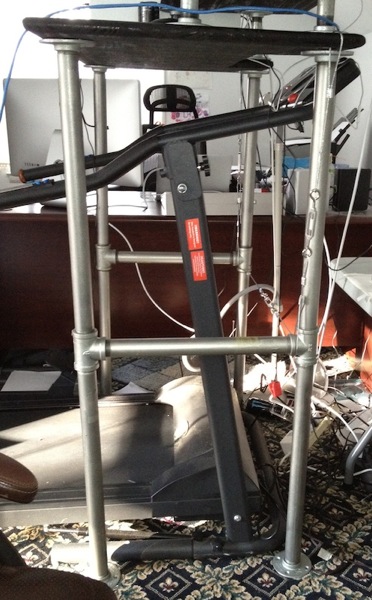
Here's a better view of the "H" legs and guy wires. Please excuse the mess. I can't currently get behind the treadmill desk to clean it, and haven't had the gumption to relocate it yet.
Photo 3

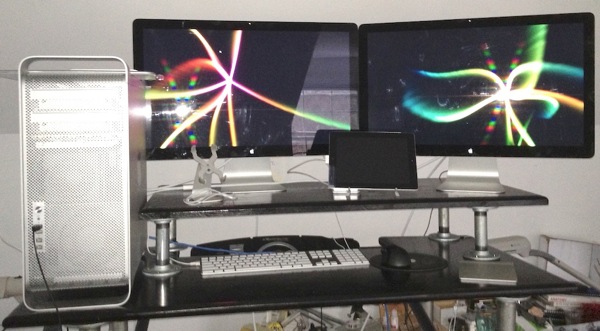
Here's a picture of the desk and riser. Notice how my riser is off-center to make room for the Mac Pro:
Photo 2

Tuesday, January 24, 2012

Wow.

Just… wow. Those are crazy numbers any way you cut it.

Monday, January 23, 2012

How I Learned to Stop Worrying and Love the iBooks Author EULA

I've been debating whether to post about the iBooks Author EULA or not. In general, I've been trying to avoid hotly debated and controversial subjects here for the simple fact that those discussions tend to eat up a lot of time and often aren't very productive. My opinion on iBooks Author and iBooks 2 is fairly close to some other authors I know. Because this is something that's near and dear to my heart, however, I figure it's worth a few words. And with me, a few words is usually more than a few.

There's been a lot of foofooraw since the iBooks 2 announcement last week. There's been all sorts of stories, tweets, and blog posts about how Apple is going to "steal your work" if you use iBooks Author. There's also been the all-too-familiar refrains of just how evil Apple is. It all seems vaguely familiar. Almost like… almost like we've been here before, what with all the people gnashing their teeth, rending their clothes, and complaining to the heavens about how evil Apple is because of the developer agreement app store guidelines iBooks 2 EULA.

There's also been a lot of complaints about the fact that Apple is using a proprietary format rather than using and extending ePub 3.

None of this bothers me terribly. Oh, it's not that there aren't things I would want different if I were King of the World, but the reality is that deciding whether to use iBooks Author is just another business decision for me. Emotional outcries and hyperbole are all well and good, but they don't change the parameters of the decision. Business decisions inherently involve risk, and the risk here is at a level that I'm perfectly comfortable with.

Before I explain why, though, I want to put up front that I'm not a lawyer. Well, that's not technically true, but I'm not a practicing lawyer and I'm not YOUR lawyer, so don't take anything I say as legal advice. I'm just explaining why I'm not concerned. If you have concerns, you should take those concerns to your lawyer before making up your mind.

The EULA

Make no mistake, the iBooks 2 EULA is poorly written and vague. The mere fact that people are up in arms is testament to that fact. And if the ambiguity that is there bothers you, don't use it. There are plenty of tools for creating eBooks, so if you think the risk of Apple "stealing" your work is too high, using another tool solves the problem.

There are several reasons why I'm perfectly comfortable with  the risk involved. In no particular order, those reasons are:
  • It's simply not in Apple's long-term interest to take ownership of authors' books and Apple can almost always be relied upon to do what's in their own long-term best interest. Getting 30% of every iBook sale means they are motivated to keep authors happy. More than that, though, they need authors to want to write for this new platform in order to establish it as the dominant interactive next-generation eBook platform. Stealing books won't get them to that goal. Suing authors who publish non-interactive versions of their content for other platforms like the Kindle or ePub won't either.
  • Although the wording is certainly vague enough that you could argue more than one interpretation, the capitalization of "Work" in the EULA (meaning it has a specific contractual meaning) combined with the verbiage, "Work you create with this software" implies that the intent is to restrict only the application-specific output. In other words, the most likely intent as I read it is to cover the proprietary file format used for the new features not supported by other existing eBook platforms.
  • Even if that weren't the intent, from a purely evidentiary point of view, the other file formats that iBooks Author exports to are open, standard formats and it would be difficult for Apple to prove a particular non-interactive work was "generated" with iBooks Author even if they really did want to try and "steal our books". A PDF generated from iBooks Author would be nearly impossible to distinguish from one generated using Pages by simply copying and pasting the content from iBooks Author .
  • The EULA contains the following phrase: Title and intellectual property rights in and to any content displayed by or accessed through the Apple Software belongs to the respective content owner. Basically, it explicitly states that the ownership of any content you create outside of the app and import into it is completely unaffected by any "book stealing" clause, even if such a thing existed. This seems to counter the notion that Apple is trying steal our intellectual property in the first place because unless the words and images were created directly in iBooks (as opposed to being imported from Pages, Word, Photoshop, etc.), Apple would have no claim to the content anyway. Their claim would be limited to the way the content is formatted. Again, from an evidentiary standpoint, it would be incredibly hard for Apple to prove you created the content in iBooks.
  • The deal we're getting with iBooks Author isn't all that different from the deal we get when using Xcode as iOS developers, and the language of the agreements aren't all that different from each other either, and that's worked out pretty well so far.
  • And last, but not least, the kicker: Let's say, for giggles, that "book stealing" was Apple's intent, and such an intent was found to be both legal and the actual intent of the contract, and Apple decided to exercise those rights to steal my books. You know what? Even with all that, it's still a hell of a lot better deal than I've ever gotten from a traditional publisher. Apple is offering 70% of the sale price to me. The most favorable contract I've ever gotten from a publisher starts at 12% of the net price the publisher gets from the distributor, wholesaler, or retailer (which is half or less of the retail price). That percentage does slowly escalate up to 20% if I sell a ton of books, but if I publish a new edition of an existing book, the escalators go back down to 12% and I have to start all over. To put this in more concrete terms, if I were to sell a book in the iBooks Store for $9.99, I would get $6.99 per book sold, which is about four times what I get when one of my current $39.99 books sells, and I'd get that money months sooner. Oh, and guess what? I don't own those books published through a traditional publisher, either. My publisher can even have someone else update the book and can continue to use my name to promote it, even if I don't like the revisions or think the update sucks.
You can go on about what Apple "might do" or "could do", but the fact is that contracts aren't magic. If Apple wanted to screw me, there's no doubt they could, with or without this language. They've got a disproportionate amount of power in this contractual relationship because they have the audience and the platform, and they also have a ton of money and lots of really, really good lawyers. If they came after me, the merits of the case would matter little because I couldn't afford to defend myself against them, anyway. That's a risk, sure, but based on my past dealings with Apple, them trying to use the legal system to screw me seems a very remote possibility, and I'm willing to accept that risk. The language of the contract does almost nothing to change the amount of risk here for me. It's little more than a red herring as far as I'm concerned.

ePub 3 vs. iBooks 2


Many people have suggested that Apple should have used the existing ePub 3 standard and worked with the standards body to extend it in whatever ways Apple needed it extended. Instead, they decided to create a proprietary file format using the older ePub 2 specification as a starting point. It is important to note, however, that Apple is not advertising this new format as being ePub; we only know it's based on ePub 2 because people have reverse engineered the generated .ibooks files.

Now, I'll be honest. In a perfect world, I'd prefer to see Apple using an open standard here. But, there isn't an existing open standard that does what Apple wanted to do, and working with a standards body to revise existing standards to meet their needs for a yet-to-be-released piece of software would have tipped their hand about the software they were developing. People would have known exactly what Apple was working on from the things they were requesting of the standards body, which would have given competitors an advantage and could have hurt Apple's negotiations with publishers. Apple's culture is steeped in secrecy, and many would argue that this secrecy has been a contributing factor to their repeated successes over the last decade. Anybody who follows the company and understands the way they work knows exactly why they made the choice that they did here. Was it the best choice for Apple? Only time will tell, but there are obvious reasons why they would think it might be.

It's also important to note that iBooks Author is completely and totally free. But really, nothing is free. TANSTAAFL. Developing both a platform to do what iBooks 2 can do and developing a tool to create content for that platform was not a trivial task and Apple almost certainly devoted a lot of resources to getting it done and to getting existing publishers on board. Apple doesn't write software to be nice, they write software to make money. In this case, they're not making money directly, but make no mistake, it was written to make Apple money. The fact that they are not letting people use this free product to compete with them, or to create works for competing platforms should surprise no one. We, as users, authors, and publishers might desire such a tool and might have all sorts of reasons why such a tool would be an awesome thing for us. But so what? I'd like a pink unicorn that farts money. That doesn't mean I should expect somebody else to find one and give it to me for free.

Embrace, Extend, Extinguish


Lastly, several people on Twitter have pointed out that Apple's move here seems frighteningly similar to what Microsoft did throughout the nineties with their infamous "embrace, extend, extinguish" campaign. There's definitely some uncomfortable similarities, but I'm not quite ready to put this in the same camp… yet.

First, iBooks is not the dominant eBook platform, so any suggestion of a monopoly would be silly. Amazon sells far more Kindle books than Apple sells iBooks, and there are other eBook platforms, including Barnes & Noble's Nook, Kobo, and Sony's eReader to name just a few of many. The very idea of embrace, extend, extinguish requires monopoly-like control of a market to be effective, which Apple doesn't remotely have here (yet). There's also been no evidence (yet) of an attempt to "extinguish" the open ePub standard, or to brand the proprietary extended version as the standard. iBooks still supports ePub, and until Apple moves to change that, we're missing the most important and deadly of the three Es, without which there's really no harm, no foul.

The Bottom Line

To quote the narrator in Peter Pan, "all of this has happened before, and it will all happen again." Many developers railed against the "unfair" restrictions of the iOS developer agreement, the inability to sell apps outside the App Store, and the review process. I'm sure there will be similar teeth-gnashing the next time Apple creates a new market or platform, or revises any of the agreements related to any of the existing ones.

And certainly, there have been bumps in the road, some of which are still around. But overall, iOS has proved to be a great platform for developers to be on. The number of iOS devices in the world now numbers in the hundreds of millions, and many of the owners of those devices have shown a willingness to pay for content, including apps, movies, and books. It's not the gold rush the mass media thought it was four years ago, but it has been fertile grounds providing a great many people with a living, including me.

It's not a perfect place, but personally, there's no other place I'd rather be. The fact that I can now do both of the things I do professionally (write apps and write books) on those same fertile grounds, excites me. The fact that I can do things while writing my books that simply weren't possible before excites me even more.

Absolutely, things could change in the future, but I'll worry about the future in the future if I need to. For now, I'm happy here and thrilled about the possibilities that iBooks 2 and iBooks Author represent.

Monday, January 9, 2012

Blog Files

As my inbox can well attest this morning, the web server that hosted most of my blog files is gone. I moved all the blog files over to Github, but forgot to post about the new repository.

Unfortunately, I just don't have time to go back and update all the old links, but every bit of code that I've posted that's now missing, can be found at GitHub.

Old code repository at GitHub.

Sorry for the inconvenience.

Friday, December 30, 2011

Speaking at MDevCon

I'm proud to publicly announce my first speaking opportunity of 2012. I'll be speaking at MDevCon in Amsterdam this year on March 10th. This will be my first trip to Amsterdam and I'm incredibly excited to have the opportunity. I'm so excited, actually, that I'll be staying in the city for several days after the conference to hang out in Appsterdam and visit. When I know exactly which days I'll be in the city, I'll let you know.

I have one other conference that I've already agreed to speak at this year, but that one hasn't been publicly announced yet, so I can't spill the beans quite yet, but I'm equally excited about that one.

Thursday, December 29, 2011

Treadmill Desk Update

I'm coming up on the end of my second week using my treadmill desk, albeit two relatively quiet work weeks thanks to the holidays. I haven't put together the plans yet for those who might be interested in building a similar one, but the desk does seem to be holding up well. It's still very sturdy and has been working great for me.

After a really great first day where I put in over nine miles, my daily averages have backed off a bit to more in the 6-7 mile range and I'm averaging about 800 calories a day burned according to the treadmill. It seems that 1.6 MPH is my sweet spot for being able to type and mouse, though I sometimes go a little slower if I'm tired. I also usually start the morning at about 1.3 MPH, but after about 15 minutes, I'm usually up to 1.6.

I'm not finding it difficult to work for the most part. In fact, often I feel more alert and able to deal with complex problems. However, late in the day, I often feel just the opposite. I start to get fatigued, and when I do, then I often find that a difficult problem requires me to go over to my sitting desk or else needs to be pushed off until the next morning when I'm fresh. I suspect that this problem will go away as I continue to get used to it and am able to walk longer.

I currently spend about 4 hours walking, another 1-2 standing at my new desk, and the rest of my workday right now is at my old sitting desk. My goal is to get up to at least 8 hours of walking, but I'm really happy with this so far. It's not hard to do. There's no motivation for me to find. It's just part of my routine. When I go to my office, I start the treadmill. Easy-peazy.

I'm walking slow enough that I'm not experiencing much in the way of muscle soreness. A tiny bit in my calf last week, but none this week. There are some other problems that go along with the treadmill desk, however. First and foremost, my feet start to hurt something fierce by the end of the day. This week was better than last, and I suspect in a few weeks it will be a non-issue. A lot of it, admittedly, was poor shoe choice. More on that later.

Another problem with spending this amount of time moving is the potential for chafing and rashes. It goes away relatively quickly if you're smart enough to wear appropriate clothing, which I wasn't at first. If you experience chafing, here's two words to remember: coconut oil. Yep, the kind you buy for cooking. It's a solid at room temperature, but will turn into liquid from the heat of your hands. It's magic for irritated skin and it's also a lubricant. It's better than any lotion or salve I've ever tried.

I close my office door and open the window while I'm working, even though it's winter and I wear shorts and a t-shirt while working. Even at that, I'm a little warm, but I'm a warm person in general, always have been. I haven't broken out my winter jacket yet this year, so your experience might be different. Nobody I've talked to has mentioned being this warm, so it might just be me.

This one's important. Get some good walking shoes. Don't wear your existing sneakers or shoes, or worse, don't be stupid and go barefoot or wear sandals, crocs or whatever shoes happen to be closest to you. Good shoes, designed for walking, fitted by somebody who knows WTF they are doing. Four or more hours of walking is a lot of steps you're taking each day. Your feet will thank you.

So, the big question people probably want to know is: Have I lost weight?

It's really too early to tell. The scale says I've lost between two and four pounds, but honestly, my weight can fluctuate more than that just from water weight over the course of a single day. I might have lost nothing, or I might have lost more than that. I need more data points before I can form any conclusions. But, I suspect I have lost some. Even with a holiday party last weekend, I've been eating less than normal. I'm not sure if it's psychological or physiological, but I'm hungry less, and when I do eat, I'm tending to eat less and to eat healthier. I also haven't been tempted by my personal demon, the midnight snack. Well, more like the 2:30am-up-late-coding snack. Part of that may simply be that I'm too tired to work until 2:30am these days, though.

Overall, I'm declaring the experiment a success already. I'm able to work just as well walking as I am sitting except when I get fatigued, I'm burning calories while I work, and am just generally feeling better than I have in a long time.

Tuesday, December 20, 2011

Brilliantly Simple Idea: the Treadmill Desk

Software development is not the easiest vocation for getting or staying in shape. For that matter, being part-owner of a relatively young business isn't either.

I've been steadily putting on weight and getting in worse shape since before the dot com boom. Since we started MartianCraft, I've had very few days off, and my average work day has been probably twelve hours, possibly longer. Every time I try and get into a routine of exercising, something happens: a client emergency, a deadline, a build, a new prospective client, a minor family emergency. When there's not enough hours in the day (and there never are), the exercise was always the first thing to get cut.

Recently, I came across this brilliantly simple idea from a Mayo Clinic cardiologist. It's called the Treadmill Desk. Essentially, you replace your chair with a treadmill, and instead of trying to get a good strenuous calorie-burning bout of exercise in a few times a week, you just walk while you're working. You don't walk fast; in fact, you go quite slow. They typically recommend that you walk between one and two miles per hour, which is about half of most people's normal walking speed. This speed allows you to function fairly normally. After just a few minutes, you can type and mouse normally. If it gets hard to type, you back off on the speed a little. It's not a race. It's not even exercise in the traditional sense.

I'm typing this blog post while walking on a treadmill.

The goal with this walking is not to break a sweat, but rather to just be in constant motion. You will want your office a touch cooler than normal, though, as even slow walking does raise your body temperature. Despite the low-key nature of the movement, a typical person burns an additional 100 - 130 calories per hour they're at their desk. For a typical person working an eight hour day, that's between 800 and 1040 calories per day. If you work longer hours or weigh more than the average person, it's even more calories. Now, think about that. You have to burn approximately 3500 calories to lose a pound of weight, so assuming you don't increase your caloric intake, that's about a pound every three to four days of work, or two pounds a week. For someone working a forty hour week, that's about five pounds a month, or sixty pounds a year without additional exercise or dieting. There's a lot of health benefits that go along with losing extra weight, also. Lower blood pressure, lower cholesterol, lower incidence of several types of cancer.

If you work more than forty hours a week, the benefits can be even greater, assuming you don't eat more to make up for the extra calories you burn.

I've talked to a number of people who are using treadmill desks, and the feedback was universally positive. Everybody lost weight – several of them a considerable amount – and all were in better health than when they started. And almost everyone said the following word-for-word phrase to me: "I would never go back to a normal desk".

After about the third person gave me the same basic story, I was sold. Sign me up! I can do this.

But there was a problem.

There are lots of plans for treadmill desks around the Internet and you can actually buy treadmill desks now. But, here's the thing: My primary machine is a Mac Pro with two 27" ACD monitors along with a crap-ton of accessories. I couldn't find any desk for under $5,000 that looked sturdy enough to safely and securely hold the weight of all my gear, and all the plans I found for building one seemed to assume the use of a laptop or small computer with small monitor.

Because of that big sheet of glass, Apple's monitors are heavy. Because of that big aluminum case, the Mac Pro is also very heavy. My computer and monitors alone weigh well over a hundred pounds, and I wasn't about to trust that much weight worth that much money to something that looked flimsy or was designed to hold a laptop.

I experimented for a week using a makeshift treadmill desk with my MacBook Air, and I found the walking and working quite easy to do, but also found myself constantly pining to move back to my desk to use my more powerful machine and bigger monitors. I usually abandoned the treadmill after about two hours when I'd start getting into more hardcore coding, not because of the treadmill, but because of the computer.

But, that week was enough to convince me that this was a good way to reverse the slow but persistent upward trend in my weight that's marked the last several years of my life. Unfortunately, it also convinced me that I could only make it work if I could find a way to use my computer while walking.

So, I decided to build my own desk. Building a sturdy desk this tall (over four feet tall in my case, since I'm 6'3" and will be standing on a treadmill desk that's about 6" high) turned out to be an interesting, but not-entirely-trivial engineering exercise. It took a couple of re-designs and a lot of swearing, but my desk is now done and I've been happily using it for a couple of days now.

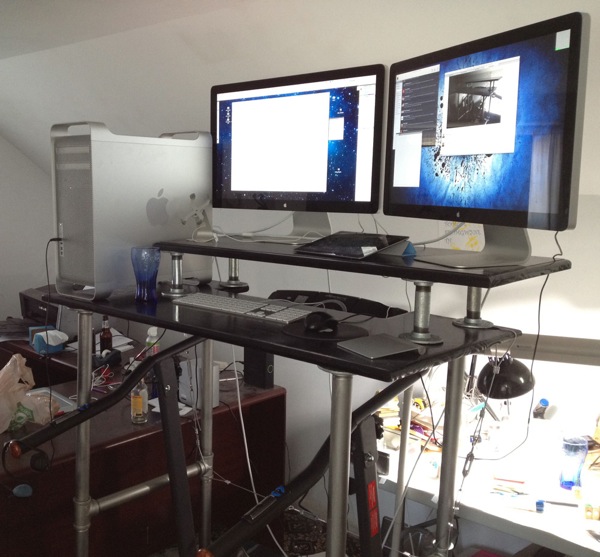
Here's my rig on my desk (excuse the messy office):

Finished 1

(Yes, there's a beer bottle in the background. That was my reward for finishing the desk.)


After I've been using it for longer and am convinced the design is good, I'll share how I made the desk for anyone who might wish to build one for themselves.

So far, so good, though. The desk seems to be solid, has no perceptible wobble, and the monitors and computer don't seem to be putting any noticeable strain on it. Yesterday, I walked nearly nine miles at an average of 1.6 mile per hour and had a productive work day. Today's about half over and I've burned a little over 600 calories while fixing two pretty gnarly bugs in client apps. These two days have been enough to convince me that this is going to work.

By having my good computer on the treadmill desk and my MacBook Air at my regular desk, there's a built-in incentive for me to walk, or at least stand, rather than sit at my desk. I'm simply more productive when I have more screen real estate and a more powerful computer.

In a week or so, I'll put together a parts list and basic instructions, but the design is pretty basic. 1¼" galvanized pipe makes up the main frame of the desk with ⅛" wire rope and turnbuckles as guy wires to provide additional lateral stability.

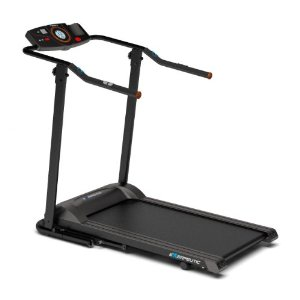
This is the treadmill I use:
NewImage


It's designed only for walking, will hold up to 400 pounds, and it's shorter than most treadmills, so it takes up less room. It's not cheap, but it's fairly reasonable for a treadmill at $400, and it can fold up out of the way if you need to. I've been very happy with it so far. While it's not whisper quiet, it's nowhere near as loud as most treadmills I've used, and it has a full set of controls on the handle where you can reach them easily while using it as part of a treadmill desk, which is much nicer than having to awkwardly reach over the desk to the treadmill's console.

The desk plans (when I post them them) are intended to work with this treadmill, you will probably need to make minor adjustments to use it with other models, as well as account for any height difference.

Monday, November 14, 2011

Comments Gone

I regret to inform you that I've had to completely disable comments on the blog. I had to switch to moderation a while back since the spam detectors were failing to catch anything meaningful. Unfortunately, the rate of spam comments has been accelerating recently to the point where I simply don't have the time to search for the few actual and valid comments in the proverbial haystack of spam.

I wish I didn't have to do this. I like comments. I like hearing other peoples' takes on things and love it when somebody catches a mistake or proposes a better solution. But, comment moderation has been sucking away what little time I have for the block lately.

Maybe at some point I'll have the time to transition to software that can handle spam comments better, but I don't right now.

Sorry it had to be this way. It sucks that there are people in the world who do this shit and ruin things for everyone else.

Wednesday, November 9, 2011

Flash is Dead. No, Really this Time

It appears that Adobe is going to cease development of mobile Flash.

I'm not ordinarily one to gloat or dwell on I-told-you-sos, but I'm going to make an exception in this one instance. I took an awful lot of heat for those blog rants backin 2009 for saying things like

I hate to break it to you, but Flash, as it currently exists, is dead. Oh, it's not going to die quickly, it's going to die a slow painful death precisely because there has been such a large investment of time and money into using it by so many large corporations like Disney. Flash's roots run way too deep for it to disappear quickly.

Here's the thing, though: Flash is a product of a different generation of computing. It's a product of a world where 90% of the people used one platform, and the bulk of the remaining used another. There was Windows, and there was the Mac.

[…]

And now, the world is changing. People are increasingly browsing the web from mobile devices, and unlike the computer world of a decade ago, the mobile computing landscape is not anything like a monoculture or monopoly. There are several viable mobile platforms all competing in that space. We have the iPhone, Blackberry, Palm Pre, Windows Mobile, Android, Symbian and probably others that have slipped my mind. All of these are operating systems currently shipping on phones and all come with browsers. None of them, except a solitary model of Android phone, has Flash.

But before I get too smug, you know what? I missed a huge factor in the demise of Flash. I assumed the performance issues they were having back then were simply technical hurdles that would be overcome by Adobe's engineers before long. In the end, the lack of a monoculture was certainly a significant factor in the demise of mobile Flash, but the real nail in the coffin was that Adobe never even got mobile Flash working demonstrably well on a single model on a single platform, let alone working well on the "billions of mobile phones" they were shooting for with the Flash Consortium. I completely overestimated Adobe's ability to deliver, technically.

But all is not lost for Flash developers. Adobe has stated that they are going to "refocus" their efforts on allowing Flash to create HTML5 compliant web apps. What a brilliant idea!

If I may… one last quote from my much-reviled Flash rants:

But, that doesn't mean there's no hope. There are many ways that Adobe could save Flash/Flex for the mobile world. One way would be to create something like Google's GWT - an environment where some or all of the code gets translated into HTML and Javascript to be run on the client, leaving to a VM only those tasks that can't reasonably be handled that way.

I said that back in August 2009 and, frankly, I was kind of stating the obvious. Maybe Adobe should have made me CEO. I doubt I would've done much worse than the current management given the recent layoff announcements.

I know people think of me as an Adobe hater. I'm not. More accurately, I'm a disgruntled fan. In the nineties I held Adobe in higher regard than I held Apple (at least Apple before Jobs' return). I adored Photoshop, which I had started using around version 1.5 and which enabled me to make a living for a couple of years. Somehow, in the span of fifteen years, Adobe went from being a company that made amazing things to being a company that made mediocre things that they marketed as amazing. A company that had no focus. A company that churned out new versions of software in order to generate new income, not to meet honest customer demand. I watched a great company become a company that didn't care about being great as long as quarterly profit sheets looked good.

I, for one, am hoping for a Phoenix-like rise from the ashes on the order of Apple's comeback. Hoping… but not expecting.

Thursday, October 20, 2011

Objective-C 2.0 Compiler Directives

Steffen Itterheim has posted a really nice list of all the Objective-C 2.0 compiler directives along with examples of how to use them.

Nice!

Wednesday, October 19, 2011

GLKit Examples

I've added three new projects to my iOS OpenGL ES repository on GitHub. They are fairly simple examples of how to use GLKit and GLKBaseEffect. You can find them in the GLKit Stuff directory.

They're kind of rough, but they should be helpful to you if you're just getting started with GLKit and trying to figure out how to use it.

Thanks to Julián Oliver for tweeting the solution to a problem I was having getting textures to work with GLKBaseEffect.

Tuesday, October 18, 2011

CGAffineTransform Additions

As you probably know, Apple provides a bunch of functionality for manipulating objects in 2D space using CGAffineTransform. Oddly, Apple doesn't provide you with a way to extract the scale, transform, and rotation information from a CGAffineTransform and they don't provide any shearing functionality at all.

Here are some additional inline functions that I use. This adds the ability to extract component values of the CGAffineTransform and also adds the ability to create and extract shear information.

As always, this code is free to use without restriction or limitation, but has no warranty whatsoever. If you fix a bug, feel free to let me know about the fix so I can incorporate the fix.

#ifndef __MCP_AFFINE_TRANSFORM_ADDITIONS__
#define __MCP_AFFINE_TRANSFORM_ADDITIONS__

#import <CoreGraphics/CoreGraphics.h>

#ifdef __cplusplus
extern "C" {
#endif

#define degreesToRadian(x) (M_PI * x / 180.0)
#define radiansToDegrees(x) (180.0 * x / M_PI)

static inline CGAffineTransform CGAffineTransformMakeShear(CGFloat shearX, CGFloat shearY)
{
return CGAffineTransformMake(1.f, shearY, shearX, 1.f, 0.f, 0.f);
}

static inline CGAffineTransform CGAffineTransformShear(CGAffineTransform transform, CGFloat shearX, CGFloat shearY)
{
CGAffineTransform sheared = CGAffineTransformMakeShear(shearX, shearY);
return CGAffineTransformConcat(transform, sheared);
}

static inline CGFloat CGAffineTransformGetDeltaX(CGAffineTransform transform) {return transform.tx;};
static inline CGFloat CGAffineTransformGetDeltaY(CGAffineTransform transform) {return transform.ty;};
static inline CGFloat CGAffineTransformGetScaleX(CGAffineTransform transform) {return sqrtf( (transform.a * transform.a) + (transform.c * transform.c) );};
static inline CGFloat CGAffineTransformGetScaleY(CGAffineTransform transform) {return sqrtf( (transform.b * transform.b) + (transform.d * transform.d) );};
static inline CGFloat CGAffineTransformGetShearX(CGAffineTransform transform) {return transform.b;};
static inline CGFloat CGAffineTransformGetShearY(CGAffineTransform transform) {return transform.c;};
static inline CGFloat CGPointAngleBetweenPoints(CGPoint first, CGPoint second)
{
CGFloat dy = second.y - first.y;
CGFloat dx = second.x - first.x;
return atan2f(dy, dx);
}

static inline CGFloat CGAffineTransformGetRotation(CGAffineTransform transform)
{
// No exact way to get rotation out without knowing order of all previous operations
// So, we'll cheat. We'll apply the transformation to two points and then determine the
// angle betwen those two points

CGPoint testPoint1 = CGPointMake(-100.f, 0.f);
CGPoint testPoint2 = CGPointMake(100.f, 0.f);
CGPoint transformed1 = CGPointApplyAffineTransform(testPoint1, transform);
CGPoint transformed2 = CGPointApplyAffineTransform(testPoint2, transform);
return CGPointAngleBetweenPoints(transformed1, transformed2);
}


#ifdef __cplusplus
}
#endif

#endif

 
Design by Wordpress Theme | Bloggerized by Free Blogger Templates | coupon codes