Tuesday, March 29, 2011

Briefs is Dead, Long Live the Briefs

Rob, one of my MartianCraft partners-in-crime, decided to throw in the towel last night on Briefs.app. After a solid year of fighting with Apple's app review team, implementing changes that were suggested might clear the path for getting Briefs.app on the App Store, and trying to just get a straight answer from Apple about what the real problem was, he's finally decided it's just not worth the hassle any more.

There were several lights at the end of the tunnel over the course of the year, each one a bigger and faster freight train. Despite the changes to the license agreement that seemed to imply Apple was going to become more reasonable on this subject, they continued to insist that Briefs allowed users to download and run executable code and is dangerous.

I don't like that answer, but if that was the answer, they should have manned up and told him that a year ago rather than stringing him along, giving him false hope, and enticing him to invest more time he doesn't have on a fruitless endeavor.

This was no way to treat a third party dev, and Rob has been way too nice about the whole damn situation.

Monday, March 28, 2011

On WWDC Now Being "Broken"

Over at TUAW, fellow author Erica Sadun opines that WWDC is broken because it sold out fast. And she's right. It's so horribly broken that more people want to attend than they've got room for. Th… wait, what? Where I come from, that's called "success", and it usually indicates that you're doing something right. It's not usually a big red flag that you need to make a complete about face in your approach.

But that's exactly what Erica is suggesting Apple do.

I used to work in the Enterprise software world and know all about these large conferences that Erica is referencing. I was a developer at PeopleSoft (now part of Oracle), and I've been to (and have even spoken at) mega Enterprise conferences like the old PeopleSoft conferences (20k attendees at its peak) and OracleWorld (which is now, I guess, called Oracle OpenWorld because Oracle is so… open).

Making WWDC more like these giant, soulless, "enterprise" conferences is not the answer. Scaling WWDC to 10k, 20k or 40k is fixing the problem by shooting the golden goose. Trying to scale up WWDC like that would utterly destroy everything that is wonderful about it.

WWDC is community. WWDC is actually being able to talk with the engineers who wrote the software you're having problems using. WWDC is a chance to get on a first name basis with people in our community, including (if you're lucky) some of the awesome people who make the APIs we use to make our living. It's a time for learning, absolutely, but it's also for making friendships, making business connections, and looking for future employees/employers/subcontractors. The current size of WWDC is part of what makes it great and is part of why so many people want to attend. In fact, the past few years, it's bordered on being too big, with lab slots becoming harder to get and many sessions having long lines and being standing room only.

What WWDC is, is not what giant corporate conferences like OracleWorld are. If anything, they're the polar opposite. Which is not to knock what those big conferences are - they serve a particular market, and they serve it well, but we are not their market and our needs cannot be met by adopting their model. Conferences like Oracle World are places where groups of people from the same large company or government entity go together, hang out together, and then leave together. They're places that people go because their employer is paying for them to go and has instructed them to go. They're places where people wander through large convention halls picking up swag they don't really want while being sold on the merits of various products their employers don't really need. They're vendor fair as much as a place to learn. In fact, they're usually more like one big fucking advertisement that your company pays for you to attend.

They are not events (by and large) that people save up and do without in order to attend. They're not events that people make sacrifices in order to find a way to go.

But that's exactly what WWDC is. WWDC is a conference that people want to go to even if they have to pay money out of their own pocket. It's something people look forward to attending and talk about having attended for months afterwards. It's a conference where a great many people pay their own way to attend and are thrilled to do so.

Monstrous mega-conferences don't develop community. That's simply not what they're there for. Forty thousand people isn't a community: It's a city. Forty thousand people is so far beyond anybody's monkeysphere as to make the concept of "community" meaningless. Wandering around conferences like OpenWorld no more engenders a sense of community than does walking through Times Square.

I don't want WWDC to become that. You don't want WWDC to become that. I honestly don't even think Erica really wants WWDC to become that. I think what she wants is a perfectly egalitarian world where everybody gets what they want. But that only exists in fiction. In real life, everything involves tradeoffs, and the tradeoffs with her suggested solution would be disastrous for our community.

Scarcity always increases value. Apple could have chosen to jack up the WWDC ticket price until they stopped selling out, but they didn't do that. In fact, the price hasn't increased in years. Yes, they did get rid of the early-bird pricing and group rates, but the base ticket price for WWDC has remained unchanged for quite some time (8 years maybe? Anyone know?). Apple could gouge us and many of us would pay the inflated price happily. But they don't do that. In fact, they charge us less than the early bird prices at big mega-conferences like Oracle OpenWorld, Tech Ed, and PDC, despite the fact that WWDC has no sponsors or advertisers and no vendor floor.

The simple fact of the matter is that any mechanism that Apple might implement to "level the playing field" for tickets would result in somebody feeling like they didn't get a fair chance to purchase. The more complex the scheme and the more advance notice Apple were to give, the more opportunities there would be for people to game the system and create true inequity in the process.

What Apple did do was put WWDC tickets on sale without advance notice and sold them on a first come, first served basis. That's not perfect, but it is about as close to a level playing field as you can get. Yes, some people were on planes, and some people were sleeping (including people in Silicon Valley, it should be noted), and some just weren't paying attention to the Internet when the tickets went on sale. But those tickets were available for over ten hours and everybody should have known they were going to sell out quickly. Yes, people got left out, and it sucks. That's the nature of scarcity.

This is not an artificial scarcity, however. WWDC tickets are like money, you can't just solve the scarcity by printing more tickets. Every additional ticket reduces the value of the conference to the rest of the attendees. Letting everybody have what they want means nobody gets what they really want, or need.

I'll take scarcity and a once-a-year scramble to buy tickets before they sell out over a soulless commodity conference like OpenWorld any day, thank you.

WWDC 2011 is Sold Out.

I told you they'd go fast.

WWDC First Timer's Survival Guide, 2011 Edition

Today, WWDC was announced. This is the earliest they've announced WWDC during the iPhone epoch, so there's a little more time to prepare than we've had the last few years. Given how popular it's been the past few years, I thought it was worth updating and re-posting my WWDC First Time Guide from last year and the previous year.

Again, WWDC is different every year, so don't take anything written here as gospel, but hopefully these hints and suggestions will help some of you.

  1. Arrive on Sunday or Earlier. Registration is usually open most of the day on Sunday. You really, really want to get your badge and related swag (bag, shirt, jacket, etc) on Sunday. The line for the keynote will start forming many hours before the doors to Moscone West open up on Monday (the past three years, people started lining up before midnight Sunday). If you do not have your badge when you get to Moscone on Monday morning, you will almost certainly end up in an overflow room for the Keynote and may even miss part of it. Even if you don't care about being in the main room, there's still a lot going on on Sunday and it's a good time to meet new people and catch up with old friends. You really don't want to deal with the badge process on Monday.

  2. Do not lose your badge. If you lose it, you are done. You will spend your time crying on the short steps in front of Moscone West while you watch everyone else go in to get schooled. Sure, you'll still be able to attend the unofficial after-hours goings-on (but not the Thursday night party, which is usually a blast), but you'll miss out on the really important stuff. No amount of begging or pleading will get you a replacement badge, and since they're likely to sell out, no amount of money will get you another one, either. And that would suck. Treat it like gold. When I'm not in Moscone West or somewhere else where I need the badge, I put it in my backpack, clipped to my backpack's keyper (the little hook designed to hold your keys so they don't get lost in the bottom of your bag). Yes, there have been isolated stories of people managing to convince a sympathetic conference worker to print them a new badge, but don't expect it, those are exceptions. The employees are not supposed to print new badges, and most won't.

  3. Eat your fill. They will feed you two meals a day; you're on your own for dinner. Breakfast starts a half-hour before the first session, and it's most likely going to be a continental breakfast - fruit, pastries, juice, coffee, donuts, toast, and those round dinner rolls that Californians think are bagels, but really aren't. If you're diabetic, need to eat gluten-free, or are an early riser, you'll probably want to eat before-hand. Lunch used to be (IIRC) a hot lunch, but three or four years ago they switched to boxed lunches. They are pretty good as far as boxed lunches go, but they are boxed lunches. A lot of people complain (loudly) about them and choose to go to a nearby restaurant during the lunch break, which is pretty long - at least 90 minutes.

  4. Party hard (not that you have a choice). There are lots of official and unofficial events in the evening. There's often a CocoaHeads meeting at the Apple Store. It fills up crazy fast, so go early if you go. It's usually competing with several other parties, but it starts earlier than most events and finishes early enough for people to go to other parties when it's done. Best bet is to follow as many iPhone and Mac devs on Twitter that you can - the unofficial gatherings happen at various places downtown, often starting with a few "seed crystal" developers stopping for a drink and tweeting their whereabouts. The unofficial, spontaneous gatherings can be really fun and a great opportunity. The parties often start before WWDC - there are usually a few on Sunday, and there have been ones as early as Saturday before. Pretty much any other bar within stumbling distance of Moscone West will be used for planned and informal gatherings. As we get closer, there will be lists and calendars devoted to all the events and parties. Some are invite-only, but many are first-come, first-serve. Although there's a lot of drinking going on, these are worth attending even if you don't drink. Great people, great conversations... good times.

    At some point, one or more lists will pop up to track the official parties, gatherings, meet-ups, and BOF (birds of a feather meetings - meet-ups for people interested in a particular subject).

  5. Take good notes. You are going to be drinking knowledge from a firehose there. The information will come at you fast and furious. As an attendee, you will get all the session videos on ADC on iTunes. It used to take some time before the videos were available, but hopefully they'll continue to get them out quickly. Even so, make sure you write down the information you need immediately.

  6. Collaborative note taking A few years ago, people started taking communal notes using SubEthaEdit and Panic's Coda (they are compatible with each other). That worked out really, really well. My notes from the past few years are ten times better than from previous years. With SubEthaEdit, you don't have to type fast enough to catch every detail. Instead, the audience works as a team and everybody gets great notes. The license fee pays for itself in one WWDC, especially considering you can see notes being taken in other sessions, not just your own.

  7. Labs rule. If you're having a problem, find an appropriate lab. One of the concierges at any of the labs can tell you exactly which teams and/or which Apple employees will be at which labs when. If you're having an audio problem, you can easily stalk the Core Audio team until they beat the information into your skull, for example. It's unstructured, hands-on time with the people who write the frameworks and applications we use every day. People start remembering the labs later in the week it seems, but early on, you can often get an engineer all to yourself, though people have started to catch on. Every year the labs fill up earlier in the week.

  8. Buddy up, divide and conquer There will be at least a few times when you want to be at more than one presentation at the same time. Find someone who's attending one and go to the other (Twitter is a good way to find people), then share your notes.

  9. Make sure to sleep on the plane. You won't get many other chances once you get there. Everybody is ragged by Friday, some of us even earlier. Everyone remains surprisingly polite given how sleep-deprived and/or hungover people are.

  10. Thank your hosts. The folks at Apple - the engineers and evangelists who give the presentations and staff the labs, kill themselves for months to make WWDC such a great event. So, do your mother proud and remember your manners. Say thank you when someone helps you, or even if they try and don't. And if you see one of them at an after hours event, it's quite alright to buy them a beer to say thanks.

  11. Remember you're under NDA. This one is hard, especially for me. We see so much exciting amazing stuff that week that it's natural to want to tweet it, blog it, or even tell the guy handing out advertisements for strip joints on the corner all about it. Don't. Everything, from morning to night except the Keynote and the Thursday night party are under NDA.

  12. Brown Bag it. Most days there are "brown bag" sessions. These are speakers not from Apple who give entertaining, enlightening, or inspiring talks at lunchtime. Check the schedule, some of them are bound to be well worth your time.

  13. Monday, Monday I don't know what to say about Monday. The last few years, people started lining up before midnight the night before. I'm typically on East coast time and usually walk over around 4:15 to see what's going on. I've done the line, and I've done the have-a-leisurely-breakfast route, and both have their merits. If you straggle too much, they may start before you get in the room, however (happened to me two years ago).

    Waiting in line is not really my thing, but you do get to talk to a lot of very cool people while waiting in line, and there is a sense of camaraderie that develops when you do something silly with other people like that. Some people probably want me to suggest what time to get in line. I have no idea. Most people will get into the main room to see the Keynote. There will be some people diverted to an overflow room, but because the number of attendees is relatively low and the Presidio (the keynote room) is so big, it's a tiny percentage who have to go to the overflow rooms (maybe the last 1,000 to 1,500 or so, depending on number of VIPs in attendance). On the other hand, you'll actually get a better view in the overflow rooms unless you get in line crazy early - you'll get to watch it in real time on huge screens and you'll get to see what's happening better than the people at the back of the Presidio. So, go when you want to. If you want to get up early and go be one of the "crazy ones", cool! If you want to get up later, you'll still get to see the keynote sitting in a comfy room with other geeks.

  14. Turn off your MiFi/Clear/other wireless router. I'm so totally not kidding on this one. People will punch you if they find out you've got one on. Last year, so many people had MiFis and other mobile hotspots running during the keynote that it interfered with the conference center's (very good) WiFi network and disrupted some of the tech demos. Once you're in the building, you don't need it. They have crazy fast pipe in the building, so just use the provided WiFi and turn your wireless router off. Seriously.

  15. Park it once in a while There will be time between sessions, and maybe even one or two slots that have nothing you're interested in. Or, you might find yourself just too tired to take in the inner workings of some technology. In that case, there are several lounges around where you can crash in a bean bag chair, comfy chair, moderately-comfy chair, or patch of floor. There is good wi-fi throughout the building and crazy-fast wired connections and outlets in various spots on all floors. So, find a spot, tweet your location, and zone out for a little while or do some coding. You never know who you might end up talking with. If you move around too much, well, let's just say a moving target is harder to hit than a stationary one.

  16. Twitter is invaluable, but don't expect it to stay up during the keynote. There's really no better way to hook up with people you didn't travel with than Twitter. Two years ago, we completely overwhelmed twitter during the keynote. Last year it fared okay, though there were some delays and hiccups.

  17. It's okay to leave. Don't worry if a few minutes into a session you decide that you've made a horrible mistake and it's too boring/advanced/simple/etc, or you're just too hungover. Just get up and leave quietly and wander to a different session. Nobody is going to be offended if you leave politely and without causing a disturbance.

  18. Bring proof of age on Thursday night. The official party is always on Thursday night, and it's always a blast. There's good food, good drink, great company, and usually a pretty good band. The last three years featured OK, Go, Cake, and the Bare Naked Ladies. They are pretty strict about making sure only people who are over 21 get alcohol. So, if you want to have a drink or five on Thursday, don't leave your license or passport in your hotel room, even if you're 70 years old.

  19. It's okay to take breaks. Your first time, you're going to be tempted to go to every session you possibly can. Somewhere around Wednesday or Thursday, though, that effort combined with lack of sleep, is going to take its toll on you. If you're too tired or overwhelmed to process information, it's okay to hole up on a couch or at a table instead of going to a session, or even to go back to your hotel (you did get a close one, right?). In fact, it's a darn good idea to map out a few "sacrificial" time slots that won't feel bad about missing just in case you need a break. You don't want to burn out and then miss something you are really interested in. And some of the best, more advanced sessions fall at the end of the week, so don't shoot your wad early in the week.

  20. Get a close hotel If at all possible, try and get a hotel within two blocks and definitely not more than five blocks from Moscone West. Five blocks doesn't seem like a lot, but it can become quite a hassle, especially if you're North of Moscone West because you'll be climbing up a pretty decent hill in one direction.

  21. Official Evening Events In addition to the Thursday night Beer Bash, there are other official activities in the evening that are very entertaining and usually happen in the early evening before the parties really get going. The two stalwarts are the Apple Design Awards and Stump the Chumps (it's actually called "Stump the Experts", but most of the participants refer to it as "Stump the Chumps"). Stump the Experts is an Apple trivia game-show like event with notable tech luminaries and former Apple employees. Lots of sharp wits and deep knowledge of Apple make for some good entertainment. There used to also be a Monday night reception and cocktail hour, but if memory serves, it hasn't happened in a few years.

  22. Take the BART If you're flying into either SFO or OAK and are staying near Moscone West (or near any BART station) there's really no reason to bother with renting a car or taking a cab from the airport. Just take BART and get off at the Powell Street station and walk up 4th street (South). Moscone West will be about four blocks on your right.

  23. Bring a Sweatshirt or Jacket A lot of first-timers assume that it's California in the summer so it's going to be hot. Well, it could be, during the middle of the day, but look up Mark Twain's quote about San Francisco in the summer. It can be downright cool in San Francisco in the summer time, especially in the evenings and early morning. Bring a sweatshirt or light jacket, and wear layers because the temperature differential over the course of the day can be forty or fifty degrees.

  24. Sample Code Many sessions will have sample code, usually downloadable from the schedule or class descriptions web pages. The sample code will stay up for a while, but may not stay around forever, so it's a good idea to download any code samples you want as soon as you can. Edit: It looks like starting with 2009, you can get to the old source code for years you attended by logging in to ADC on iTunes, however I always save off a copy just in case.

  25. Get a Battery Pack You might want to consider a battery pack for your iPhone. You'll be in for some very long days, and it's not uncommon for your phone to be bone dry by early evening if you don't remember to charge it during the day. AT&T reception in San Francisco is notoriously bad, and that takes a toll on battery life.

  26. Don't Sound Like a N00b It's technically called the "World Wide Developer's Conference", so logically, you'd expect people to refer to it as "the WWDC" (e.g. "I'm going to head over to the WWDC")… only nobody does. It's just "WWDC" ("are you gong to WWDC this year?). Less commonly, it's also called the "Dubdub", with or without the "the": ("Man, what an awesome Dubdub that was", or "What time are you heading over to the Dubdub?").


Have more suggestions for first-timers? Add them to the comments.

WWDC 2011 Announced

June 6-10 at Moscone West. You should go. If you're going to go, don't wait, they will sell out.

Thursday, March 10, 2011

Attributed Strings in iOS

Ten months ago when the original iPad shipped, Apple released iOS 3.2, and for the first time, iOS developers had access to NSAttributedString and NSMutableAttributedString, objects designed to hold strings along with font, paragraph, and style information. We no longer had to resort to using heavy UIWebViews or complex Core Graphics calls to draw styled text.

Well, sort of…

On the Mac side of things, NSAttributedString and its counterpart NSMutableAttributedString have been around for a long, long time, as part of Foundation. But, there's also been, for nearly as long, categories on both of these classes in App Kit called the Application Kit Additions which have all sorts of useful additional methods.

These categories provide ways to create attributed strings from various sorts of formatted text documents (RTF, HTML), to create attributed strings by specifying multiple specified attributes, to tweak existing attributes, to draw the attributed string, and to determine the size of an attributed string if it were to be drawn.

In fact, most of the really useful methods for these two classes are contained in these App Kit categories and not in the base classes. Unfortunately, we don't have those categories in the iOS SDK, or even a scaled back version of them. We just have the base classes. That means we have a whopping thirteen methods on NSAttributedString, and another thirteen on NSMutableAttributedString.

Cocoa has luxury-brand attributed strings; Cocoa touch has store-brand generic ones.

Even weirder, NSAttributedString has an init method that takes a dictionary of string attributes, but the key constants for using that method aren't even included in iOS in either the public headers or the documentation. The description of the methods that take these attributes state that the constants are in the Overview section of the documentation, but that's actually only true in the Mac OS X documentation, not the iOS documentation.

In other words, you can't create an NSAttributedString or NSMutableAttributedString using initWithString:attributes: because you don't have the constants you need in order to specify the various attributes. That's not entirely true; you actually are able to use the Core Text counterparts of the NSAttributedString constants , such as kCTForegroundColorAttributeName in place of NSForegroundColorAttributeName, however this isn't actually documented anywhere, and there isn't an exact 1:1 correlation between the NS and CT string attributes (though it's close).

This situation is really odd. Apple went through great efforts to give us all the low-level pieces need to do complex text rendering, but didn't give us higher-level objects to handle most that functionality elegantly. We have the lion's share of all of the low-level Core Text and Core Graphics calls that are available on Mac OS X (still no Core Image, though). Yet, we have to write low-level Core Text and Core Graphics code to do the bulk of even the most common typesetting tasks using attributed strings.

Fortunately, NSAttributedString and NSMutableAttributedString are both toll-free bridged to their Core Foundation counterparts CFAttributedStringRef and CFMutableAttributedStringRef respectively. That means you can create, for example, a CFAttributedStringRef and simply cast it to an NSAttributedString pointer, and then calling NSAttributedString methods on it will work.

Mostly.

There's one gotcha here. On iOS, UIFont and CTFont are not toll-free bridged, even though NSFont and CTFont on the Mac are. You cannot pass a UIFont into a function that expects a CTFont and vice versa.

To get a CTFont from a UIFont, you can do this:

CTFontRef CTFontCreateFromUIFont(UIFont *font)
{
CTFontRef ctFont = CTFontCreateWithName((CFStringRef)font.fontName,
font.pointSize,
NULL);
return ctFont;
}


Notice the name of this method - the word "create" in the function name indicates that the returned CTFont object has been retained for you, and you are responsible for calling CFRelease() on it when you're done with it, to avoid leaking.

Going the other way, from a CTFont to a UIFont is only a little more involved. Here's a category method on UIFont that will create an instance of UIFont based on a CTFontRef pointer

@implementation UIFont(MCUtilities)
+ (id)fontWithCTFont:(CTFontRef)ctFont
{
CFStringRef fontName = CTFontCopyFullName(ctFont);
CGFloat fontSize = CTFontGetSize(ctFont);

UIFont *ret = [UIFont fontWithName:(NSString *)fontName size:fontSize];
CFRelease(fontName);
return ret;
}

@end


Once you have the ability to convert the two font objects into each other, creating attributed strings really isn't that bad. Here's an example category method on NSMutableAttributedString that will create an instance by taking an NSString plus a font, a font size, and a constant representing the desired text justification. It will return an autoreleased attributed string with the text attributes applied to the entire string:

+ (id)mutableAttributedStringWithString:(NSString *)string font:(UIFont *)font color:(UIColor *)color alignment:(CTTextAlignment)alignment

{
CFMutableAttributedStringRef attrString = CFAttributedStringCreateMutable(kCFAllocatorDefault, 0);

if (string != nil)
CFAttributedStringReplaceString (attrString, CFRangeMake(0, 0), (CFStringRef)string);

CFAttributedStringSetAttribute(attrString, CFRangeMake(0, CFAttributedStringGetLength(attrString)), kCTForegroundColorAttributeName, color.CGColor);
CTFontRef theFont = CTFontCreateFromUIFont(font);
CFAttributedStringSetAttribute(attrString, CFRangeMake(0, CFAttributedStringGetLength(attrString)), kCTFontAttributeName, theFont);
CFRelease(theFont);

CTParagraphStyleSetting settings[] = {kCTParagraphStyleSpecifierAlignment, sizeof(alignment), &alignment};
CTParagraphStyleRef paragraphStyle = CTParagraphStyleCreate(settings, sizeof(settings) / sizeof(settings[0]));
CFAttributedStringSetAttribute(attrString, CFRangeMake(0, CFAttributedStringGetLength(attrString)), kCTParagraphStyleAttributeName, paragraphStyle);
CFRelease(paragraphStyle);


NSMutableAttributedString *ret = (NSMutableAttributedString *)attrString;

return [ret autorelease];
}


What about calculating the space needed to draw an attributable string? That's a little more involved, but it can be done. Here are two category methods on NSAttributedStringthat will tell you how much space an attributed string will require when drawn at a specified width or height, which is a useful thing to know when laying out text:

NB(1): This is a new version that's both shorter, and fixes a bug with the original version.

NB(2): A couple of people on Twitter have commented that you should save a reference to your CTFrameSetterRef when calculating height or width and re-use it, because the framesetter will cache those calculations. If you use a new one, you not only have the overhead of a new object, you will also be doing the size calculation twice. I'm planning a future post where I show how to draw attributed strings, and I need to give some thought about how to re-architect the code for that post based on that feedback.

- (CGFloat)boundingWidthForHeight:(CGFloat)inHeight
{
CTFramesetterRef framesetter = CTFramesetterCreateWithAttributedString( (CFMutableAttributedStringRef) self);
CGSize suggestedSize = CTFramesetterSuggestFrameSizeWithConstraints(framesetter, CFRangeMake(0, 0), NULL, CGSizeMake(CGFLOAT_MAX, inHeight), NULL);
CFRelease(framesetter);
return suggestedSize.width;
}

- (CGFloat)boundingHeightForWidth:(CGFloat)inWidth
{
CTFramesetterRef framesetter = CTFramesetterCreateWithAttributedString( (CFMutableAttributedStringRef) self);
CGSize suggestedSize = CTFramesetterSuggestFrameSizeWithConstraints(framesetter, CFRangeMake(0, 0), NULL, CGSizeMake(inWidth, CGFLOAT_MAX), NULL);
CFRelease(framesetter);
return suggestedSize.height;
}


I assume it's only a matter of time before Apple gives us the NSAttributedString UIKit Additions category, or some similar higher-level functionality. In the meantime, any time you have to deal with attributed strings, the best bet is to figure out how to do what you need to do in Core Text and/or Core Graphics (Apple's Programming Guides actually show exactly how to do the most common tasks using both of these frameworks), then wrap a generic version of that code into a category method on NSAttributedString or NSMutableAttributableString.

Building for the MAS

If you have any thought of making the jump from iOS to the Mac App Store, bookmark this post by Craig Hockenberry right now. It's a brilliant and detailed guide to everything you need to do to get your application on the Mac App Store from somebody who's been there.

Monday, March 7, 2011

Design Then Code

Mike Rundle just put up a really nice beginner's tutorial on program iOS SDK applications from scratch. Although I disagree with him pretty violently about whether you should use Interface Builder (no, really, you should use it), it's otherwise a brilliant introduction; one of the best I've seen on the web for beginners.

Friday, March 4, 2011

The iPad 2 Rant

MartianCraft has a fair amount of Android work right now. Personally, I try to focus on the iOS work whenever possible, but we're a small company, so nobody gets to play the primadonna. As a result, I spend a good chunk of my time on Android projects and have to stay abreast of both the Android and iOS worlds from both a hardware and a software perspective.

Last week, I found myself grudgingly admitting to myself that the Motorola Xoom is not a bad tablet. It feels incomplete in many ways. It has rough edges, some definite hardware and software CBBs¹, and a general dearth of good, native-resolution apps. But, it had potential and I definitely saw how certain demographics might be attracted to it over the iPad. I saw a tablet that normal people could use with some frustration, but not an insurmountable amount… much like Windows, post Windows-95.

The thing that I haven't seen in any of the Android tablets, however, is a compelling reason to buy them instead of the iPad. The only people I know who've bought Android tablets also own iPads. Other than a strong aversion to Apple's products or Apple as a company, what would compel somebody to pay $800 for a Xoom or Tab rather than going out and getting an iPad? Maybe there's a reason, but I can't see it. While both the Xoom and Tab had some specs that were better than the original iPad, neither offered a comparable experience let alone a better one, and neither could do anything that the iPad can't², despite higher price tags.

Then came yesterday.

Two days ago, the Xoom looked like a decent, almost finished and slightly overpriced tablet. Two days ago, it had a couple of quantifiable advantages, including native CDMA support and a better GPU. Two days ago, you could make the Xoom look better than the iPad on paper. Though marketing based on tech specs hasn't proven to be a very effective strategy in mobile computing space, at least they did have that for them. They had grounds for claiming you should buy the Xoom instead of an iPad. The arguments were thin, but two days ago they existed.

Today, simply put: The Xoom is fucked. So, I suspect, is the unreleased Samsung Tab 10.1 and the RIM Playbook. I can only imagine the discussions that are going on inside those companies today.

Only the staunchest Apple haters and self-deluded "openness" ideologues are going to pony up that kind of dough for a tablet that can't offer a comparable experience and doesn't have better tech specs. The Xoom doesn't even have the advantage of working with a carrier that Apple's tablet doesn't. In seven days, there will be both native CDMA and GSM models of the iPad 2.

Think about this: yesterday when I checked, the Android Marketplace had sixteen Honeycomb tablet-resolution apps. Sixteen. And you know what's not included in that sixteen? That space game that they show the guy playing in the Xoom commercials. In other words, they had to put a fake game in the commercial. Would they have done that if they had even one compelling application that could make the Xoom look better than the iPad?

As a tablet platform, Android has two big challenges.

First, it has a chicken-and-egg problem with software. Developers are waiting for people to buy Android tablets in sufficient quantity to support the platform, and many consumers are waiting for good apps to buy Android. In the phone world, Android seems to be past that hump. While the app situation is nowhere near as good as on iOS yet, there are apps — including some good ones — for the platform.

But, even if the Xoom were every bit as amazing of a piece of hardware as the iPad 2, it would still have the problem that it does less cool things. There's nothing comparable to Garage Band or iMovies, or any of the hundreds of jaw-dropping iPad apps that have been created in the last year like Infinity Blade, The Elements, or Alice. There's just no "wow" app you can put on your Xoom and show people that's going to make them want to run out and buy one. There's nothing you can do and confidently say "your iPad can't do that shit right there, bitch".

The second, and much larger problem is simply one of price. I see people constantly comparing the Android/iOS situation to the Windows/Mac situation of the eighties and nineties. I usually see this claim by people laughably arguing that Apple's failure is imminent.

In the nineties, Apple kept insane profit margins on their products while dozens of manufacturers created inexpensive commodity PCs running Windows. There was a margin war on the PC side, and PCs became noticeably cheaper (despite paying hefty licensing fees to Microsoft), and that price difference, combined with Microsoft closing some of the usability gap with the Mac, is what lead to the dominance of Wintel machines. In the nineties, Macs simply cost more. You could argue that Macs were cheaper based on TOC or employee efficiency, but in the quantifiable terms that bean counters understand, the Mac was a lot more expensive and didn't do noticeably more, especially once Adobe jumped ship and become cross-platform.

That's not where things are now, however. For typical consumers - people who don't have a dog in the technology race, so to speak, are going to buy based largely on price, Apple's mobile "post-PC devices" aren't just better than their competitors, they're cheaper than comparable competitors.

We don't have a situation where commodity resellers can easily assemble components into a working, desirable mobile device. Mobile devices are all about form factor, design, and ease of use. They don't sit on a desk, they go where you go. They need to be well engineered, light, get good battery life, and be easy to use. They can't require IT support staff, an instruction manual, or training. A large beige box on a desk is one thing, but in your pocket it's another thing altogether.

Why is this the case, though? Why can't these companies compete with Apple on price in the tablet space?

The prices Apple can offer is a result of two things. First, is plain and simple buying power. Apple sells a lot of devices, so they buy a lot of screens, flash memory, etc. As a result, they can get quantity discounts. Apple got to the 10 inch form factor first and cornered the market, driving up the price for 10" screen components for any competitors coming after them.

The second, however, is that they have gobs of cash on hand. A lot of market watchers say Apple is foolhardy to keep so much cash on hand. On the contrary! Apple understands psychology, and not just consumer psychology. When they go to a vendor or hardware partner and ask for exclusive arrangements, priority fulfillment, or better prices, do you know what bargaining chip they have that few other companies have?

The corporate equivalent of a suitcase full of cash.

When a vendor needs to retool for a new manufacturing process Apple has developed or needs to increase their output capacity, Apple shows up with a wad of cash in hand. They don't have to liquidate any assets or get a loan or seek permission of shareholders. They just play Daddy Warbucks and pull out a wad of million dollar bills. Apple's partners, in addition to getting large-volume contracts, can get working capital as part of their arrangment with Apple without taking out loans. A definite part of the reason you were able to buy an iPad for only $499 is because Apple didn't follow conventional wisdom about cash on hand.

Arguing that Apple would be doing better by doing what everybody else is doing isn't usually very convincing to me.

Motorola and Samsung… they're both large companies with a lot of buying power and strong brand recognition. The problem is, they don't understand the game that Apple's playing in the mobile space, so they're playing it wrong. They're so caught up in catching up that they're not even trying to innovate in this space. Maybe HP or Rim will figure it out, but I'm not going to hold my breath.

Which is unfortunate. If Apple's doing this kind of amazing stuff without any viable competition, can you imagine what they'd be doing with strong, viable competitors nipping at their heels?


1 "Could Be Betters"
2 From a consumer perspective, not from the perspective of a geek who likes to take things apart and put them back together. The Xoom, with its more powerful processor and GPU had the potential to do things the original iPad couldn't, but didn't ship with any application that proved it. Consumers believe what they see, not what the tech specs say.

Thursday, February 24, 2011

QuickBoot

If you're going to install the 10.7 preview on a separate hard drive or partition, it's definitely worth knowing about Buttered Cat Software's QuickBoot, which allows you to change startup disks and reboot from your menu bar.

Lion in the House

Today, Apple released a preview version of Mac OS X Lion, but only for registered Mac developers. This is a big release, not just in terms of front-end experience, but also under the hood. A lot of the changes are influenced by UIKit and iOS, hence the moniker "Back to the Mac", but there's also a fair amount of completely new goodness, some of which will likely roll down to iOS at some point.

If you're an iOS developer, but not a Mac developer, it's probably worth $99 to get access to Tiger Lion. It'll give you a better idea of where Apple is taking things.

Plus, there's just a lot of really cool stuff in there.

Interestingly, the OS preview is being delivered via the Mac App Store, which might be a hint at how paid OS upgrades will be handled in the future.

Members of the Mac developer program can log into the Mac Developer site to download Lion, the release notes, and a new version of Xcode 4.

Wednesday, February 23, 2011

Voices that Matter Seattle

So far, 2011 has been pretty light for me in terms of speaking. I do, however, have one speaking engagement lined up for this year: I'll be speaking at Voices that Matter in the land of Mordor Seattle on April 9th and 10th. If you're interested in going, early bird pricing ends on February 25.

You can use the speaker code SEASPK2 to get $100 off.

There's a great speaker lineup for this conference, including Andy Ihnatko.

Tuesday, February 22, 2011

Blender 2.5 beta 6 Objective-C Export

A kind reader updated my Objective-C export script for Blender to work with the 2.5 beta 6 version of Blender. You can find the new version on GitHub.

On a related note, if you make a change to your clone of any of my public repositories on Github, you can send me a pull request. I'm happy to take additions, bug fixes, and other updates back into the master repository.

Thanks to John Becker for updating the script!

Apple Outsider on the Subscription "Hubbub"

I have a very short list of "must-read" blogs. While I have a much bigger list of blogs I read as time permits, the list of ones that I check every morning before I buckle down to work consists of only about a half-dozen blogs by people in our industry who really know their stuff. One of those blogs is Apple Outside, written by former Apple Evangelist, Cocoa Guru, and all-around nice guy Matt Drance (not to be confused with the more intimidating BatDrance who is most definitely not Matt's alter-ego).

I've been keeping my head low on the whole subscription kerfuffle that's been happening in the iOS dev world. Partially that's just because I'm busy and don't have time to pen a long blog-rant, but it's also because it's a complex situation on which I don't have a fully-formed opinion yet. Matt's even-handed take on the situation does a great job of articulating the situation and is well worth reading.

Tuesday, February 15, 2011

A Couple CGAffineTransform Goodies

Thanks to Core Animation, we iOS programmers tend to use affine transformations (by way of CGAffineTransform) a lot. By being able to combine multiple 2D transformations into a single matrix, we have the ability to do a lot of cool animation effects with only a few lines of code.

Take the following example, which is fairly typical:

    CGAffineTransform transform = CGAffineTransformMakeTranslation(0, -translation);
transform = CGAffineTransformScale(transform, scaleFactor, scaleFactor);
view.transform = transform;


Not bad, right? In just three lines of code, we're able to both scale and translate a view or layer. But in reality, there's actually quite a few operations going on behind these three lines of code. The CGAffineTransformScale() function calls CGAffineTransformConcat() to perform a matrix multiplication operation between two affine matrices. But, as you probably know, you can't multiply a 2x3 matrix by another 2x3 matrix. To multiply affine transformations, they have to be converted back to 3x3 vector matrices first.

On today's devices (even mobile devices), this all takes a trivial amount of processing power. But sometimes, when you're doing a lot of these transformations — say thousand or tens of thousands a second — it can be valuable to be able to avoid that conversion and matrix multiplication.

It just so happens that with certain commonly used CGAffineTransforms, you can cheat. Certain matrices can be joined together without performing matrix multiplication. For example, here are the matrices created by CGAffineTransformMakeScale() and CGAffineTransformMakeTranslation(), respectively:

Equation08           Equation06


Go ahead and multiply those two together. Plug in any number for tx, ty, sx, and sy and run the numbers. I'll wait. Okay, you don't have to. This is what you'll get:
Equation0x

So, if that's the result we're going to get, why bother going through the matrix multiplication in the first place? Why not just populate the matrix with both the scale and translate values right from the get-go? Well, we can. We can also do the same thing with translate and rotate.

This is all there is to it:

static inline CGAffineTransform CGAffineTransformMakeRotateTranslate(CGFloat angle, CGFloat dx, CGFloat dy)
{
return CGAffineTransformMake(cosf(angle), sinf(angle), -sinf(angle), cosf(angle), dx, dy);
}

static inline CGAffineTransform CGAffineTransformMakeScaleTranslate(CGFloat sx, CGFloat sy, CGFloat dx, CGFloat dy)
{
return CGAffineTransformMake(sx, 0.f, 0.f, sy, dx, dy);
}


That's it. It only saves you two lines of code:

    view.transform = CGAffineTransformMakeScaleTranslate(scaleFactor, scaleFactor, 0, -translation);


But, your stack allocation is considerably smaller (one CGAffineTransform instead of two CGAffineTransforms and an intermediate 3x3 array. It also saves you eighteen floating point multiplications and nine floating point additions. 99.9% of the time, that number of operations is going to have no noticeable affect on your application - it's a trivial amount of both memory and FLOPS under most normal situations.

But… if you're doing a lot per second, they can add up and it's nice to know there's a way that you can save yourself a little overhead in some situations.

Sunday, February 13, 2011

Xcode 4 Icons

Well, now that Xcode 4 is GM, it has the same icon as Xcode 3.25. Ordinarily, this wouldn't be an issue, since a GM release means you can throw out the old one and use it full-time.

Only, you may not be able to with all of your projects. Xcode 4 GM has a few issues that make it hard to go full-time with it, including a linker error that can only be worked around by turning some level of code optimization, a change that makes it hard to debug. A few of these problems impact projects I'm working on, so as a result, I have to grudgingly use Xcode 3.25 for some tasks.

Despite a small handful of problems, though, Xcode 4 is where I want to be whenever possible. Having multiple identical icons in your Dock can be a bit of a pain.

Unfortunately, I didn't save the old Xcode 4 installers. If I had, I would have just gone and stolen the old preview icon and continued using that. Since I didn't, I did the same thing I did for beta iOS releases and made a customized version of the app icon for Xcode 4. If you want to use it, you can download it here. To install, you just copy the .icns file into Xcode 4's app bundle, replacing the existing one. And, no, replacing the icon file with a new one doesn't cause problems with Xcode 4 due to code signing, though I feared it might.

This is what it looks like:

Xcode

Tuesday, February 8, 2011

MC3D - Platform Agnostic 3D Foundation

Sorry for the lack of posts recently. Things have been, well… you know. Same old story. Super busy. Which is good, but it's murder on blog post frequency.

I've recently had to port some OpenGL ES work I did from iOS to Android. It used to be that doing so would have been insanely painful (as opposed to just painful). I would have had to convert the Objective-C code to Java, and then maintain completely distinct sets of code that do the same exact thing. Fortunately, the Android NDK (Native Development Kit) allows you to write code for Android in C/C++. The version of the NDK supported on 2.2 still requires part of the Activity (Android's counterpart to an iOS view controller) to be written in Java, but does allow you to call C/C++ code using JNI. In 2.3 and 3.0, you can do entire activities in C or C++.

This is a huge step forward for Android for those of us who do performance-critical work on multiple platforms, but it's not without some pain. Debugging across the JNI bridge is… less than easy. But, being able to share code across platforms is a huge win, and being able to get native speeds in the process is teh awseome.

During these projects, I've been taking a lot of my 3D-related code and creating a new set of platform-agnostic C functions and types. I've been cleaning up and making names consistent, and placing appropriate pre-compiler macros to make sure the code compiles correctly everywhere. On iOS, the library will take advantage of the Accelerate Framework in places, but doesn't require Accelerate to function.

I've chosen C because I don't like mixing C++ and Objective-C. The object models are too different for my tastes. But I've also made sure to include proper ifdef'd extern statements so that you can import the MC3D header files from C++ without hassle.

I've dubbed this set of functions MC3D, and I'm making it open source under a simplified version of the simplified BSD license (simplified simplified BSD license?). I've taken out the attribution requirement, so the only requirement is that if you re-distribute the source code, you have to leave the copyright and license text intact. That's it. Otherwise, you can use it for free in any project, commercial or otherwise, without paying anything, without attributing, and without asking (no really, you don't need to ask).

MC3D is still very much a work in progress, and I'm only adding code to the repository that I feel is ready for public consumption. Much of what's in MC3D has been posted here before, sometimes with different names or in slightly different form.

I have other code that I plan to add in the future, including higher-level functionality like model loading, scene management, and skeletal animation, but I won't add anything until its both solid and platform agnostic.

Currently, documentation is very sparse, and I currently can't offer any support or help with using it, so caveat emptor! I will gladly accept contributions, bug fixes, and new functionality back into the MC3D codeline.

MC3D on GitHub.

Link fixed, sorry about that

Thursday, January 27, 2011

Complete Friday Q&A

Mike Ash just announced the availability of his Complete Friday Q&A book. Mike's weekly blog posting is a must read for any Cocoa developer. Mike's knowledge of the language and system internals is amazing, and having all his weekly posts available in one place formatted like a book is a great resource. Go check it out on iTunes or Amazon.

Garage Games

I noticed that Garage Games, the makers of the Torque game engine have recently had a near-death experience. As of the end of last year, it looked like they were shutting down operations. However, they appear to be in the midst of a phoenix-like return to life with, perhaps, some changes in focus and priority. The bad news for iOS folks, is that they've removed the mobile version of their 3D engine from their product list. I don't know if this means it's abandoned, or that they're just not ready to announce/release it. They are actively hiring developers and designers, and from the job descriptions they've posted, it sounds to me like they've got their sights set firmly on mobile.

To celebrate their revival, they're having a sale on all their products - you can get any of their engines, including a full source license for $99.

Now, I honestly don't know how Torque compares to, say, Unity, Sio2, or the UDK in terms of features or ease of development, but there have been a lot of very solid games created with Torque over the years and the demos show the engine is versatile and fairly powerful.

What I do know that $99 is a hell of a price for a source license to a game engine of this size and complexity. For me, it's worth that much money to get to peek around their code. There's a lot to be learned from looking at other people's code.

No word on how long the sale is for, but you can check it out here.

Note: I had an e-mail conversation with Garage Games' community manager about iTorque 3D. Unfortunately, right now the official word is that the product is off their roadmap. They have no announced plans to release it, so if you're targeting the iPhone or mobile devices in general, you're out of luck for now and should probably look at another engine.

That being said, they didn't rule out the possibility of re-introducing iTorque 3D at some future point. Frankly, if you're interested in writing games, I still think it's well worth dropping $99 for a license to be able to see the choices they've made in designing their engine as well as how they've implemented them. It's a pretty good example of a complex cross-platform project.

I have to say, I like the new public face of Garage Games. Their responses to my questions were prompt and candid. I think the new management knows exactly what they want to do and I'm looking forward to seeing where they take things.

Friday, December 31, 2010

On Seven Inches

Tim Bray has a year-end blog post up that's worth a read. In case you don't know, Tim Bray is Google's Android Evangelist. As you might expect from someone who would take that job, he's as enthusiastic about the Android platform as I am about iOS. Although his perspective colors his view (as does mine), his analysis is usually pretty good.

He's got one assertion in this most recent post, however, that doesn't seem to ring true to my ear.
Apple will totally do a 7" device. Anyone who’s spent quality time reading books or playing games on the Galaxy Tab knows; there’s a great big hole in the ecosystem that needs something bigger than a handset but that still fits in one hand and you can use for four hours in a row sitting up. This argument is over.


John Gruber seems similarly skeptical, opining yesterday that:
The problem is that it’s nice, for certain tasks, to be able to hold a tablet in one hand, but you can’t do that with the current iPad. I think Bray’s mistake is assuming that using a 7-inch display is the only way to solve that problem.


The argument is far from over, and it's silly to even make the assertion. I have, within arm's reach, the very 7" tablet Tim refers to - a Samsung Galaxy Tab. I have spent quality time with the Tab, and think I definitely count as part of the set known as "anyone", yet I don't see this glaring hole that Tim thinks is so obvious. Personally, I found the Tab awkward for text reading, though part of that is due to Android's abysmal text rendering engine. The only way the Tab is better than the iPad for reading is that it's lighter and more portable. As for games, I'll admit that the Tab's form factor is pretty much ideal for driving games. All other types of games I've tried, it's either no better or worse than the iPad and, of course, there's no comparison in the selection of available games yet.

The Tab is a 16:9 tablet running Android 2.2. For watching 16:9 video content like movies and HD television shows, the end result is that you get roughly the same size image video as you do on the iPad in a package that's lighter and easier to hold, which sounds like a winner, right? There are downsides, however. The smaller form factor means less room for batteries and thus shorter battery life. The energy requirements for a 7" tablet are not considerably less than those of a 10" device, but there's a lot less room for batteries. As a result, while battery life is almost never an issue on my iPad, it's often one on the Tab. If you've seen the inside of an iPad, you know that most of the heft of the iPad comes from batteries. Apple made the design decision that they'd rather have a slightly heavier device that could run all day long on a single charge with normal usage. Based on sales and reviews, I think it's safe to say that was a good decision.

Batteries are getting more efficient every year, as are processors, so at some point, a 7" device with iPad-like battery life is completely feasible, however when that happens, a 10" device will have even better battery life. But battery life is far from the only downside to this form factor.

With the exception of video, some types of games (e.g. car driving games), and likely a handful of other tasks, the smaller form factor is simply not as good as the iPad for most things you'd want to do. It sits in an uncomfortable middle ground between phone-size devices and 10" tablets like the iPad and the… well, like the iPad. The Tab does nothing considerably better than either an iPhone or an iPad. It's "as good" at a handful of tasks.

What it boils down to is that the main advantage of the 7" form factor is that it's easier to carry around with you and is lighter to hold. I'm just unconvinced that's enough of a reason to make a 7" iPad inevitable.

Personally, If I were going to buy something to fit between my iPhone 4 and my iPad, I'd buy a Kindle, and recent sales numbers seem to indicate that many people are making that choice. The Kindle does less than the Tab, but it's even lighter and it does do something better than the iPad, iPhone, and Tab: it's a better ebook reader. It gets great battery life, it's easy on your eyes, has nice text, it's easy to carry, can be held comfortably in one hand, and it's much, much cheaper.

When Apple introduced the iPad, it looked like it was going to compete, and probably kill, the burgeoning ebook reader market. Instead, it pushed those special-purpose devices into a lower price bracket where they no longer compete directly with the iPad. Looking at how the sales numbers have jumped recently, the iPad may just be the best thing that ever happened to the Kindle. The Kindle and Nook are almost down into the "impulse buy" category, and as a result, they're selling like hotcakes, often to people who already own iPads.

But where does a seven inch tablet fit into the market? What would compel someone who owns an iPad to buy one, or would compel someone to buy one instead of an iPad? There isn't really a huge unmet demand for this product to fill. There's no pressing, burning need that would cause people to buy yet another device. A seven inch tablet has to compete with products that are already on the market and that are well-established. It can't compete with the Kindle on price, size, weight, or as an ebook reader. It's not noticeably cheaper than the iPad, yet has shorter batter life. It doesn't do anything that the iPad or iPhone can't. It's only compelling advantages are that it's lighter and smaller. Well, for a small segment of the market, it has another advantage: it's not from Apple.

The Galaxy Tab has been selling pretty well, but it's got novelty working for it, and it's really the only viable non-Apple tablet on the market right now. That will not be the case for long, however. The way the iPad has sold, you can expect every computer hardware manufacturer to try to claim a piece of the tablet market. Microsoft has already announced that, for them, CES would be about "slates" yet again this year (oh, boy!).

For seven inch tablets to gain traction in the long run, they will have to provide a compelling advantage over the iPad, the iPhone, and the Kindle. If they're not going to compete on price, maybe there's some feature or ability where seven inch tablets can distinguish themselves and establish a long-term foothold, but I haven't thought of it yet, and apparently neither have the current tablet manufacturers like Samsung.

The only way Apple will release a 7" tablet is if they think of some compelling reason for such a product to exist. It's possible that the reason would be price - making a more affordable and smaller iPad available to people who can't afford a $500+ device but want something bigger than an iPod touch. That's not impossible given Apple's drive for competitive pricing in their consumer products the last few years, but it's far from a foregone conclusion.

Wednesday, December 22, 2010

More Animation Curves than You Can Shake a Stick at

Core Animation is awesome. It makes doing a lot of complex, fancy animations downright easy. One of the really nice built-in features of Core Animation is the ability to use animation curves. These curves let you specify whether the animation happens linearly (at the same pace throughout the animation), or whether the animation eases in, eases out, or does both.

When you have to go closer to the metal and use OpenGL ES, you're not so lucky. We don't have animation curves provided for us in OpenGL ES. We have to interpolate ourselves. Fortunately, the math behind animation curves is straightforward. Plus, there are far more curves than just the four Apple offers.

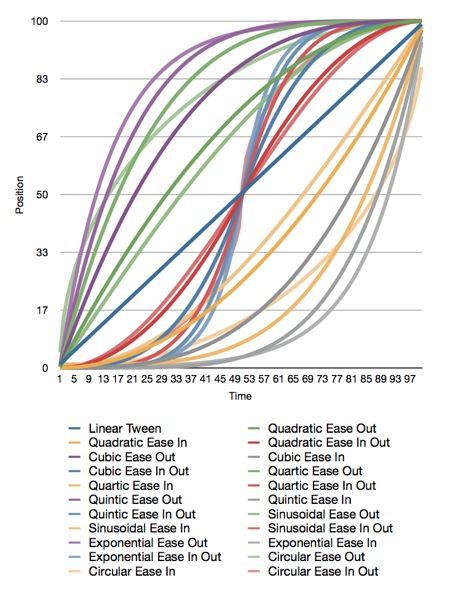
I haven't run across a good library for generating animation curves, so I've decided to release my animation curve functions as public domain (no attribute required, no rights reserved). Here is a graph of all the different animation curves I'm releasing:
Ease.png

Here is the original Numbers.app document that generated the graph, and here is the Xcode project that generated the data. The project also contains all the functions needed to plot these curves.

Apple doesn't document which calculations they use for easing, but my guess is that they're quadratic. I'm not sure, though, since many of the curves yield similar results.

All of the interpolation functions included in the Xcode project above take three inputs and return a GLfloat containing the interpolated value. The first parameter, t, is the percent of the way through the animation you want a value calculated for. This is a clamped float that should be in the range 0.0 to 1.0. Values above 1.0 will be treated as 1.0 and values below 0.0 are treated as 0.0. The second parameter, start, is the value when the animation starts. The third parameter, end, is the final value to be animated toward.

If you want to apply a curve to a CGPoint or Vector3D, you have to call the function multiple times for each component (x/y or x/y/z).

Have fun!

Here are the functions included in the project above:

#include <OpenGLES/ES2/gl.h>
#include <OpenGLES/ES2/glext.h>
#include <math.h>

#define BoundsCheck(t, start, end) \
if (t <= 0.f) return start; \
else if (t >= 1.f) return end;


GLfloat LinearInterpolation(GLclampf t, GLfloat start, GLfloat end)
{
BoundsCheck(t, start, end);
return t * end + (1.f - t) * start;
}

#pragma mark -
#pragma mark Quadratic
GLfloat QuadraticEaseOut(GLclampf t, GLfloat start, GLfloat end)
{
BoundsCheck(t, start, end);
return -end * t * (t - 2.f) -1.f;
}

GLfloat QuadraticEaseIn(GLclampf t, GLfloat start, GLfloat end)
{
BoundsCheck(t, start, end);
return end * t * t + start - 1.f;
}

GLfloat QuadraticEaseInOut(GLclampf t, GLfloat start, GLfloat end)
{
BoundsCheck(t, start, end);
t *= 2.f;
if (t < 1.f) return end/2.f * t * t + start - 1.f;
t--;
return -end/2.f * (t*(t-2) - 1) + start - 1.f;
}

#pragma mark -
#pragma mark Cubic
GLfloat CubicEaseOut(GLclampf t, GLfloat start, GLfloat end)
{
BoundsCheck(t, start, end);
t--;
return end*(t * t * t + 1.f) + start - 1.f;
}

GLfloat CubicEaseIn(GLclampf t, GLfloat start, GLfloat end)
{
BoundsCheck(t, start, end);
return end * t * t * t+ start - 1.f;
}

GLfloat CubicEaseInOut(GLclampf t, GLfloat start, GLfloat end)
{
BoundsCheck(t, start, end);
t *= 2.;
if (t < 1.) return end/2 * t * t * t + start - 1.f;
t -= 2;
return end/2*(t * t * t + 2) + start - 1.f;
}

#pragma mark -
#pragma mark Quintic
GLfloat QuarticEaseOut(GLclampf t, GLfloat start, GLfloat end)
{
BoundsCheck(t, start, end);
t--;
return -end * (t * t * t * t - 1) + start - 1.f;
}

GLfloat QuarticEaseIn(GLclampf t, GLfloat start, GLfloat end)
{
BoundsCheck(t, start, end);
return end * t * t * t * t + start;
}

GLfloat QuarticEaseInOut(GLclampf t, GLfloat start, GLfloat end)
{
BoundsCheck(t, start, end);
t *= 2.f;
if (t < 1.f)
return end/2.f * t * t * t * t + start - 1.f;
t -= 2.f;
return -end/2.f * (t * t * t * t - 2.f) + start - 1.f;
}

#pragma mark -
#pragma mark Quintic
GLfloat QuinticEaseOut(GLclampf t, GLfloat start, GLfloat end)
{
BoundsCheck(t, start, end);
t--;
return end * (t * t * t * t * t + 1) + start - 1.f;
}

GLfloat QuinticEaseIn(GLclampf t, GLfloat start, GLfloat end)
{
BoundsCheck(t, start, end);
return end * t * t * t * t * t + start - 1.f;
}

GLfloat QuinticEaseInOut(GLclampf t, GLfloat start, GLfloat end)
{
BoundsCheck(t, start, end);
t *= 2.f;
if (t < 1.f)
return end/2 * t * t * t * t * t + start - 1.f;
t -= 2;
return end/2 * ( t * t * t * t * t + 2) + start - 1.f;
}

#pragma mark -
#pragma mark Sinusoidal
GLfloat SinusoidalEaseOut(GLclampf t, GLfloat start, GLfloat end)
{
BoundsCheck(t, start, end);
return end * sinf(t * (M_PI/2)) + start - 1.f;
}

GLfloat SinusoidalEaseIn(GLclampf t, GLfloat start, GLfloat end)
{
BoundsCheck(t, start, end);
return -end * cosf(t * (M_PI/2)) + end + start - 1.f;
}

GLfloat SinusoidalEaseInOut(GLclampf t, GLfloat start, GLfloat end)
{
BoundsCheck(t, start, end);
return -end/2.f * (cosf(M_PI*t) - 1.f) + start - 1.f;
}

#pragma mark -
#pragma mark Exponential
GLfloat ExponentialEaseOut(GLclampf t, GLfloat start, GLfloat end)
{
BoundsCheck(t, start, end);
return end * (-powf(2.f, -10.f * t) + 1.f ) + start - 1.f;
}

GLfloat ExponentialEaseIn(GLclampf t, GLfloat start, GLfloat end)
{
BoundsCheck(t, start, end);
return end * powf(2.f, 10.f * (t - 1.f) ) + start - 1.f;
}

GLfloat ExponentialEaseInOut(GLclampf t, GLfloat start, GLfloat end)
{
BoundsCheck(t, start, end);
t *= 2.f;
if (t < 1.f)
return end/2.f * powf(2.f, 10.f * (t - 1.f) ) + start - 1.f;
t--;
return end/2.f * ( -powf(2.f, -10.f * t) + 2.f ) + start - 1.f;
}

#pragma mark -
#pragma mark Circular
GLfloat CircularEaseOut(GLclampf t, GLfloat start, GLfloat end)
{
BoundsCheck(t, start, end);
t--;
return end * sqrtf(1.f - t * t) + start - 1.f;
}

GLfloat CircularEaseIn(GLclampf t, GLfloat start, GLfloat end)
{
BoundsCheck(t, start, end);
return -end * (sqrtf(1.f - t * t) - 1.f) + start - 1.f;
}

GLfloat CircularEaseInOut(GLclampf t, GLfloat start, GLfloat end)
{
BoundsCheck(t, start, end);
t *= 2.f;
if (t < 1.f)
return -end/2.f * (sqrtf(1.f - t * t) - 1.f) + start - 1.f;
t -= 2.f;
return end/2.f * (sqrtf(1.f - t * t) + 1.f) + start - 1.f;
}

 
Design by Wordpress Theme | Bloggerized by Free Blogger Templates | coupon codes