Tuesday, April 27, 2010

OpenGL ES from the Ground Up 9 (intermission): Quaternions

Before we can get into the next post in the OpenGL ES from the Ground Up, which covers skeletal animation, we have to take a little detour and talk about a new datatype we'll be using, the Quaternion. We'll use quaternions to store the rotation on all three axes of a single bone or, in other words, to store the direction the bone is pointing. In skeletal animation, as you'll see in the next installment, vertices in the model are attached to one or more bones and move as the bones they are attached to move. Using quaternions, as opposed to storing the three Euler angles of in three GLfloats or a single Vector3D has two advantages:
  1. Quaternions are not subject to gimbal lock. Euler angles are, so quaternions will allow our 3D skeletons to have full range of motion.
  2. Combining multiple rotations using quaternions requires significantly less calculations than doing matrix rotate transformations for each Euler angle
Now, quaternions are horribly complex and difficult to understand. They are advanced mathematics: completely crazy juju. Fortunately, you do not need to fully understand the underlying math to use them. But, we need to use quaternions to accomplish skeletal animation, so it's worth a second to talk about what they are and how we use them.

Discovery

Mathematically speaking, quaternions are an extension of complex numbers and were discovered by Sir William Rowan Hamilton in 1843. Technically speaking, quaternions form a "four-dimensional normed division algebra over the real numbers". Zoiks! More simply, a quaternion uses a fourth dimension to allow the calculation of triples for all three Cartesian coordinates by providing each axis with three other values. Okay, maybe that wasn't all that simple, was it?

Don't get scared off yet. If you're not deeply-versed in advanced mathematics, quaternions can make your brain hurt. But, as I said earlier, you really don't have to grok Quaternions to use them. The concept is very similar to something you've already seen. If you recall, matrix transformations involve the use of a 4x4 matrix to apply transformations in three dimensional space. When it comes time to use the transformed data, we just ignore the fourth value. Think of the fourth value in a quaternion as a work value, it's just there to provide a space for the calculations. Math majors, please don't yell at me - this oversimplification will help mere mortals live at peace with quaternions.

Quaternions were considered rather revolutionary at the time of discovery, but their heyday was somewhat short-lived. In the mid-1880s, vector calculus began to supplant quaternion theory in mathematics, since it described the same phenomena using concepts that are easier to understand and describe.

Not Quite Dead Yet!

In the 20th century, however, quaternions came back into favor. As we discussed in part 7, there is a phenomenon called gimbal lock that can occur when you do rotation transformations individually on each axis, which has the undesirable effect of stopping rotation on one of the three axes.

Despite the fact that quaternions came out of complex, theoretical mathematics, they do have practical applications. One such practical application is the representation of angles of rotation on all three axes. Because quaternions represent the Cartesian (or three-axis) rotation using four dimensions, the representation is not subject to gimbal lock, and you can convert between quaternions and rotation matrices as well as between quaternions and Euler angles with no loss of fidelity¹. This makes them absolutely perfect for storing rotation information about an object, like say… an individual bone of an articulated skeleton? Instead of storing the angle on three axes, we store a single quaternion.

Quaternions can be multiplied like matrices, and rotation values stored in different quaternions can be combined by multiplying them. The result of a quaternion multiplication is exactly the same as matrix multiplication with two rotation matrices, and involves considerably less calculations to accomplish, meaning that in addition to avoiding gimbal lock, we reduce the number of FLOPS we perform each time through our application loop. Not only are there less operations in quaternion multiplication than matrix multiplication, but since we also can represent all three axes using a single quaternion, we typically can do less quaternion multiplications than matrix multiplications. If we were storing rotation in a Vector3D or using three GLfloats, we would often have to do three matrix multiplications — one for each axis. As a result, storing quaternions can lead to a substantial performance improvement over storing individual angles of rotation.

The Quaternion Struct

From a data standpoint, a Quaternion is nothing more than a Vector3D with an additional GLfloat, usually referred to as w. So, for our purposes, a quaternion will look like this:
typedef struct {
GLfloat x;
GLfloat y;
GLfloat z;
GLfloat w;
}
Quaternion3D;

Normalizing a Quaternion

Easy enough. Now, just like Vector3Ds, since quaternions represent a direction in space, the actual distance values don't matter, and it's common to normalize them down to 1.0 before and/or after doing other calculations. We can accomplish that like so:
static inline void Quaternion3DNormalize(Quaternion3D *quaternion)
{
GLfloat magnitude;

magnitude = sqrtf((quaternion->x * quaternion->x) +
(quaternion->y * quaternion->y) +
(quaternion->z * quaternion->z) +
(quaternion->w * quaternion->w));

quaternion->x /= magnitude;
quaternion->y /= magnitude;
quaternion->z /= magnitude;
quaternion->w /= magnitude;
}

Creating a Quaternion from a Rotation matrix

Quaternions don't do us any good if we don't have any way of converting quaternions to and from our other objects used to represent angles of rotation. Let's first look at creating a quaternion from a rotation matrix. Here's what the function to do it looks like:
static inline Quaternion3D Quaternion3DMakeWithMatrix3D(Matrix3D matrix)
{
Quaternion3D quat;
GLfloat trace, s;

trace = matrix[0] + matrix[5] + matrix[10];
if (trace > 0.0f)
{
s = sqrtf(trace + 1.0f);
quat.w = s * 0.5f;
s = 0.5f / s;

quat.x = (matrix[9] - matrix[6]) * s;
quat.y = (matrix[2] - matrix[8]) * s;
quat.z = (matrix[4] - matrix[1]) * s;
}

else
{
NSInteger biggest;
enum {A,E,I};
if (matrix[0] > matrix[5])
if (matrix[10] > matrix[0])
biggest = I;
else
biggest = A;
else
if (matrix[10] > matrix[0])
biggest = I;
else
biggest = E;

switch (biggest)
{
case A:
s = sqrtf(matrix[0] - (matrix[5] + matrix[10]) + 1.0f);
if (s > QUATERNION_TRACE_ZERO_TOLERANCE)
{
quat.x = s * 0.5f;
s = 0.5f / s;
quat.w = (matrix[9] - matrix[6]) * s;
quat.y = (matrix[1] + matrix[4]) * s;
quat.z = (matrix[2] + matrix[8]) * s;
break;
}

s = sqrtf(matrix[10] - (matrix[0] + matrix[5]) + 1.0f);
if (s > QUATERNION_TRACE_ZERO_TOLERANCE)
{
quat.z = s * 0.5f;
s = 0.5f / s;
quat.w = (matrix[4] - matrix[1]) * s;
quat.x = (matrix[8] + matrix[2]) * s;
quat.y = (matrix[9] + matrix[6]) * s;
break;
}

s = sqrtf(matrix[5] - (matrix[10] + matrix[0]) + 1.0f);
if (s > QUATERNION_TRACE_ZERO_TOLERANCE)
{
quat.y = s * 0.5f;
s = 0.5f / s;
quat.w = (matrix[2] - matrix[8]) * s;
quat.z = (matrix[6] + matrix[9]) * s;
quat.x = (matrix[4] + matrix[1]) * s;
break;
}

break;

case E:
s = sqrtf(matrix[5] - (matrix[10] + matrix[0]) + 1.0f);
if (s > QUATERNION_TRACE_ZERO_TOLERANCE)
{
quat.y = s * 0.5f;
s = 0.5f / s;
quat.w = (matrix[2] - matrix[8]) * s;
quat.z = (matrix[6] + matrix[9]) * s;
quat.x = (matrix[4] + matrix[1]) * s;
break;
}

s = sqrtf(matrix[10] - (matrix[0] + matrix[5]) + 1.0f);
if (s > QUATERNION_TRACE_ZERO_TOLERANCE)
{
quat.z = s * 0.5f;
s = 0.5f / s;
quat.w = (matrix[4] - matrix[1]) * s;
quat.x = (matrix[8] + matrix[2]) * s;
quat.y = (matrix[9] + matrix[6]) * s;
break;
}

s = sqrtf(matrix[0] - (matrix[5] + matrix[10]) + 1.0f);
if (s > QUATERNION_TRACE_ZERO_TOLERANCE)
{
quat.x = s * 0.5f;
s = 0.5f / s;
quat.w = (matrix[9] - matrix[6]) * s;
quat.y = (matrix[1] + matrix[4]) * s;
quat.z = (matrix[2] + matrix[8]) * s;
break;
}

break;

case I:
s = sqrtf(matrix[10] - (matrix[0] + matrix[5]) + 1.0f);
if (s > QUATERNION_TRACE_ZERO_TOLERANCE)
{
quat.z = s * 0.5f;
s = 0.5f / s;
quat.w = (matrix[4] - matrix[1]) * s;
quat.x = (matrix[8] + matrix[2]) * s;
quat.y = (matrix[9] + matrix[6]) * s;
break;
}

s = sqrtf(matrix[0] - (matrix[5] + matrix[10]) + 1.0f);
if (s > QUATERNION_TRACE_ZERO_TOLERANCE)
{
quat.x = s * 0.5f;
s = 0.5f / s;
quat.w = (matrix[9] - matrix[6]) * s;
quat.y = (matrix[1] + matrix[4]) * s;
quat.z = (matrix[2] + matrix[8]) * s;
break;
}

s = sqrtf(matrix[5] - (matrix[10] + matrix[0]) + 1.0f);
if (s > QUATERNION_TRACE_ZERO_TOLERANCE)
{
quat.y = s * 0.5f;
s = 0.5f / s;
quat.w = (matrix[2] - matrix[8]) * s;
quat.z = (matrix[6] + matrix[9]) * s;
quat.x = (matrix[4] + matrix[1]) * s;
break;
}

break;

default:
break;
}

}

return quat;
}

Well, ugh! If you really want to understand what's going on here, it's going to require an understanding of matrix calculus, Euler's rotation theorem, and the concepts of eigenvalues and trace, not to mention a thorough understanding of the way rotations are represented in matrices. When you've finished your PhD in mathematics, you can come back and explain it to the rest of usl. You can find the algorithm used in this function laid out in pseudocode at the Matrix FAQ.
Creating a Rotation Matrix from a Quaternion

Going the other way is actually a little bit easier. Again, the basic algorithm comes from the Matrix FAQ, though I had to switch it to row-major ordering:
static inline void Matrix3DSetUsingQuaternion3D(Matrix3D matrix, Quaternion3D quat)
{
matrix[0] = (1.0f - (2.0f * ((quat.y * quat.y) + (quat.z * quat.z))));
matrix[1] = (2.0f * ((quat.x * quat.y) - (quat.z * quat.w)));
matrix[2] = (2.0f * ((quat.x * quat.z) + (quat.y * quat.w)));
matrix[3] = 0.0f;
matrix[4] = (2.0f * ((quat.x * quat.y) + (quat.z * quat.w)));
matrix[5] = (1.0f - (2.0f * ((quat.x * quat.x) + (quat.z * quat.z))));
matrix[6] = (2.0f * ((quat.y * quat.z) - (quat.x * quat.w)));
matrix[7] = 0.0f;
matrix[8] = (2.0f * ((quat.x * quat.z) - (quat.y * quat.w)));
matrix[9] = (2.0f * ((quat.y * quat.z) + (quat.x * quat.w)));
matrix[10] = (1.0f - (2.0f * ((quat.x * quat.x) + (quat.y * quat.y))));
matrix[11] = 0.0f;
matrix[12] = 0.0f;
matrix[13] = 0.0f;
matrix[14] = 0.0f;
matrix[15] = 1.0f;
}

Converting an Angle and Axis of Rotation to a Quaternion

Another conversion we can do with quaternions is to rotate on an arbitrary axis represented by a Vector3D. This can be tremendously useful in skeletal animation and is quite difficult to implement using matrices. To create a quaternion based on an angle and axis of rotation, we do this:
static inline Quaternion3D Quaternion3DMakeWithAxisAndAngle(Vector3D axis, GLfloat angle)
{
Quaternion3D quat;
GLfloat sinAngle;

angle *= 0.5f;
Vector3DNormalize(&axis);
sinAngle = sinf(angle);
quat.x = (axis.x * sinAngle);
quat.y = (axis.y * sinAngle);
quat.z = (axis.z * sinAngle);
quat.w = cos(angle);

return quat;
}

Extracting an Angle and Axis of Rotation from a Quaternion

We can also go the other way. We can take the rotation represented in a quaternion and extract the angle of rotation and degrees from it, like so:
static inline void Quaternion3DExtractAxisAndAngle(Quaternion3D quat, Vector3D *axis, GLfloat *angle)
{
GLfloat s;
Quaternion3DNormalize(&quat);
s = sqrtf(1.0f - (quat.w * quat.w));

if (fabs(s) < 0.0005f) s = 1.0f;

if (axis != NULL)
{
axis->x = (quat.x / s);
axis->y = (quat.y / s);
axis->z = (quat.z / s);
}


if (angle != NULL)
*angle = (acosf(quat.w) * 2.0f);
}

Quaternion Multiplication

To combine the rotations from two different Quaternion3Ds, we just need to multiply them together. Here we go:
static inline void Quaternion3DMultiply(Quaternion3D *quat1, Quaternion3D *quat2)
{
Vector3D v1, v2, cp;
float angle;

v1.x = quat1->x;
v1.y = quat1->y;
v1.z = quat1->z;
v2.x = quat2->x;
v2.y = quat2->y;
v2.z = quat2->z;
angle = (quat1->w * quat2->w) - Vector3DDotProduct(v1, v2);

cp = Vector3DCrossProduct(v1, v2);
v1.x *= quat2->w;
v1.y *= quat2->w;
v1.z *= quat2->w;
v2.x *= quat1->w;
v2.y *= quat1->w;
v2.z *= quat1->w;

quat1->x = v1.x + v2.x + cp.x;
quat1->y = v1.y + v2.y + cp.y;
quat1->z = v1.z + v2.z + cp.z;
quat1->w = angle;
}

Inverting a Quaternion

We can do a spacial invert of a quaternion by conjugating it. Conjugating a quaternion just means that we invert the the three components of the quaternion that represents the vector (x, y, and z). In this implementation, we also normalize the quaternion as part of the calculation rather than as a separate step:
static inline void Quaternion3DInvert(Quaternion3D  *quat)
{
GLfloat length = 1.0f / ((quat->x * quat->x) +
(quat->y * quat->y) +
(quat->z * quat->z) +
(quat->w * quat->w));
quat->x *= -length;
quat->y *= -length;
quat->z *= -length;
quat->w *= length;
}

Creating a Quaternion from Euler Angles

I've warned against Euler angles for rotation, but there are times when you'll have to convert Euler angles to a quaternion, such as when accepting input from a user. To do this, we have to create Vector3Ds to represent each of the Euler axes, create Quaternions using those vectors and the passed in values, then use quaternion multiplication to combine the resulting quaternions.

static inline Quaternion3D Quaternion3DMakeWithEulerAngles(GLfloat x, GLfloat y, GLfloat z)
{
Vector3D vx = Vector3DMake(1.f, 0.f, 0.f);
Vector3D vy = Vector3DMake(0.f, 1.f, 0.f);
Vector3D vz = Vector3DMake(0.f, 0.f, 1.f);

Quaternion3D qx = Quaternion3DMakeWithAxisAndAngle(vx, x);
Quaternion3D qy = Quaternion3DMakeWithAxisAndAngle(vy, y);
Quaternion3D qz = Quaternion3DMakeWithAxisAndAngle(vz, z);


Quaternion3DMultiply(&qx, &qy );
Quaternion3DMultiply(&qx, &qz );
return qx;
}

SLERPs and NLERPS

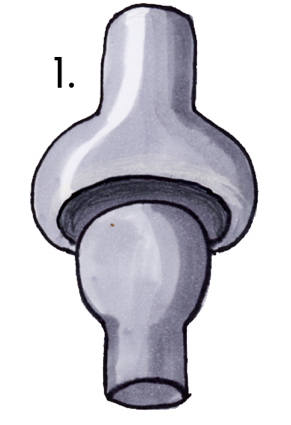
Finally, the piece de resistance: SLERPs and NLERPS. SLERP is shorthand for Spherical Linear Interpolation and NLERPS for normalized linear interpolation. Remember how we did algebraic linear interpolation in Part 9a to calculate the correct location for each vertex based on how much time had elapsed? Well, those same calculations are not necessarily going to give us the results we want when interpolating quaternions. Imagine a ball and socket joint:
Screen shot 2010-04-27 at 3.26.49 PM.png
Source: Wikipedia


You know where there's a ball and socket joint? In your shoulder. The clavicle and spine of the scapula form a cradle for the ball shaped protrusion at the top of the humerus bone. Well, that's handy. Stand in front of a mirror, hold your am up over your head, and then keeping your arm straight, bring it down until it's at your side. Your hand doesn't move in a straight line, does it. Your hand moves in an arc and moves faster than your elbow and your shoulder and chances are your hand didn't move at a constant speed. That's the basic movement we want to simulate when we animate angles of rotation.

SLERPs and NLERPs are the two most common approaches. SLERPs are more precise and give a better simulation of reality, but they are slower and more processor intensive. NLERPs are much faster because they are essentially the same linear interpolation we've already used, only normalized after doing the interpolation, which you might have been able to guess from the name "normalized linear interpolation".

Use SLERPs when realistic looking animation is more important than speed, NLERPs otherwise. The two methods take the exact same parameters, so switching between the two shouldn't be a big deal, so you can experiment to see whether SLERPs are worth the additional processing cost.

Here's the simpler NLERP implementation:
static inline Quaternion3D Quaternion3DMakeWithNLERP(Quaternion3D *start, Quaternion3D *finish, GLclampf progress)
{
Quaternion3D ret;
GLfloat inverseProgress = 1.0f - progress;
ret.x = (start->x * inverseProgress) + (finish->x * progress);
ret.y = (start->y * inverseProgress) + (finish->y * progress);
ret.z = (start->z * inverseProgress) + (finish->z * progress);
ret.w = (start->w * inverseProgress) + (finish->w * progress);
Quaternion3DNormalize(&ret);
return ret;
}

Now, the SLERP implementation is a little more complex and requires the ability to calculate a dot product on a Quaternion, which is done exactly the same as calculating the dot product of a vector:
static inline Quaternion3D Quaternion3DMakeWithSLERP(Quaternion3D *start, Quaternion3D *finish, GLclampf progress)
{
GLfloat startWeight, finishWeight, difference;
Quaternion3D ret;

difference = ((start->x * finish->x) + (start->y * finish->y) + (start->z * finish->z) + (start->w * finish->w));
if ((1.f - fabs(difference)) > .01f)
{
GLfloat theta, oneOverSinTheta;

theta = acosf(fabsf(difference));
oneOverSinTheta = (1.f / sinf(theta));
startWeight = (sinf(theta * (1.f - progress)) * oneOverSinTheta);
finishWeight = (sinf(theta * progress) * oneOverSinTheta);
if (difference < 0.f)
startWeight = -startWeight;
}
else
{
startWeight = (1.f - progress);
finishWeight = progress;
}

ret.x = (start->x * startWeight) + (finish->x * finishWeight);
ret.y = (start->y * startWeight) + (finish->y * finishWeight);
ret.z = (start->z * startWeight) + (finish->z * finishWeight);
ret.w = (start->w * startWeight) + (finish->w * finishWeight);
Quaternion3DNormalize(&ret);

return ret;
}

Finish Line

Okay, now we're armed and dangerous and ready to do some skeletal animation. I'll meet you back here next time for it. I've updated the Xcode project template with these new functions and datatypes.


1 Because our programs use floating point variables, we will actually see slight changes in data due to the phenomenon known as loss of significance. This is not because we're using quaternions. It's because we use floating point variables.

Friday, April 23, 2010

iPad Max Touches

One thing I've been curious about for a while is what is the extent of the iPhone's ability to detect and track multiple touches. On the original iPhone, I've been able to detect and track 5 touches, though my fingers are large enough that I rarely could get it to recognize more than 4 distinct touches.

On the iPad, we've got a much bigger screen that will let all ten fingers touch at the same time without running together.

So, can the iPhone SDK track 10 fingers at once? Yep. It sure can. I wrote a simple program to just record the count of the touches set provided to the four UIResponder touch-related methods, and it had no problem identifying and tracking 10 separate fingers at the same time.

I don't know what the hardware or software limitations are on Apple's multi-touch technology, but it seems to be high enough not to be an issue.

MacTech 25 Most Influential?

Today, I received the most recent issue of MacTech Magazine. The cover story was about The MacTech 25: The 25 Most Influential Rock Stars, MVPSs, Prophets and Pundits of the Apple Technical Community. Curious about who made the list, I flipped to the cover story and started reading through the names.

At the start, the list was pretty much the people I expected, but when I turned the page, there was my name, following Dan Lyons and Brent Simmons, and preceding Leo Laporte and David Pogue. I knew a couple people had voted for me, but I really didn't expect to actually make the list. I'm still a little stunned, to be honest, and flattered. I haven't figured out yet if I'm supposed to be an MVP, "rock star", prophet, or pundit, though, but I'm flattered no matter which it is.

The fact that enough people appreciate my work enough to have voted for me means an awful lot more to me than actually being on the list, so I want to send a very sincere thank you out to the people who voted for me.

Thursday, April 22, 2010

Table View Cells Redux

Quite a while ago, I posted about Apple's recommended way of doing custom table view cells in Interface Builder. The code from that post has been available for 9 months and today, for the first time, somebody pointed out to me that the attached project didn't reuse dequeued cells because I forgot to type the cell's identifier in Interface Builder.

Which is the weakness with Apple's recommended approach. It's a real Achille's heel. It's really, really easy to forget that step, and the code works perfectly fine if you do forget, you're just eating memory and getting poorer performance than you should. Unless you profile your apps or test with very large data sets, you could very well ship your app like this and not even realize it. You never want your customers to discover these things before you.

Now, I didn't even know I had made this mistake until today, but I've known it was a potential problem for quite some time, which is why, in my contract work, I've started using a modified version of the technique. My earlier mistake now gives me a good excuse to post that modification.

Mostly, it's the same technique as I discussed before, only I start out by defining a constant for the identifier. I actually create a header file in my Xcode projects ConstantsAndMacros.h in my project, which I add to my pre-compiled header file. This means that any constants and any macros I put in ConstantsAndMacros.h will be available to all my source code files in my project without having to manually import them. For a simple project, that file might look something like this:


#define TABLE_CELL_IDENTIFIER @"Table Cell Identifier"
#define NSStubLog() NSLog(@"%s", __PRETTY_FUNCTION__)¹

Once I have that file, I add it to the .pch file in the Other Sources folder:

#ifdef __OBJC__
#import <Foundation/Foundation.h>
#import <UIKit/UIKit.h>
#import "ConstantsAndMacros.h"
#endif

Now that constant is available project wide². Then, in my UITableViewCell subclass, I override the reuseIdentifier method and add a class method with the same name, like this:

+ (NSString *)reuseIdentifier
{
return (NSString *)TABLE_CELL_IDENTIFIER;
}

- (NSString *)reuseIdentifier
{
return [[self class] reuseIdentifier];
}

By doing this, the system will ignore any identifier I set in Interface Builder, or any value I set in code using the setBundleIdentifier: mutator method. For instances of this particular class, it will always use the same identifier. By creating the class method, I have access to that identifier even if I don't yet have an instance of the class.

For all the other steps in using custom table view cells loaded from a nib, the process is the same as the previous tutorial and it works great. Here's an example tableView:cellForRowAtIndexPath: method using this technique:

- (UITableViewCell *)tableView:(UITableView *)tableView cellForRowAtIndexPath:(NSIndexPath *)indexPath 
{
TestCell *cell = (TestCell *)[tableView dequeueReusableCellWithIdentifier:[TestCell reuseIdentifier]];
if (cell == nil)
{
NSLog(@"Loading new cell");
[[NSBundle mainBundle] loadNibNamed:@"TestCell" owner:self options:nil];
cell = loadCell;
self.loadCell = nil;
}

cell.cellLabel.text = [NSString stringWithFormat:@"Row %d", [indexPath row]];
return cell;
}

Notice the NSLog() statement? I can open my table view cell in Interface Builder and set any identifier I want, or set no identifier at all, and it will still re-use table view cells. Run the app, and no matter what you do in Interface Builder, you'll only see a handful of rows loaded from the nib file. After the initial loads, it will just keep reusing the same cell instances over and over. This is far less fragile than having to make sure the identifier in IB and the one in your code match.

There might be times when you don't want to set it up like this - when you need to have multiple identifiers for the same table view class, but those situations will be exceedingly rare. In most practical situations where you are subclassing UITableViewCell, you will want a single identifier for all instances of that class. What you normally won't want is the fragility of having to make sure the value in your code matches the one in IB exactly, especially given that there are no obvious signs that you've forgotten to do it.


1 This macro just logs the name of the method of function that it's placed in when that method is called. I use it whenever I stub out an IBAction method to make sure my connections are all made correctly, hence the name, but it's useful for debugging as well.

2 If you will only use a table view cell in a single controller, you probably don't want it here. In general, I try to create table view cells to be generic enough to be used in more than one controller. Sometimes that's not possible or practical, and in those cases, #define your identifier in the table view controller header instead.

You can find a sample implementation project right here/

Misc Ramblings

Wow. It's been a while since I've posted anything. I don't think I've gone this long without a blog post since I started. Maybe towards the end of writing the books I might have, but not otherwise. Anyway, let me catch you up on a few things while I eat my lunch.

I've got a few tutorials that have been simmering, but finding time to write them down has been hard. Programming is a feast-or-famine business, and thanks to the crazy success of the iPhone, iPod Touch, and iPad, things seem to be very much in feast mode lately. Not that I'm complaining - it's far better than the alternative - but when you spend twelve or more hours at your desk writing code most every day, it's hard to motivate yourself to write a tutorial about writing code in your spare time. I think I might be getting a breather here pretty soon, so I'll try and get some new iPad related tutorials out and hopefully another OpenGL ES one at some point.

Rumor Mill


Let's see, what else is going on in the world? There was a rumor that Apple's looking at buying ARM, ARM shares soared, then ARM came out and said flat out it wasn't true, and their stock stopped soaring. Call me cynical, but I still think it's a possibility. It'd be a great match and a great strategic move for Apple. Apple has the cash. If they bought ARM and a graphics chip maker like NVidia, they'd have total control of the entire A4 SOC except for the mass production side of things, and I'm sure that would be desirable to Apple. They love control.

ARM is a mobile and embedded powerhouse. Apple would get control and a big sledgehammer over many of their competitors. At first blush it seems like it might hurt Apple's relationship with Intel but, actually, it would be great for Intel, because it would drive a lot of Apple's mobile competitors exclusively to Intel's Atom chipset.

I have no idea if it'll happen, or if there was ever any validity to the rumor in the first place, but it "feels" like a good move for Apple if they could pull it off and it "feels" like something they would do. They've got to have plans for some of that cash they're stockpiling. If not, well, feel free to call me, Steve… I'll be glad to hold onto some of it for you.

Ebert


I have a number of friends and acquaintances who are game designers, and there's been quite a buzz lately over Roger Ebert's recent statement that games can never be art. I, of course, disagree with his statement. In fact, I find it almost laughable. Of course games can be art. I mean, I'm not a big gamer, but I've played enough for that to be obvious to me. Roger Ebert, by his own admission, hasn't. He's judging based on YouTube videos, screenshots, and people's descriptions.

But it's hard to see how many games wouldn't qualify as art. Saying otherwise is saying that the whole is somehow less than the sum of the parts. Sculpting (digital modeling is just another form of sculpting), painting (digital is just another medium), writing narrative and dialogue - these are all things that are widely considered art. How can you put those things together into a package and have something that can never be art?

Now, I like Roger Ebert's writing. I don't agree with his tastes in movies all that often, but I like the way he writes. When I read his reviews of movies, I generally know enough to know if I'm going to like it or not even when I disagree with his assessment. He generally communicates well. This post isn't like that. It's rambling and self-contradictory. It's post-hoc rationalization for an opinion he already held. There is no exploration. Most of his "logic" could just as easily be applied to any commercial artistic endeavor, like movies. The rest of his logic is basically nonsense.

But here's the thing: So what? The question of "what is art" is completely unanswerable in any way other than a completely subjective and personal one. To Roger Ebert games aren't art. To me and especially to people who love games, they clearly can be and often are. It's okay for us not to all agree on this particular subject. It really is. It clearly wasn't meant as an insult, just as a statement of opinion on an inherently subjective topic.

There are many things that are widely considered art that I, personally, don't consider art. To me, a lot of 20th century art simply isn't. Most of the work by, for example, Jackson Pollock and Isamu Noguchi simply do not match my personal, subjective definition of art. To me, they're silly, but not in a Monty Python, intentionally silly way. It's silly stuff that takes itself way too seriously. These works don't convey or communicate or show us anything. They evoke no emotion, recall no events, inspire nothing. In my mind, they take no talent¹ to produce and the world is no better for their creation.

Yet, the vast, vast majority of people (very possibly including you), and nearly all soi-disant experts on art disagree with my assessment in these cases, and that fact doesn't influence my opinion in the slightest. I suspect Roger Ebert is no more likely to be swayed on the subject of games as art than I am about a lot of 20th century art, no matter how impassioned or well-reasoned the response.

Or, in other words: Get over it. Don't waste your time arguing with someone who isn't going to be swayed and probably won't even bother to argue back. Saying something isn't art isn't saying it has no value. That's the way we often interpret it, but we're being too sensitive when we do. If you create, and people like what you create, who cares if there's somebody out there that doesn't like or care about it? You can't please everybody. Most books on Amazon with five-star ratings also have some one-star ratings (including mine). What appeals to one person will revolt another. Such is life, and you'll be happier if you don't rely too much on external validation of your work.

Apple


Well, Apple is clearly on its death bed once again. The iPad, as many pundits predicted, has been a miserable failure, and sales of iPhones and iPod Touches have stalled as they fail to compete with the flood of innovative new Android and Palm phones that have come out this year.

Okay, maybe that's not entirely true.

Whatever your personal feelings about Apple, they're on quite a roll. It's a great time to be a programmer with iPhone SDK experience. We've got to be getting close to a hundred million iPhone OS devices sold - last I knew, there were over 85 million. That's a huge potential market. We've now exceeded or, at least, are getting very close to the installed base of Mac OS computers, even taking the phenomenal recent growth in Mac sales into account.

Well, that's all I have for now. I'll hopefully be back to technical posts in the not-too-distant future.


1- That's not to say these men didn't have talent, just that much of their work product didn't require it. Isamu Noguch's earlier works, such as his Undine, are absolutely phenomenal.

Monday, April 12, 2010

Can We Stop with the "Evil" Thing?

I always enjoy reading James Higgs' commentary on iPhone issues even though we often disagree on issues. That is true for today's piece entitled iPhone OS 4.0: Now With Added Evil. He makes some good points, many of which I disagree with, but, I have one big pet peeve with his post, which is…

…can we please stop with this trend of calling things we dislike or disagree with "evil"?

Evil is baby killing… pogroms… serial killers… the Jonah Brothers. You know, bad shit. Evil is not restricting the choice of languages you can use when you write software for a single software platform from a single vendor. My gosh, people. Talk about skewed, first-world perceptions! This is, at worst, "annoying", "frustrating", or maybe even "bothersome". It's certainly not "evil" in any reasonable sense of the word. It's not even immoral, unethical, illegal or fattening, no matter how much you may dislike it.

(Sorry, James - you're not the only one to do this, yours was just the proverbial straw that broke the camel's back)

I appreciate that people don't like the recent SDK agreement changes, and I even understand why. But let's keep some fucking perspective, can we? We all signed an agreement that said Apple could unilaterally change the terms of the agreement by giving us notice, and we were okay with that because we wanted to be part of the App Store. Now that Apple has actually gone and changed it a few times, people are whinging like the world is ending. The door's not locked, people. Feel free to leave if it gets too onerous for you. If you're not willing to man up the way Dan Grigsby did, then register your complaints using the bug reporter and move on with your life.

I don't always like the decisions Apple makes. I think the app store censorship is sucky, the review process is still too arbitrary, and 3.3.1 is worded more broadly than it should be. But none of those are bad enough to make me leave the platform. I like the platform, and there's still so much opportunity here that I definitely want to stay. So, I've lodged my complaints and have moved on.

I really don't want to get sucked into the argument about 3.3.1, but I need to point out that there is a valid reason why Apple would choose to do this. Even if you don't agree with their decision, you should at least acknowledge that it's not arbitrary (something I've seen as an implicit assumption in many of the rants and arguments against 3.3.1)

If you use Apple's provided tools and frameworks, when you submit your app, all the code that makes up your app is available. Apple controls part of it, and you control the other part. With an intermediate layer, there's a third chunk of code that's a black box. Apple can't get to it and you can't get to it, either. Have you noticed that we're also not allowed to build frameworks for the iPhone the way we can on the Mac. Same exact reasoning.

The changes Apple is having to make to the frameworks to accommodate the multitasking APIs in 4.0 offer a good example of why Apple feels they need to do this. I can't discuss technical details of 4.0, but I will say that by tweaking the frameworks and APIs, Apple has been able to maintain a surprisingly high level of backwards compatibility with older apps. Guess which apps aren't playing nicely with the new multitasking functionality?

Yes, it's about control, but no, it's not arbitrary or without reason. You are welcome to disagree with Apple's judgment, but don't assume the changes ares being done for arbitrary reasons: to spite Adobe or because Steve Jobs is in a bad mood.

Let's look at a hypothetical situation. Let's say that instead of the handful of Flash-generated apps that Adobe snuck onto the App Store, let's imagine that there are 5,000 of them. Let's also say that hypothetically, for some reason, Flash-generated apps don't work with 4.0, and Apple can't reasonably make them work with 4.01. When 4.0 is released and all of those apps break, who's going to end up looking bad?

If you responded with anything other than "Apple", you're delusional or, at least, don't understand customers. Customers don't know or care how their apps were made. They know that yesterday, their apps worked, today they don't and the only difference is that they updated to a new version of the OS. What's the logical assumption for somebody who doesn't know the underlying technical details to make? There's only one: That Apple's new OS sucks. Would it be an accurate assumption? No, but that's the perception people would be left with, and to Apple, customer perception is king.


1- Yes, Apple could work with Adobe to get the Flash Packager changed, but a) Apple has some reason to anticipate that Adobe would drag their heels, since they've dragged their heels for ten years on moving Creative Suite to Cocoa, and b) they'd have to test a good portion of the 185,000 apps on the App Store to even know which third party library was at fault, which just isn't practicable.

Core Data Library

For quite some time, I've been thinking about ways to improve the use of UITableViewController. I experimented a bit with a property-list driven model, and then simplified that into the paired-array version that is in More iPhone 3 Development. One of the things on my "would like to do list" has been to revisit that and create a good, robust tool to make table-based editable detail views easier.

Somebody beat me to the punch though. I haven't tried it out yet, but first impressions are positive and it looks like a great tool for anyone writing apps with table-based detail views.

Friday, April 9, 2010

"Go Screw Yourself, Apple!"

Lee Brimelow is a platform evangelist at Adobe, and has raised a bit of a ruckus with a blog post that finished with a nice succinct "Screw You, Apple".

I like it.

Oh, I don't agree with it. Not one little bit. Even though I don't necessarily agree with all of the SDK Agreement changes Apple has made for 4.0, their actions clearly are not "unethical" as Lee alleges, and they are certainly no worse than Adobe telling Flash Developers they'd be able to develop for Apple's App Store without, you know, talking about it with Apple first. But I enjoyed reading the post, and understand where he's coming from. I think it's a good thing he said what he said and that he's as passionate as he is about the products he evangelizes.

This may surprise you, but I've been known to go off on a rant myself and have a couple of strong opinions on technology myself. In fact, somebody reminded me on twitter that I pretty much predicted exactly what Apple would do about Flash, if not the specifics of how they would do it. Took a little bit of heat at the time, too.

There's a lot of speculation that Lee should lose his job over this post. I think Adobe would be downright foolish to do that. It was a bit, well, ill-advised, perhaps, to make these statements on an official looking blog (yes, I know it's not actually official) because no matter how fervently he says his words were "not in an official capacity", the fact is, he is authorized to speak on behalf of Adobe as part of his job and probably should have chosen his words a tad more cautiously or chosen some other forum to vent. But, so what? A guy at Adobe whose job it is to evangelize Adobe's developer products doesn't like something done by a competitor that has a potentially huge impact on the users of those products? That shouldn't surprise anybody. He just said what a lot of people at Adobe were thinking. This isn't news. Of course he's pissed off. He should be! I would be too in his position. I assume he wouldn't be in that position if he didn't feel just as strongly about Flash/Flex/AIR as I do about Cocoa and Objective-C, and what Apple has done is, make no bones about it, bad for Flash/Flex/AIR developers.

Though I liked the post, since I don't agree with it, I feel compelled to address a couple of things he said.

First, there's a little bit of a persecution complex going on in the post. Apple's not on a "crusade" against Adobe. Apple's on a crusade for their own interests, just like Adobe is. I guarantee you that the decision-makers at Apple feel strongly that a huge influx of Flash-generated apps would be bad for the platform, and not without some justification. It's not that Apple doesn't like Adobe, it's that they honestly feel this is the best thing for their customers and their interests. Just like Adobe feels the best thing for their interests is to find a way to let Flash developers sell to iPhone users.

I think it's interesting how Lee then pulls the whole "Adobe and Apple have helped each other get where they are" schtick. Despite the fact that Mac products are what allowed Adobe to become a large, successful company, Adobe hasn't felt compelled to treat the Mac as a first class citizen in over a decade (though there are signs that may be changing). Where's 64-bit Photoshop? Where's a good Flash runtime that doesn't leak like a sieve or max out all processing cores for a relatively simple task? If you have used Adobe products on both Windows and the Mac, it's hard to buy into this whole Adobe-and-Apple-holding-hands-in-a-tree scenario he paints. Adobe only wants to hold hands again because Apple's been phenomenally successful in the emerging mobile market and they want a piece of the action.

The fact is, Adobe and Apple are both big corporations out for their own interests. They help each other out when it benefits them, but they don't hesitate to let go, or even give their former "friend" a good kick in the ass when that's what's in their best interests. Case in point, when Apple looked like it was dying, Adobe was rapidly rewriting all of their existing products with an eye toward being able to deliver Windows versions even though Photoshop and Pagemaker were, at the time, huge incentives for buying a Mac. If Adobe has been Apple's friend, they've sure been a fair weather one. But they're not friends. They're corporations, period, so rant all you want about Apple's actions, but don't act as if Adobe has been betrayed or wouldn't take exactly the same kinds of actions if they were in a similar situation.

I doubt Lee and I will ever see eye-to-eye on most technology issues. We're both too invested in opposing technologies. He won't give money to Apple, similarly, I feel the same way about Adobe. For a very long time, I was as big a fan of Adobe as I am of Apple, but now I'm not a fan and won't buy their products.

So I understand his anger, and don't think his "Go screw yourself Apple" is any worse than my occasional "Flash sucks" declarations.

But Adobe should've seen this coming and a lot of this anger should be directed at themselves rather than at Apple. They took a huge (I would argue foolish) risk and it didn't pan out. If a competitor writes a license to specifically disallow your products and then you look for and find a loophole in that license, then announce to the world that you're going to exploit that loophole, how can you possibly not foresee your competitor closing the loophole? Adobe was betting that Apple wouldn't block them if they made a public announcement at their big developer conference thinking, perhaps, that Apple wouldn't want the negative publicity. Adobe bet wrong.

The App Store is Apple's playground. Maybe they should be nice and let everyone play on their playground, but they don't have to, and the fact that you bought a shiny new ball to play with doesn't change that fact at all, Adobe.

Mobile Orchards Abandons iPhone Platform

Saw today that Dan Grigsby of Mobile Orchard is abandoning iPhone development and ceasing publication of Mobile Orchard. This is a shame. Mobile Orchard is one of the few podcasts that's ever asked me on, and Dan is just a nice guy. The iPhone dev community is a tiny bit worse for his leaving.

And I'm not altogether unsympathetic to his reasons for going. Apple's tightening grip on the platform has me feeling very conflicted. Apple's stuff, both on the surface and under the hood is just better than their competitors as far as I'm concerned, and not just a little better. Their stuff is more fun and more intuitive to use, and it's far more fun to program. I love the platform so much that I made a fairly drastic career change to one where I could make considerably less money just so that I could work with it every day. So, for me, I'm not about to abandon the platform any time soon because I don't see a viable alternative. And by "viable" I mean, of course, "fun from my personal, subjective, and very biased perspective".

There are, of course, other "viable" mobile platforms in the more traditional sense of the word. I could get by using my Nexus One as my primary phone, but I don't love it and won't without drastic improvements and changes. I could program Java or C#, but I wouldn't enjoy either to the extent that I enjoy programming in Objective-C (I've worked with both in the past, Java quite a lot). I still love this platform way too much to willingly leave.

We all know Apple likes control, and the more they get, the more they're able to take, which is a bit of a vicious cycle that I hope gets broken before too many more developers get as frustrated as Dan and leave the platform. I have no illusion that people who leave won't be replaced. They will. But much of what I love about this platform is the community, a community that developed when it wasn't as profitable or lucrative than competing technologies. It's a community of people who love what they do. Every time someone who loves what they do leaves and is replaced, there's a chance they'll be replaced by someone doing it solely for the money; because it's the hottest mobile market. Too much of that, and we'll be no different than the "Microsoft Developer Community", which is to say… no longer a community, but just a bunch of people who made similar career choices.

Thursday, April 8, 2010

iPhone SDK 4.0

I am in the process of downloading the iPhone SDK 4.0 beta 1. So, like most of you, I haven't actually seen the new APIs, just the presentation by Steve, Phil, and Scott earlier today. If I did know more, I wouldn't be able to tell you because of the NDA.

For the most part, I'm excited about the changes that are coming. I've used Android's "multitasking", and I think that Apple has been 100% right not to just port the workstation model of "multitasking" to the phone. It's hard to say how well these new "multitasking" APIs will meet our needs as developers, but the best that I can tell from the presentation, Apple seems to have struck a good balance. Battery life can really suffer with a traditional "multitasking" approach, as I've discovered using my Nexus One. Only time will tell for sure, but I feel good about these APIs.

Folders look to be implemented well. This is not really a developer feature, so there's not much for me to say there other than it looks like a great solution to a problem that people assume was trivial. It wasn't. Both multitasking and presentation of large volumes of data are very different problems on a small, handheld device than they are on a computer workstation, and I'm glad that Apple's putting some thought into how to add these features intelligently rather than throwing in every feature that any customer requests. Companies that do that are using what I call a "kitchen sink approach" to software development, and the long-term results of that approach are not often great.

GameCenter? I have mixed feelings about it. I probably will never use it as a consumer. I'm just not much of a gamer. I love the creative process that goes into creating games, but just don't spend much time playing, and I don't really care about phony awards and accomplishments. But, I know a lot of people do, and this could be quite a boon for iPhone and iPad gaming.

Unfortunately, there are a number of competing services run by people who jumped into iPhone development early, companies like OpenFeint, who are now finding themselves in the undesirable position of trying to compete with 800 pound gorilla that is Apple. Not that this is a new tactic for Apple, nor is there necessarily anything wrong with what they've done, but it saddens me a little nonetheless.

iAds is another feature that I have mixed feelings about. If you have a free app with ads, this is probably a great thing for you. But, it's just a hard thing for me to get excited about advertisements, no matter how spiffy they look. Well, at least they're not Flash.

Overall, I'm excited and positive about this update. There was one thing about the presentation tough, that I felt was a negative. I thought some of the answers given during the Q&A period were just outright disingenuous. The most blatant case in point was when Steve was asked about distributing apps without the App Store, His response was to point out that Android has a "porn app store that your kids can get to", and then state that Apple "didn't want to go there". Whisky. Tango. Foxtrot?

Kids can get to any number of porn web sites on a Mac, iPad or iPhone.

Apple does absolutely have a right to do this: It's their walled garden. I just wish they'd be more upfront about their reasons when asked rather than giving stupid responses like "think of the children" (which has already become a bit of a joke from its use in censorship discussions). Kids are, generally speaking, more comfortable with technology than their parents. Kids can find porn if they're determined to do so. There's not a thing you can do to prevent it if they decide they want it, but to the extent that things should be done, it should be done by their parents. This is not Apple's job, nor any other corporation's job. It's not even the government's job. It's mine and, if you have kids, yours. It's also not a valid reason to give us the ability to run Apps that haven't been approved by the Mothership.

If Steve had stood up on stage and said "we want our 30% cut, so that's why you can't distribute outside the App Store", it would have felt like it was an honest answer. If he had said "we want to control the experience in any way we can", I would have bought it. I might not have liked it, but those would have felt like honest answers.

The answer we got today felt like a big "fuck you" disguised as a smarmy "we know better than you".

The next time a client gets mad because an ad hoc build won't run for them, I'm going to tell them that it won't work so kids can't get porn. I doubt I'll be able to pull it off as well as Steve did, though.

Wednesday, April 7, 2010

iPadDevCamp NYC April 16-18

iPadDevCampNYC will be held in New York city from April 16 through April 18 at the AOL New York offices. The non-profit event is inspired by MacHack, BarCamp, and SuperHappyDevHouse, and will be three days of hacking combined with social events, speakers, sessions, and panels. Large chunks of time are devoted, of course, to coding on the iPad.

ipaddevcamp.png


Sounds like a great opportunity to meet other iPad devs. If you live in the NYC area, you might want to check it out. It's only $50 for the entire three-days.

Unfortunately, I can't attend, but if I lived closer I absolutely would.

Monday, April 5, 2010

My Weekend with iPad

I'll be honest with you: I wasn't all that excited about getting an iPad in order to use it. I was mostly excited about developing for it. I bought the lowest-end 16Gb Wi-Fi and figured it would be permanently attached to my computer. For reasons I stated shortly after the iPad introduction, I saw this as a product targeted at other, less technically savvy individuals.

And I still think it's a great product for those people. I really do. I think with just a few changes, such as a keyboard dock with a USB port and built-in Time Machine, this could be the ultimate non-techie computer.

I also saw the very obvious role as a media consumption device. It's clearly targeting the Kindle and Nook, and it's going to do great in that role. The screen is not hard on your eyes, even though it's LED. The colors are beautiful and the viewing angle is nearly 180°. Combined with the 10 hour battery life (mine actually went a fair bit longer on the first charge), it's a great eBook reader as well. I love the idea of eBooks, but until the publishing industry gets a clue and stops trying to charge me $12.99 for fifty year old books I can pick up for a dollar or get from the library, I'm hesitant to actually buy any and will limit my iPad reading to news and all the lovely classic literature available on Project Gutenberg.

But I really didn't see myself falling in love with this product. I saw it as a great vacation computer; something that would be small and easy to pack that would let me check e-mail and surf the web while on vacation without being tempted to do work, and that was about it.

But, the exact thing that makes it a good vacation computer is key. Yesterday was Easter, and I promised my wife I wouldn't work this weekend. So, I actually unplugged and closed my computer and didn't use it at all. My iPhone is great for keeping in touch when I'm away from my computer, but typing any volume of e-mail on it sucks.

The iPad allowed me to do triage with my e-mail and read the news without going upstairs to my office. Now, I have a tendency, when I get in front of my computer, to start responding to work e-mails. I'll also sometimes pull open a project that I've been having problems with if I've thought of a possible solution, or hack out some notes about possible blog postings It's very easy for me to get sucked in to doing a few hours of work completely unintentionally.

But not with iPad. Some people are complaining about there being no Xcode on it. Screw that. I don't WANT Xcode on it. I think it's perfect as-is. This is something I can use to read before bed, without getting sucked into work. This is something I can play a game with the kids on, and not get sucked into doing work afterward. This is something I can use to check the news or weather without going up to my cave office and then getting sucked into work.

The iPad is not a way to do work, it's wax for my ears against the siren call of work.

Plus, it's really fun. It's silly how much I like it.

A Few More Notes on Creating Universal Apps

Now that I've had some more time with the iPad and making Universal Apps, I've realized there are some important things I left out of Saturday's post.

First, I talked about the newly defined macro UI_USER_INTERFACE_IDIOM(). There's a problem with this right now, however, because iPhone OS 3.2 was an iPad only release. Most of us are assuming that iPhone and iPad will eventually run on the same OS version, but for now they don't ,and UI_USER_INTERFACE_IDIOM() doesn't exist in 3.1.2 and earlier. So, if you're creating a Universal Binary, you can't compile code that uses it.

Instead, you need to use a different technique, which is the check the precompiler definition __IPHONE_OS_VERSION_MAX_ALLOWED, which is set to the OS version number without dots. The definition is five digits, the first is the major release number, the second and third are the minor release number, and the fourth and fifth number are the patch release number. So, 3.2 would be defined to 30200 and 3.1.2 would be defined to 30102, so here's how you should probably design your code for the time being:

#if __IPHONE_OS_VERSION_MAX_ALLOWED >= 30200
if (UI_USER_INTERFACE_IDIOM() == UIUserInterfaceIdiomPad)
NSLog(@"iPad Idiom");
else
#else
NSLog(@"iPhone Idiom");
#endif


In the future, you won't need to check this, but it won't hurt to after. Since it's resolved during pre-compilation, there are no drawbacks other than a little bit of code clutter.

I forgot to mention that there's an option to upgrade Targets to Universal under the Project menu. It will convert your target for you, and you should use it instead of manually setting the project (the way I did my first few). If the option is grayed out, make sure that your project's base SDK (not just the currently selected SDK) is iPhone Device 3.0+. If it's older, or if it can't find the Base SDK, you won't get the option.

This option will do a few things. It will update your Base SDK to 3.2 and your Deployment SDK to the original Base SDK. It will configure your targets either to create a Universal Application, or two separate applications. It will create your application's main iPad NIB for you. It will strip out the ARM6 instructions from the iPad portion of the binary.

Note: As a few people have pointed out in the comments, UI_USER_INTERFACE_IDIOM() works just fine in Universal Apps. Where you can't use it is if you want to test your universal app's iPhone functionality in the simulator. The 3.2 Simulator only works in iPad configuration, so to test the iPhone build on the simulator, you need to set the Active SDK to 3.1.2, and this check will allow your code to compile against the 3.1.2 Simulator target. If you're testing on the device, the code above is unnecessary (but also doesn't hurt anything). Sorry for the confusion.

Saturday, April 3, 2010

Converting iPhone Apps to Universal Apps

Well, the NDA has finally lifted, so we can start talking about iPhone SDK 3.2 and the iPad. The logical starting place seemed to be how to convert your existing applications into a "Universal App" that runs natively both on the iPad and the iPhone/iPod touch. Now, a lot of you have likely already had to figure this stuff out so you could get your updated app on the store today, but for those who didn't go the early adopter route, let's take a few minutes to look at the process. It's pretty straightforward but there are a few gotchas.
Note: There are some additional things you should know, so read this post also before tackling your update.

Targeting All Devices


The first thing you have to do is identify that you want to build your existing application as a universal application. For this article, I'm using the Xcode project from OpenGL ES Particle Generator Application, but I'll try to keep the information general. Note: the following step is not needed if you use Xcode's Update Project Target for iPad option talked about here.

Bring up your Project Info window in Xcode by either double-clicking on your project's root node in the Groups & Files pane or selecting Edit Project Settings from the Project menu and then navigate to the Build tab. Now, the change we're about to make needs to be made to all configurations, so make sure that the Configuration popup menu is set to All Configurations, otherwise you'll only make the change on one configuration.

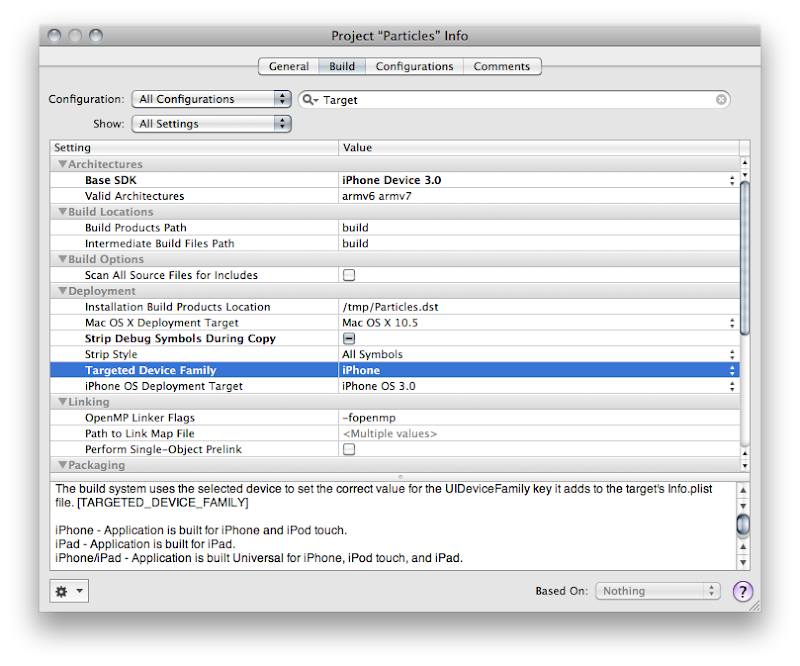
We need to change a setting called Target Device Family, so type Target into the search bar, or just search for that entry manually (it'll be under the Deployment heading). Right now, it should look like this:

Screen shot 2010-04-01 at 10.09.58 AM.png


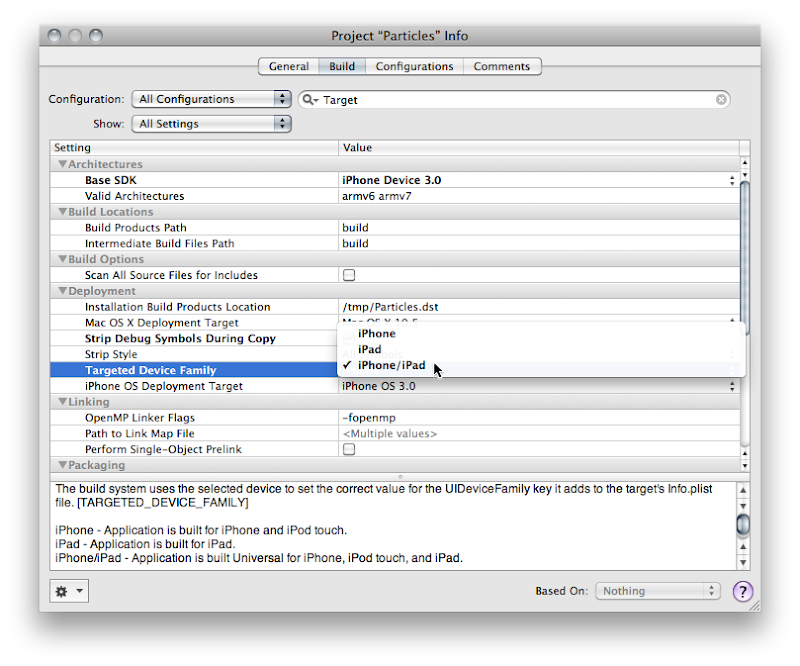
See how it says iPhone? Yeah, you know what to do. Click on it and change it so it reads iPhone/iPad, like so:

select_target.png


Good! now you're done, right? Most likely, no.

Auditing for Hardcoded Sizes


The next thing you're going to want to do is audit your application to see if you hard-coded the screen size anywhere in your application. You shouldn't have hardcoded those values, but let's face it, we've all done it. A Project Find (⌘⇧F) for 320 and 480 and that should turn up any of those hardcoded values. In the Particle Generator code, I did it in only one place, in code that creates a UIImage of the OpenGL view. The line of code where I did it looks like this:
    CGImageRef imageRef = CGImageCreate(320, 480, bitsPerComponent, bitsPerPixel, bytesPerRow, colorSpaceRef, bitmapInfo, provider, NULL, NO, renderingIntent);

Usually, the fix for this will be obvious. Instead of hardcoding, you want to pull the width and height from the OpenGL view. The code where I did it actually exists on the GLView class, so I can fix it like so:
    CGImageRef imageRef = CGImageCreate(self.frame.size.width, self.frame.size.height, bitsPerComponent, bitsPerPixel, bytesPerRow, colorSpaceRef, bitmapInfo, provider, NULL, NO, renderingIntent);

But, what if what you've hardcoded is the actual size of the view? Then you need to pull the size from the main screen instead of the view. That's easy enough to do.
    UIScreen *screen = [UIScreen mainScreen];
[myView setFrame:[screen applicationFrame]];


Dealing with Different Window Sizes


Most likely your application's one instance of UIWindow is contained in your MainWindow.xib file that gets loaded automatically. Most likely, that Window is hardcoded to 320x480. Now, you might think that you can just go into Interface Builder and set the autosize attributes for the window and it will get resized for you at launch. You would be wrong. There is no automatic check to make sure your window is the right size.

You have to make sure that the window is the right size for the device you're running on. There are, basically, two ways of doing that. If your application is such that you just need to resize the window and your autosize attributes will take care of making everything look nice, then you can just handle this programmatically in applicationDidFinishLaunching: by setting the window's size to the size of the screen, less the status bar andy any other objects controlled by the iPhone OS (this is known as the Application Frame). Doing this looks almost exactly like setting the size of the view above:
    CGRect  rect = [[UIScreen mainScreen] bounds];
[window setFrame:rect];

Now, this is actually a good approach for the Particles application because it has one full-screen view. However, the iPad and the iPhone are really different devices, and there are several UI components available on the iPad that aren't available (at least yet) on the iPhone, such as split views and pop up views. For many applications, especially complex applications using a lot of UIKit views and controls, you're probably going to want to provide completely different NIB file based on which device on which the code is running.

Info.Plist Device-Specific Entries


The one really important nib file in every iPhone application is, of course, MainWindow.xib, and there has to be a way to tell your application to use a different MainWindow.xib for different devices. In fact, there is. For each key that Info.plist supports, such NSMainNibFile, which is used to specify the name of the application's main nib file, you can now specify device-specific entries. If you provide a device-specific entry for the device the application is currently running on, it will use the device-specific value, otherwise it will just use the normal value.

Device-specific keys are exactly the same as the original or default key except the key name is followed by a tilde (~) and then the name of the device in all-lowercase letters. So, to tell our application to load a different nib file for the iPad, we can add a key called NSMainNibFile~ipad and then specify the name of the nib file to use when launching on an iPad. For the iPhone and iPod touch, it will continue to use the default value, MainWindow.xib, but for the iPad, it will use the nib file you've specified in the new, device-specific key.

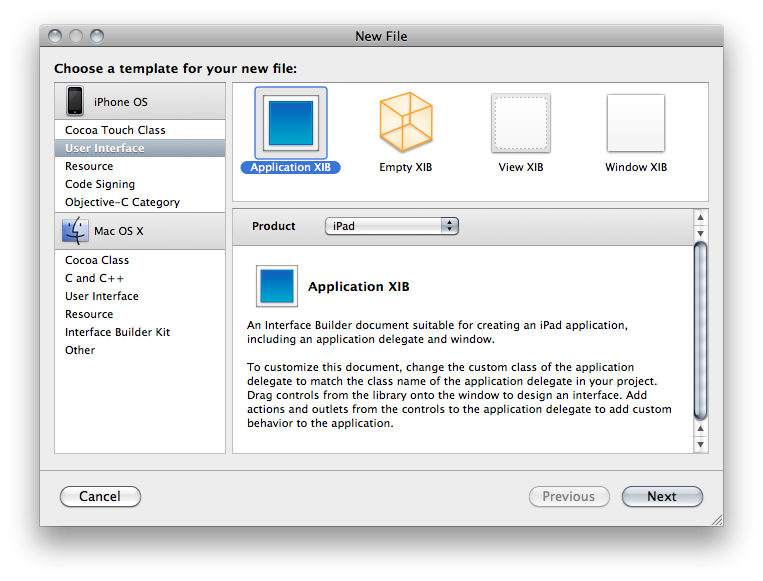
You can add a new version of MainWindow.xib to your project by selecting the Resources group and choosing Add New File from the File menu. From the New File Assistant, select User Interface from under the iPhone OS, then select Application XIB, and make sure you select the right device in the Product drop-down.

Screen shot 2010-04-01 at 10.43.29 AM.png


Make sure you remember to connect all the outlets and actions in this new nib to the same outlets and actions you used in the other nib. Remember, only one of the application nibs will be loaded, so there's no conflict.

For any key in the Info.plist file, you can use this same technique to override the default value with a device specific. You could, for example, have the iPhone version start in Portrait and the iPad version start in landscape, like so:
    ...
<key>UIInterfaceOrientation</key>
<string>UIInterfaceOrientationPortrait</string>
<key>UIInterfaceOrientation~ipad</key>
<string>UIInterfaceOrientationLandscapeLeft</string>
...

Programmatically Determining Device


If you have code that needs to vary depending on whether it's running on the iPad or iPhone/iPod touch, Apple has provided a new macro called UI_USER_INTERFACE_IDIOM() that will tell you that. There are currently two values defined, UIUserInterfaceIdiomPhone and UIUserInterfaceIdiomPad, and this macro will return the value that corresponds to the device being run. So, for example, if you needed to push a view controller onto the navigation stack, but wanted a different nib used for the iPad than the iPhone, you might do this:
    MyController *controller = nil;

if (UI_USER_INTERFACE_IDIOM() == UIUserInterfaceIdiomPad)
controller = [[MyController alloc] initWithNibName:@"MyiPadNib" bundle:nil];
else
controller = [[MyController alloc] initWithNibName:@"MyiPodNib" bundle:nil];

[self.navigationController pushViewController:controller animated:YES];
[controller release];

If you need finer-grain control, and need to know exactly which device, there's no official, supported way to determine the exact device. The vast majority of the time you you think you need to know the device, you don't actually need to know the device, you just need to know which features are supported. Even though you can find code around the web that will determine the device based on UIDevice, you really shouldn't base your logic on that because such code can be fragile since you don't know what future devices will exist, or what features they will have.

In cases like the Image Picker, Apple provides a way to determine which features are available on your device, such as whether there's a camera, and whether that camera supports video. When Apple hasn't provide a specific check or test, what you can do is use NSClassFromString(), which (as is probably obvious from the name) creates a Class instance based on the name of a class contained in a string. If this returns nil, then you know the class you're asking about isn't available. You can wrap your code that uses classes that aren't available everywhere in these checks and make code that works correctly on all devices, and will continue to do so in the future (for the most part - it's never possible to 100% future-proof code). Here's an example of checking for the existence of the UISplitViewController, which is a new class only available on the iPad:
    Class splitViewController = NSClassFromString(@"UISplitViewController");
if (splitViewController)
{
UISplitViewController* mySplitViewController = [[splitVCClass alloc] init];
// ... configure, use, then release
}

You can do something similar with C functions by checking if the function is NULL For example, one of the frameworks added with iPhone SDK 3.2 is CoreText.framework. If we wanted to use the function CTFontCreateWithName() to create a new font using that framework, we could wrap the logic in an interface idiom check, like above, or we could just check to see if the function we want to use exists by seeing if the symbol CTFontCreateWithName is NULL at runtime, like so:
    if (CTFontCreateWithName != NULL)
CTFontFontRef myFont = CTFontCreateWithName(@"Comic Sans", 14.0, NULL);


Go, Go, Gadget iPad, Go!


Well, that pretty much covers the basics you'll need to convert your existing iPhone apps to Universal Apps. The more complex your app, the more likely you'll want to consider doing separate iPad and iPhone applications. I'll show how to add another target to your Xcode project so you can generate two applications from the same project in a future post. For many apps, however, this should be enough to get you porting away, so port away!

Friday, April 2, 2010

Ad Hoc Distribution, Android vs. iPhone

I've spent a fair few words on this blog discussing my perception of the Android SDK. To sum it all up simply, my overall opinion is that programming for the Android SDK is good, but nowhere near as good, nor as fun, as programming for iPhone SDK. Although Android has some places where it shines, there are relatively few where it outshines the iPhone SDK.

There is one, however. One where the experience is worlds better in the Android camp: ad hoc distribution.

When you do contract programming, ad hoc distribution is a big part of your life. A lot of people who hire others to write software aren't programmers themselves, so we have to have a way to get the applications we develop to our client for their review and for testing. On the iPhone, we have to go through this relatively convoluted process where we create an ad hoc distribution certificate then create an ad hoc provisioning profile that ties the application to certain, specific devices based on a unique identifier called a UDID. The client then has to install the provisioning profile on their phone, and then install the app.

When it works, it's not too terrible. It's a bit of a pain in the ass, but it's not too awfully time-consuming.

The problem is when it doesn't work. When a client reports that an app won't install, trying to remotely figure out why can be really tedious and time-consuming and the process creates a negative impression of the platform in the eyes of the client. And there are many reasons it can go wrong, and it does go wrong way too often in my experience. If the application bundle gets changed in any way, code signing fails and the app won't launch. If the provisioning profile doesn't get installed properly, installation of the app fails. Often, when the problem is finally fixed, we have no idea what we did that fixed it.

And we developers are left holding the bag. We're left spending hours and sometimes even days trying to get the app working on the client's device. Usually, that time we spend figuring out what the hell is going on is unbillable. When a client isn't a programmer, especially when a client isn't particularly tech-savvy, the whole process can be extraordinarily painful and frustrating both for us and for our clients. On top of that, we're limited to 100 devices that we can even do this process with. With several models of iPhone and iPod Touch, plus the iPad and the fact that most developers have multiple clients in the course of a year, we have the added hassle of having to manage our devices so we don't exceed our limit.

On Android? I drop the compiled app into my Dropbox folder and e-mail the client the URL to it. I instruct them to tap the link from their phone. That's it. It just works. No hassles, no worries. There's a one-time instruction I have to give them that involves tapping a checkbox in their phone's settings to allow third-party apps, but after that, it's just the URL. The user still has control of whether it gets installed, so it's relatively safe, but there's no provisioning profile, no iTunes requirement, no worries about the application getting corrupted or accidentally changed in transit. No angry customer calls or e-mails.

In most ways, I wish Android was more like the iPhone. In this way, I really, really wish the iPhone was more like Android. This whole process lacks the polish and ease of use that I ordinarily associate with Apple products, and after two years of developer complaints, it has improved a bit, but not nearly enough.

 
Design by Wordpress Theme | Bloggerized by Free Blogger Templates | coupon codes